Select Language:
Forza Horizon 6 can look absolutely stunning one moment and turn your PC into a space heater the next. With huge open-world landscapes, changing weather, ray tracing, and cars polished to the point you can see your own reflection, choosing the right graphics settings makes a big difference.
Luckily, you don’t need an ultra-high-end PC to enjoy smooth gameplay and beautiful visuals at the same time. Small adjustments can improve frame rates, sharpen image quality, and keep racing smoothly without losing the details that make Japan stand out.
—
### Best Video Settings
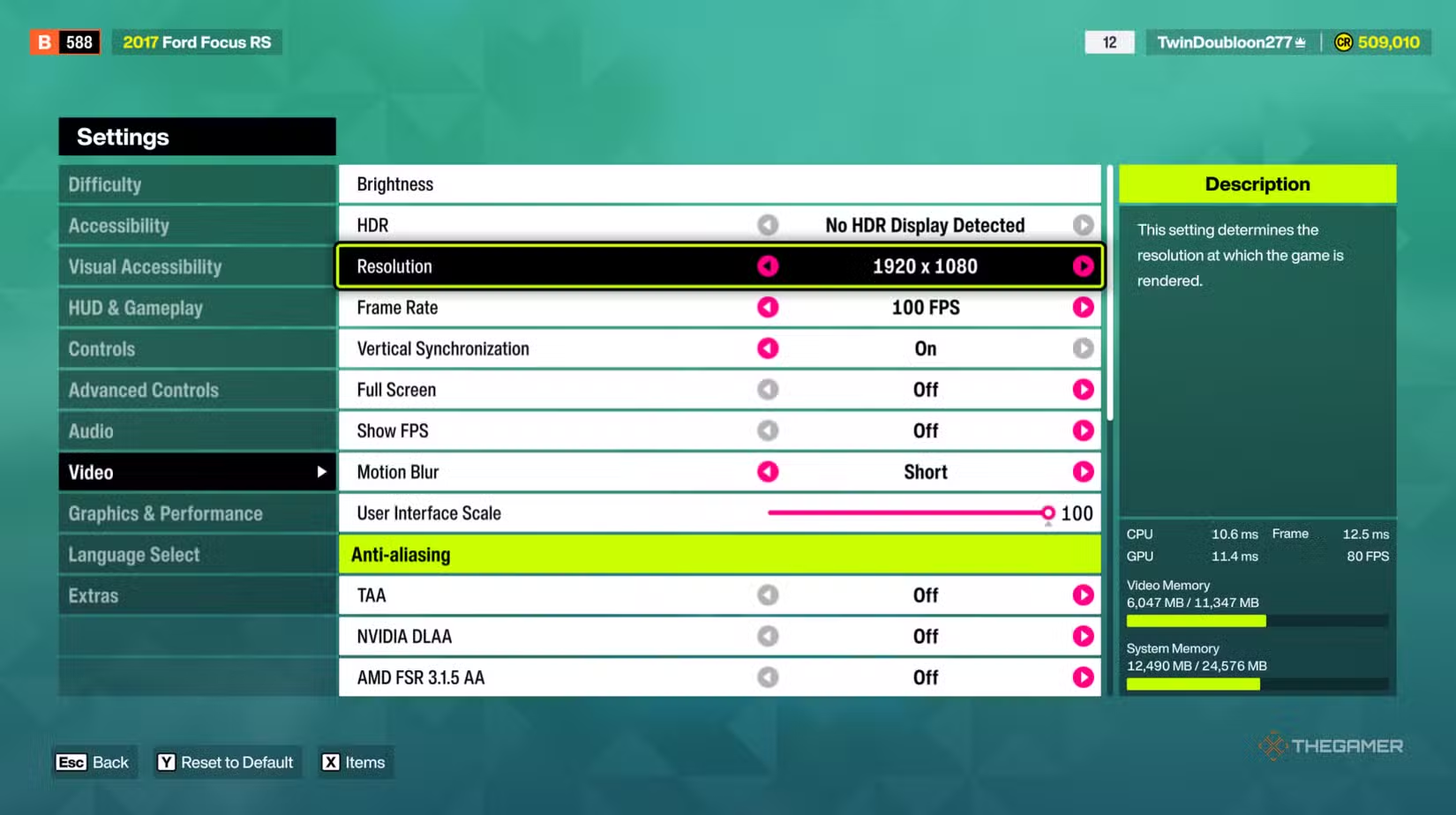
These settings focus on overall image quality, stable frame rates, and display options.
| Setting Name | Ideal Setting | Why |
|———————————-|——————————————————|—————————————————–|
| Resolution | Native monitor resolution (1080p / 1440p / 4K) | Keeps images clear and avoids blurry textures or jagged edges. |
| Frame Rate Limit | Match monitor refresh rate (100 to 165 FPS) | Ensures smooth racing and reduces unnecessary GPU load. |
| Vertical Sync (V-Sync) | On for tearing, Off for lowest latency | V-Sync prevents screen tearing; disabling it may reduce input lag for competitive play. |
| Full Screen | On | Fullscreen mode boosts performance and lowers lag slightly. |
| Motion Blur | Short or Off | Maintains speed feeling without making turns or traffic hard to see. |
| User Interface Scale | 100 | Offers good readability without cluttering the screen. |
| TAA | Off | TAA can soften images during fast movement. |
| NVIDIA DLAA | On (for high-end Nvidia GPUs) | Provides sharp, clean edges and clear cars at native resolution. |
| AMD FSR 3.1.5 | On (for high-end AMD GPUs) | Boosts performance with minimal image quality loss. |
| Intel XeSS | On (for high-end Intel GPUs) | Best option for Intel GPUs; still useful on some non-RTX hardware. |
| FidelityFX CAS | Off | Can create graininess and harsh edges when sharpening in motion. |
—
### Best Graphics and Performance Settings
These settings balance visual beauty with performance, especially since lighting, fog, particles, and terrain effects can impact your frame rates significantly.
| Setting Name | Ideal Setting | Why |
|———————————-|——————————————————|—————————————————–|
| Preset | Custom | Allows precise tuning instead of relying on generic presets. |
| Car Level of Detail | High | Keeps nearby cars looking good during races without heavy FPS impact. |
| Environment Texture Quality | Ultra | Improves roads, terrain, and buildings visibility greatly. |
| Environment Geometry Quality | High | Keeps scenery detailed without overloading CPU and GPU. |
| Car Reflection Quality | High | Maintains shiny, realistic cars without major performance hits. |
| Screen Space Reflections Quality | High | Enhances reflections on wet roads and vehicles, performance-friendly. |
| Raytraced Reflections Quality | Off | Ray-traced reflections are demanding and often hard to notice during high-speed driving. |
| Shadow Quality | High | Delivers strong visuals with low performance cost. |
| Night Shadows | Off | Boosts FPS during night races with minimal detail loss. |
| Screen Space GI Quality | High | Adds richer indirect lighting without heavy FPS cost. |
| Raytraced GI Quality | Off | Very demanding and offers minor visual gains in racing. |
| Shader Quality | High | Keeps lighting, reflections, and materials sharp without dropping performance. |
| Audio Quality | Ultra | Slight impact on frames but improves sound effects and game immersion. |
| Deformable Terrain Quality | High | Keeps trails in dirt, mud, and snow detailed without overloading CPU. |
| Particle Effects Quality | Ultra | Makes smoke, sparks, dust, and weather effects look better with moderate performance impact. |
| Volumetric Fog Quality | High | Keeps environmental effects lively while avoiding heavy load. |
| Lens Effects | Ultra | Adds bloom and reflections, especially during sunsets and night drives. |
| Motion Blur Quality | High | Smooths out high-speed motion with a cinematic feel without excessive blurring. |
—
Adjusting these settings can help you find the perfect balance between stunning visuals and a smooth racing experience.
 ChatGPT
 Perplexity
 Gemini AI
 Grok AI