Select Language:
Mods for Windrose are one of the simplest ways to make small improvements to the game without overhauling it completely. Just a few tweaks can make resource gathering faster or remove some building restrictions. The best part is that setting up mods isn’t as complicated as it might seem at first.
Once you know where to find the mods and where to put them, it’s mostly a matter of copying, pasting, and launching the game. From downloading mods online to activating them in-game, this guide covers everything so you can get started quickly and focus on playing and exploring Windrose’s features.
How to Install Mods
Before you begin, make sure the game is completely closed. Mods won’t install properly if Windrose is still running.
The main source for mods is Nexus Mods. You’ll need to create an account or log in before downloading anything. After signing in, search for your desired mod and download it to your computer.
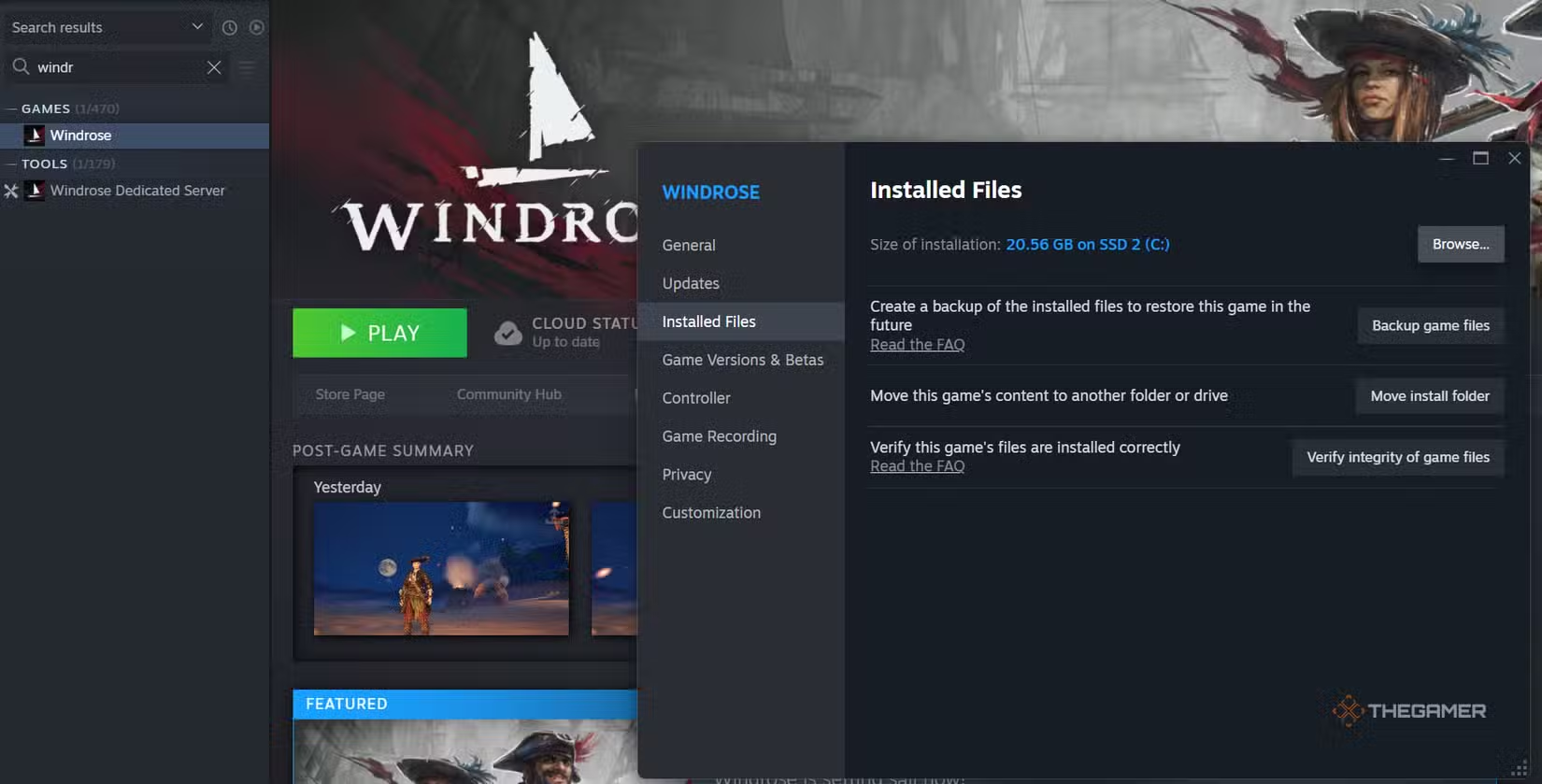
Next, locate your Windrose game folder. The easiest way is to right-click the Windrose shortcut in Steam, select “Properties,” then “Installed Files,” and click “Browse.” This opens the folder where the game files are stored.
Once inside the game folder, simply place the downloaded mod file into the appropriate folder indicated in the mod’s instructions. Most mods will tell you exactly where to put them, so be sure to read the description on Nexus.
After you’ve installed the mod, just close the folder, start Windrose, and the mod should be active in the game. Some mods might require starting a new game save, but most will work immediately.
What Are the Best Mods?
Most available mods focus on quality-of-life improvements. Here are some recommended ones:
| Name | Description |
|---|---|
| More Mineral Resources | Boosts resource yields and speeds up respawning of ores, stone, and other materials. |
| 2x 3x 5x 10x All Loot | Multiplies loot drops, giving you more items from chests and enemies (some gear may be excluded). |
| More Stacks | Increases how many of each item you can carry in a single slot. |
| Better Lantern | Extends lantern light range and fuel capacity, with an option for infinite fuel. |
| Extended Bonfire Radius | Increases the area around bonfires where you can build structures. |
These mods generally improve gameplay by making gathering faster, inventory management easier, and lighting better, all without disrupting the core experience.
 ChatGPT
 Perplexity
 Gemini AI
 Grok AI