Select Language:
When creating a new Mii on your island in Tomodachi Life: Living The Dream, start by opening the menu with the plus button and selecting the option to add a new Mii. You can either build one from nothing or start with a pre-made template. New Miis are blank slates, so you have full freedom to design them however you want. The interface offers several options, which we’ll explain below.
Designing the Face
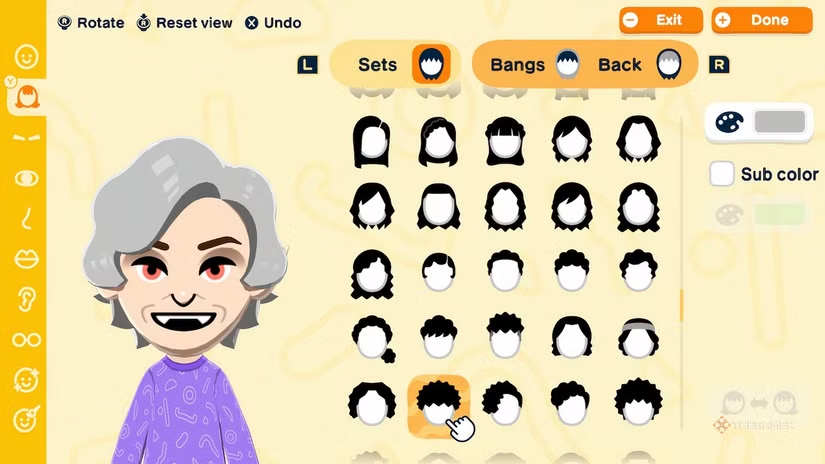
The first step is choosing the face’s appearance. This includes selecting skin tone, eye shape and color, hairstyle, nose, mouth, and other facial features. You can add facial lines, facial hair, glasses, and beauty marks. Most features can be customized with a wide range of colors, allowing for plenty of personal expression.
Choosing the Body
Next, decide what your Mii’s body looks like. Do you want them short and stocky or tall and slim? You can mix different body attributes to give each Mii a unique look. Additionally, choose their voice from several preset options, or customize it for a completely distinct sound.
All Personality Types
Finally, assign a personality to your Mii. This involves selecting five traits:
- Movement speed (slow or quick)
- Speech style (polite or blunt)
- Energy level (flat or expressive)
- Thinking style (serious or relaxed)
- Dreams’ quirkiness (normal or quirky)
These traits combine to form one of 16 personality types, listed in the chart below. Each type influences how your Mii behaves and interacts on the island.
How to Edit Relationships
Before finalizing your Mii, set their relationships, especially if your Miis are based on real people. Use the relationship menu to create connections, such as family ties or acquaintances. If you don’t want certain Miis to date or pursue romantic connections, assign vague relationships or prevent them from forming romantic links altogether. You can also designate spouses to develop romantic stories, though these will take some time to unfold.
Editing Existing Miis
If you want to change a Mii after creating them, you don’t need to delete and start over. Simply find the Mii, open the menu, and select the option to edit their appearance. This opens the full character creation menu, allowing you to adjust their face, body, personality, or even update their relationships without losing any progress or connections. You can also use face paint to draw directly on their face—adding small makeup details or creating entirely new designs depending on your creativity.
Changing Outfits
Miis have outfits that reflect their personality traits. These are simple and uniform, showing their initial status as new characters. To get more clothing options, visit the shop to purchase new outfits. You can gift clothes to your Miis as individual pieces or complete outfits. Dressing them is easy—access the wardrobe through the same menu where you edit their appearance, giving you the freedom to change their clothing as needed for different occasions.
 ChatGPT
 Perplexity
 Gemini AI
 Grok AI