Select Language:
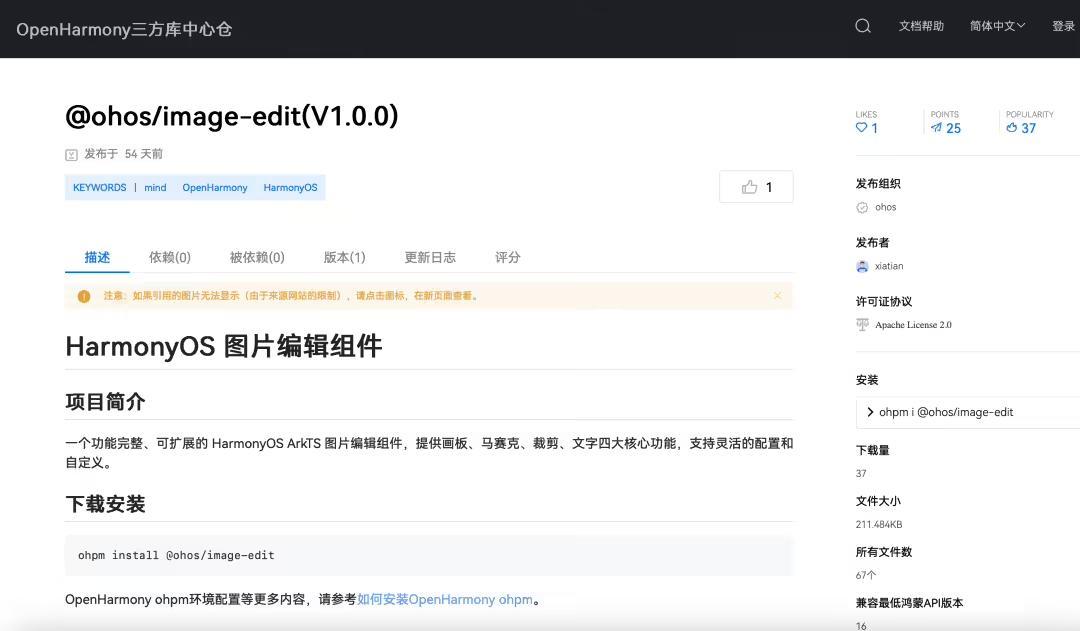
On December 29, IT之家 reported that the DingTalk team has officially launched its self-developed HarmonyOS Image Editing Component in the OpenHarmony third-party library repository and made it open source. This new addition aims to fill a significant gap within the HarmonyOS community’s image processing capabilities. Built using the HarmonyOS ArkTS language, the component offers four core image editing functions: drawing, mosaicing, cropping, and adding text.
According to the developers, quick and efficient image editing has become a vital feature in high-frequency scenarios like mobile work and social interactions, where sending images meant to be edited on the fly. However, during the early stages of HarmonyOS’s ecosystem development, the community lacked a standardized, universal image editing tool. As a result, developers often had to spend extensive time creating basic functionalities from scratch. Moreover, system-level support for specific features—such as one-click pixelation for privacy masking—was still under development, limiting the capabilities of some applications to meet users’ immediate privacy and editing needs.
The open-source HarmonyOS Image Editing Component addresses these issues directly. It not only fills the gaps in system pixelation features but also integrates mature UI interaction logic, enabling developers to incorporate enterprise-level image processing features swiftly. The component features four highly configurable primary modules:
- Drawing Board: Offers low-latency drawing experiences with customizable colors and brush sizes, supporting detailed annotations and creative sketches on images.
- Smart Mosaic: Designed for privacy scenarios, it employs efficient pixelation algorithms to blur specific regions, complementing system-level features.
- Cropping and Rotation: Allows free aspect ratio cropping via drag-and-drop gestures, coupled with image rotation tools for quick editing.
- Text Annotations: Supports adding, dragging, rotating, and styling text overlays on images, facilitating rich visual communication.
Images included in the announcement showcase the component’s interface and capabilities, illustrating its utility in various editing contexts.
The HarmonyOS Image Editing Component is now available in the OpenHarmony third-party library center. Developers interested in integrating this tool can visit the OpenHarmony official website, navigate to the “Development” section, then to “OpenHarmony Third-Party Library,” and search for “HarmonyOS Image Editing Component” to access the full source code and documentation. This release marks a significant step toward empowering developers with advanced image processing tools, fostering more dynamic and user-friendly applications within the HarmonyOS ecosystem.
 ChatGPT
 Perplexity
 Gemini AI
 Grok AI