• About Us
  • Contact Us
  • Advertise
  • Privacy Policy
  • Guest Post
No Result
View All Result
Digital Phablet
  • Home
  • NewsLatest
  • Technology
    • Education Tech
    • Home Tech
    • Office Tech
    • Fintech
    • Digital Marketing
  • Social Media
  • Gaming
  • Smartphones
  • AI
  • Reviews
  • Interesting
  • How To
  • Home
  • NewsLatest
  • Technology
    • Education Tech
    • Home Tech
    • Office Tech
    • Fintech
    • Digital Marketing
  • Social Media
  • Gaming
  • Smartphones
  • AI
  • Reviews
  • Interesting
  • How To
No Result
View All Result
Digital Phablet
No Result
View All Result

Home » Mastering the Boombox in Roblox: Evade Essentials

Mastering the Boombox in Roblox: Evade Essentials

Emily Smith by Emily Smith
February 26, 2025
in Gaming
Reading Time: 3 mins read
A A
Mastering the Boombox in Roblox: Evade Essentials
ADVERTISEMENT

Select Language:

Roblox’s Evade is an intense game of chase where large meme images, known as Nextbots, hunt you down before the clock runs out. Players can either go solo or assist others by reviving them. There are also various purchasable items in the shop to make survival easier.

ADVERTISEMENT

One of the standout items is the Boombox, which lets you blast your favorite songs during gameplay. Whether you want to share the tunes with friends or enjoy them solo, here’s a simple guide to using it.

How to Acquire the Boombox

To get the Boombox, you need to purchase the Boombox gamepass for 300 Robux. You can find it in the in-game store under the Robux section or in Evade’s store in the main Roblox menu. After buying it, equip the Boombox by heading to your Cosmetics within the Character Loadout and placing it in either slot one or slot two.

How to Use the Boombox


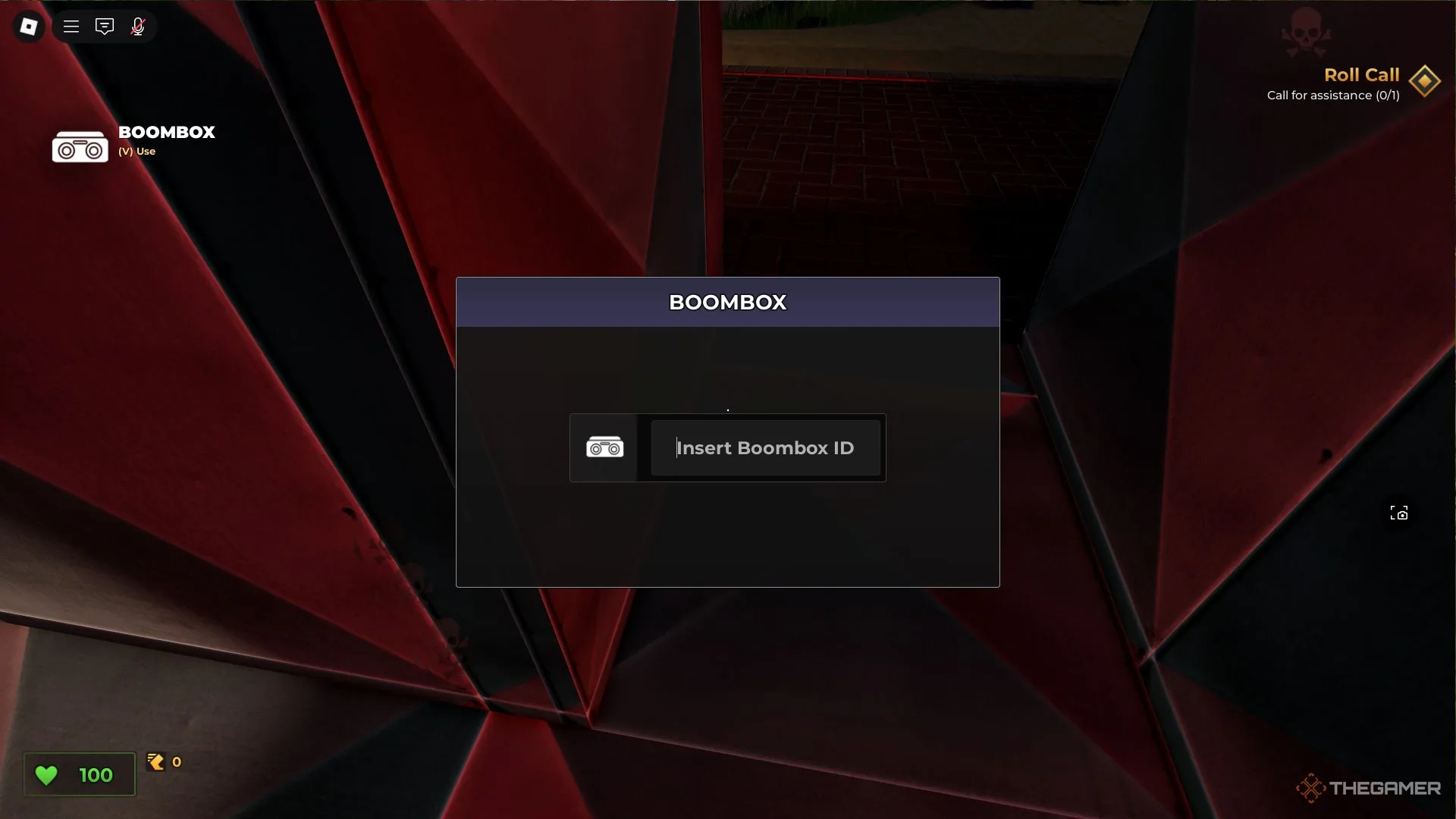
To activate the Boombox during a round, just press ‘V’ to open the Boombox menu, or if you have the Boost Pack, hit ‘H’. Here, you can enter the song ID you want and press ‘Enter’. The song will keep playing until you input a new ID or hit ‘Enter’ on an empty ID box.

To find Roblox Song IDs, a quick online search will lead you to either a specific song or to various websites that have organized lists of IDs.

Be cautious—playing songs that contain inappropriate language or explicit content can lead to a ban.

ChatGPT ChatGPT Perplexity AI Perplexity Gemini AI Logo Gemini AI Grok AI Logo Grok AI
Google Banner
Tags: boomboxEvadeGamingLive-Service GamesRobloxTutorial
ADVERTISEMENT
Emily Smith

Emily Smith

Emily is a digital marketer in Austin, Texas. She enjoys gaming, playing guitar, and dreams of traveling to Japan with her golden retriever, Max.

Related Posts

Achieving the Best Ending in Assassin's Creed Odyssey: Completing & Solving
Gaming

Achieving the Best Ending in Assassin’s Creed Odyssey: Completing & Solving

May 4, 2026
How To Quickly Increase Your Hunter Level Through Completing NTE Quests
Gaming

How To Quickly Increase Your Hunter Level Through Completing NTE Quests

May 2, 2026
How To Finish Pleasureland in Tides Of Tomorrow
Gaming

How To Finish Pleasureland in Tides Of Tomorrow

April 30, 2026
All Codes and How to Redeem Them in NTE: Completing and Solving
Gaming

All Codes and How to Redeem Them in NTE: Completing and Solving

April 29, 2026
Next Post
Valve's New VR Headset May Arrive After Six Long Years

Valve's New VR Headset May Arrive After Six Long Years

  • About Us
  • Contact Us
  • Advertise
  • Privacy Policy
  • Guest Post

© 2026 Digital Phablet

No Result
View All Result
  • Home
  • News
  • Technology
    • Education Tech
    • Home Tech
    • Office Tech
    • Fintech
    • Digital Marketing
  • Social Media
  • Gaming
  • Smartphones

© 2026 Digital Phablet