Select Language:
Living the Dream in Tomodachi Life
Playing Tomodachi Life: Living the Dream can give you hours of fun filled with silly and charming moments. Most of the funny chaos is caused naturally by your Miis, but you also have a big role in guiding them, shaping their personalities, and influencing their view of the world you’ve created. Think of yourself as their creator—they’re very aware of your presence.
Your Miis will always call you by the name you picked at the start of the game. They respect you as their leader and appreciate the influence you have on their lives. But what if you want to change that name later? Good news—you can do it! Here’s how to update what your Miis call you in Tomodachi Life: Living the Dream.
How to Change Your Name in Tomodachi Life: Living the Dream
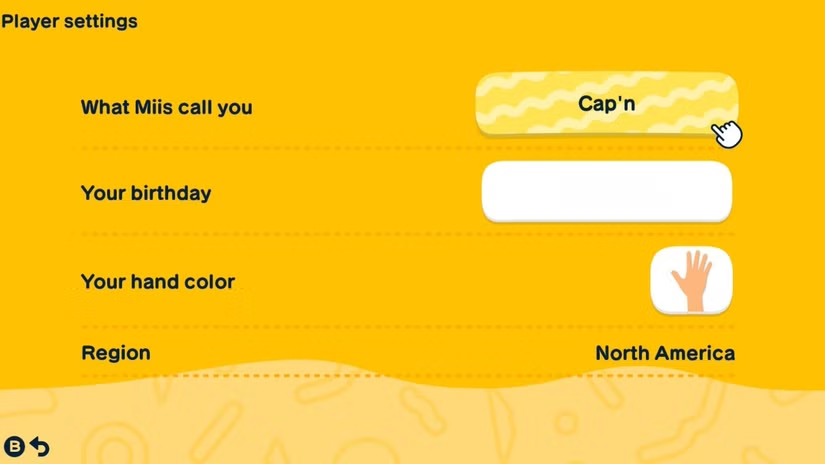
Changing your name in the game isn’t as simple as finding a specific setting on the main menu. Instead, you’ll need to go into the menu, select Settings, and then choose Player Settings.
Once you’re in Player Settings, you’ll see options to customize your profile, including what Miis call you, your birthday, your hand color, and the region you’re playing in. To change your name, click on What Miis Call You. From there, you can select a default name or create your own unique one.
Creating your own name allows your Miis to call you anything—funny, strange, or silly—and you even get to decide how it’s pronounced. This can lead to lots of hilarious moments, so pick carefully! And if you get tired of your new name later, you can always go back and change it again.
Tomodachi Life: Living the Dream is now available on Nintendo Switch.
 ChatGPT
 Perplexity
 Gemini AI
 Grok AI