
Select Language:
Summary created by Smart Answers AI
Key points:
- PCWorld highlights how activating HTTPS-only mode in web browsers enhances security by blocking access to insecure HTTP websites that could jeopardize user safety.
- This browser feature is crucial for maintaining privacy and safeguarding data, particularly as AI advancements introduce novel cybersecurity threats.
- Popular browsers like Chrome, Edge, and Firefox provide options for HTTPS-only mode within their privacy settings, with Chrome aiming to enforce secure protocols by October 2026.
Browsers such as Chrome, Edge, and Firefox have progressively increased efforts to prevent users from visiting suspicious websites, issuing warnings about unsafe URLs. However, these browsers do not automatically default to secure HTTPS connections.
Switching to HTTPS represented a significant security enhancement by ensuring data transmitted between a device and a website remains encrypted—preventing eavesdroppers from intercepting sensitive information. Despite its widespread use, browsers continue to allow access to insecure HTTP sites, which in 2023 can be risky due to potential traffic manipulation by malicious actors.
Recognizing this, Google’s Chrome team announced that starting October 2026, the browser will standardize secure connections, requiring explicit user permission before allowing unsecured sites. Meanwhile, users can proactively enable HTTPS-only mode right now for added security, which is increasingly vital as AI-driven cyber threats evolve rapidly.
In Chrome:
PCWorld
- Click on the three-dot menu icon at the top right corner
- Select Settings
- Navigate to Privacy & security in the sidebar
- Click on Security
- Under “Secure Connections,” toggle to Always use secure connections
You can opt for two modes of this feature. The default, “Warns you for insecure public sites,” suffices for most users, minimizing warnings when accessing local network devices like routers. Alternatively, you can choose “Warns you for insecure public & private sites” for more comprehensive alerts.
In Edge:
PCWorld
- Click on the three-dot menu icon in the top right corner
- Go to Settings
- Use the search bar in the top right to type “HTTPS”
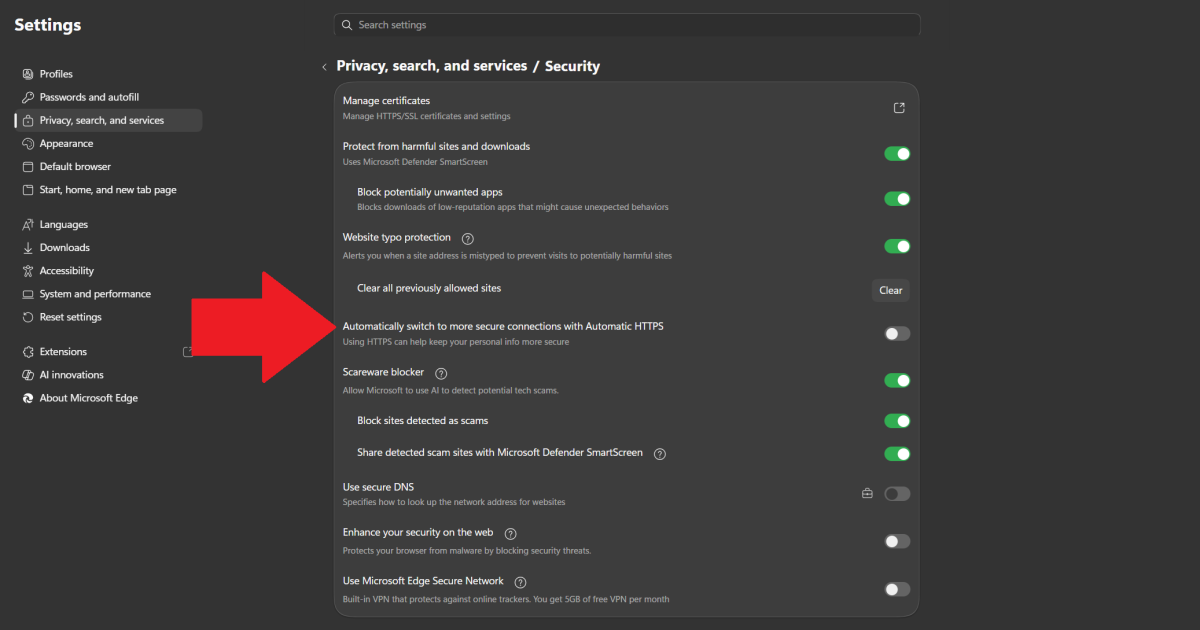
- Select Automatically switch to more secure connections with Automatic HTTPS
- Activate the toggle to enable this feature
Alternatively, within Settings, open the three-line menu on the top left, then navigate to Privacy, search, and services > Security.
In Firefox:
PCWorld
- Click on the menu icon (three horizontal lines) in the upper right corner
- Choose Settings
- Navigate to Privacy & Security
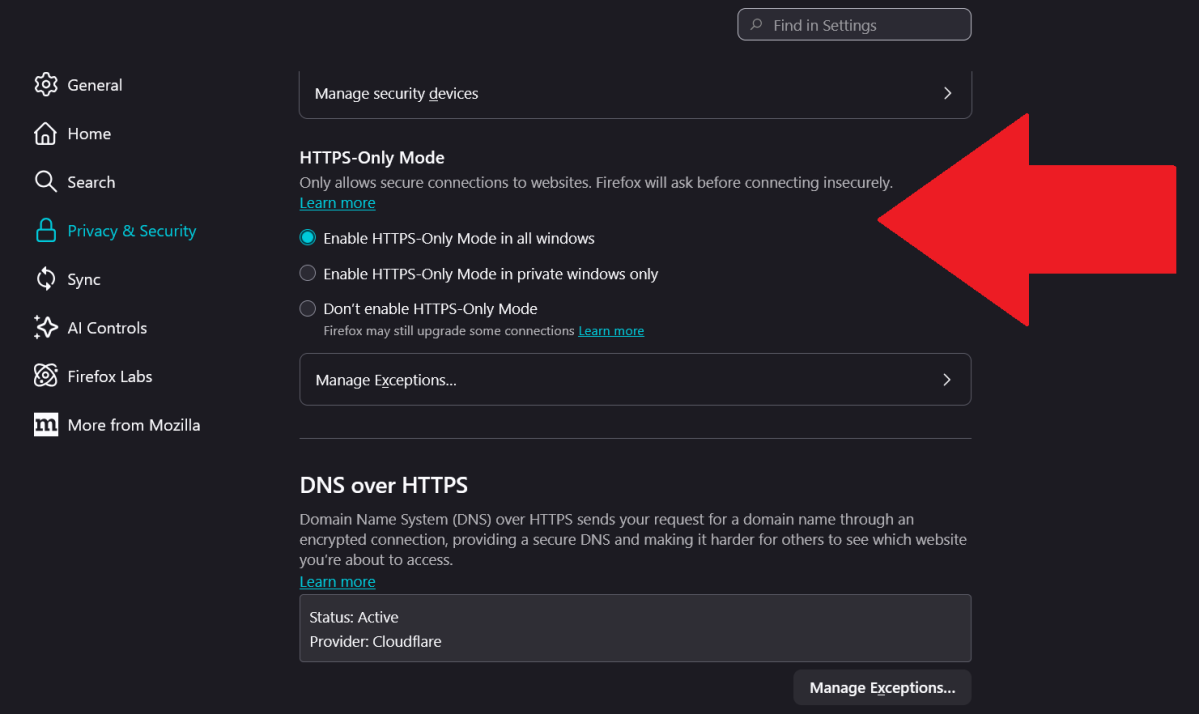
- Scroll down until you find HTTPS-Only Mode
- Select Enable HTTPS-Only Mode in all windows
You can also opt to activate this mode only in private browsing windows, but most users will benefit more from enabling it across all browsing windows. You can still access insecure sites when necessary, such as internal device management pages.
 ChatGPT
 Perplexity
 Gemini AI
 Grok AI