• About Us
  • Contact Us
  • Advertise
  • Privacy Policy
  • Guest Post
No Result
View All Result
Digital Phablet
  • Home
  • NewsLatest
  • Technology
    • Education Tech
    • Home Tech
    • Office Tech
    • Fintech
    • Digital Marketing
  • Social Media
  • Gaming
  • Smartphones
  • AI
  • Reviews
  • Interesting
  • How To
  • Home
  • NewsLatest
  • Technology
    • Education Tech
    • Home Tech
    • Office Tech
    • Fintech
    • Digital Marketing
  • Social Media
  • Gaming
  • Smartphones
  • AI
  • Reviews
  • Interesting
  • How To
No Result
View All Result
Digital Phablet
No Result
View All Result

Home » How To Create Anime Icons for Apps In Android and iOS

How To Create Anime Icons for Apps In Android and iOS

DP Staff by DP Staff
February 8, 2021
in How To
Reading Time: 2 mins read
A A
ADVERTISEMENT

Select Language:

Anime icons for apps have been launched for Android and iPhone for Anime lovers all over the world. In this post, you will learn how to change the covers of your app with anime icons.

ADVERTISEMENT

Mainly there are two ways to replace your app’s cover with anime icons when it comes to iPhone.

The first way is to manually design icons then replace them with your settings in the device. The following method is given below.

Changing or Creating Anime icons for Apps in iPhone

Anime App icon Tutorial for iOS;

ADVERTISEMENT

1. Open Canva;

Go to Canva.com, then with the help of available methods, create an account. (Free account is enough.)

2. Design a New icon using Canva

Go to Create a design, then select “Logo.”

With the help of available elements. You can also upload required images and make a cool anime icon here.
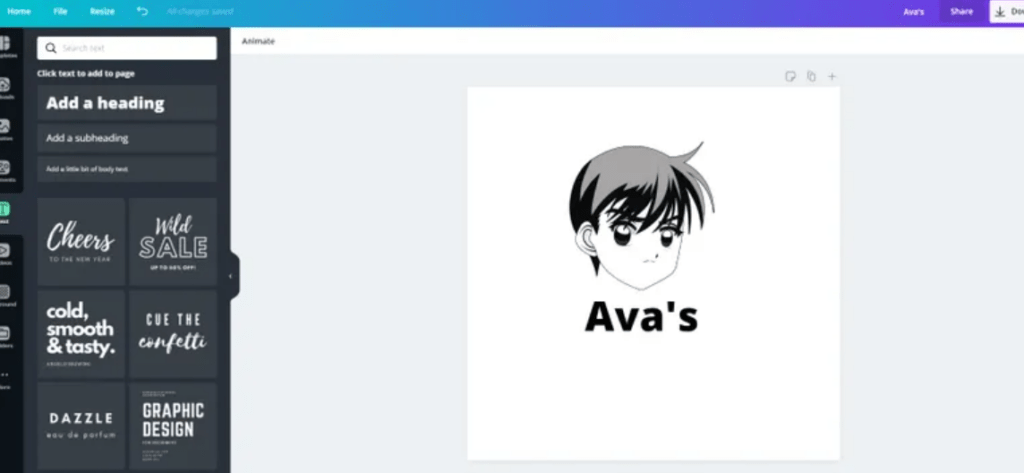
icon using Canva

3. Download the icon

On the top, there is a download button. Tap it then you will have an anime icon.

4. Download App icon Free

You can skip the purchasing part and visit the App Store Link. You can also use the free version for this.

5. Open the app, then select ”App Icon.”

The list of apps is shown from where you can change icons.

ADVERTISEMENT

You can upload your anime icon by clicking on the photo which was created using Canva.

6. Now click on create an icon, then install the icon

Make sure to allow the dialogue boxes.

Changing or Creating Anime icons for Apps in Android

It is very simple to put Anime app icons on Android devices as compared to the iPhone.

Follow the given instructions;

1. Visit Canva

2. Design an Icon

3. Download the Icon

4. Download the Icon Changer app

After downloading the Icon, download Icon Change app from Google Play Store.

5. Select your Icons

Select the app, then click on shortcuts, then click on change and select the downloaded icon. Click OK to change the app cover.

I hope now you have learned to get Anime app icons for Android and iPhone.

ChatGPT ChatGPT Perplexity AI Perplexity Gemini AI Logo Gemini AI Grok AI Logo Grok AI
Google Banner
Tags: AndroidAnimeAppleAppsGoogleiOSiPhone
ADVERTISEMENT
DP Staff

DP Staff

Related Posts

iPhone 17 Pro to Help with Offside Calls in Brazil’s Top Soccer League
Smartphones

iPhone 17 Pro to Help with Offside Calls in Brazil’s Top Soccer League

January 30, 2026
Apple Tops Best-Selling Smartphones; iPhone 17 Highlights
Smartphones

Apple Tops Best-Selling Smartphones; iPhone 17 Highlights

January 29, 2026
laptop 2587224 960 720.jpg
How To

How To Change Dictation Language & Siri Voice on Apple Devices

January 27, 2026
laptop 2588862 960 720.jpg
How To

How to Push and Fetch Email on Apple Devices: A Quick Guide

January 26, 2026
Next Post

Lenovo vs HP - Laptops and PC– Which One Is The Best to Buy?

  • About Us
  • Contact Us
  • Advertise
  • Privacy Policy
  • Guest Post

© 2026 Digital Phablet

No Result
View All Result
  • Home
  • News
  • Technology
    • Education Tech
    • Home Tech
    • Office Tech
    • Fintech
    • Digital Marketing
  • Social Media
  • Gaming
  • Smartphones

© 2026 Digital Phablet