• About Us
  • Contact Us
  • Advertise
  • Privacy Policy
  • Guest Post
No Result
View All Result
Digital Phablet
  • Home
  • NewsLatest
  • Technology
    • Education Tech
    • Home Tech
    • Office Tech
    • Fintech
    • Digital Marketing
  • Social Media
  • Gaming
  • Smartphones
  • AI
  • Reviews
  • Interesting
  • How To
  • Home
  • NewsLatest
  • Technology
    • Education Tech
    • Home Tech
    • Office Tech
    • Fintech
    • Digital Marketing
  • Social Media
  • Gaming
  • Smartphones
  • AI
  • Reviews
  • Interesting
  • How To
No Result
View All Result
Digital Phablet
No Result
View All Result

Home » How to Update Your Marathon Registration Name

How to Update Your Marathon Registration Name

Emily Smith by Emily Smith
February 27, 2026
in Gaming
Reading Time: 1 min read
A A
How to Update Your Marathon Registration Name
ADVERTISEMENT

Select Language:

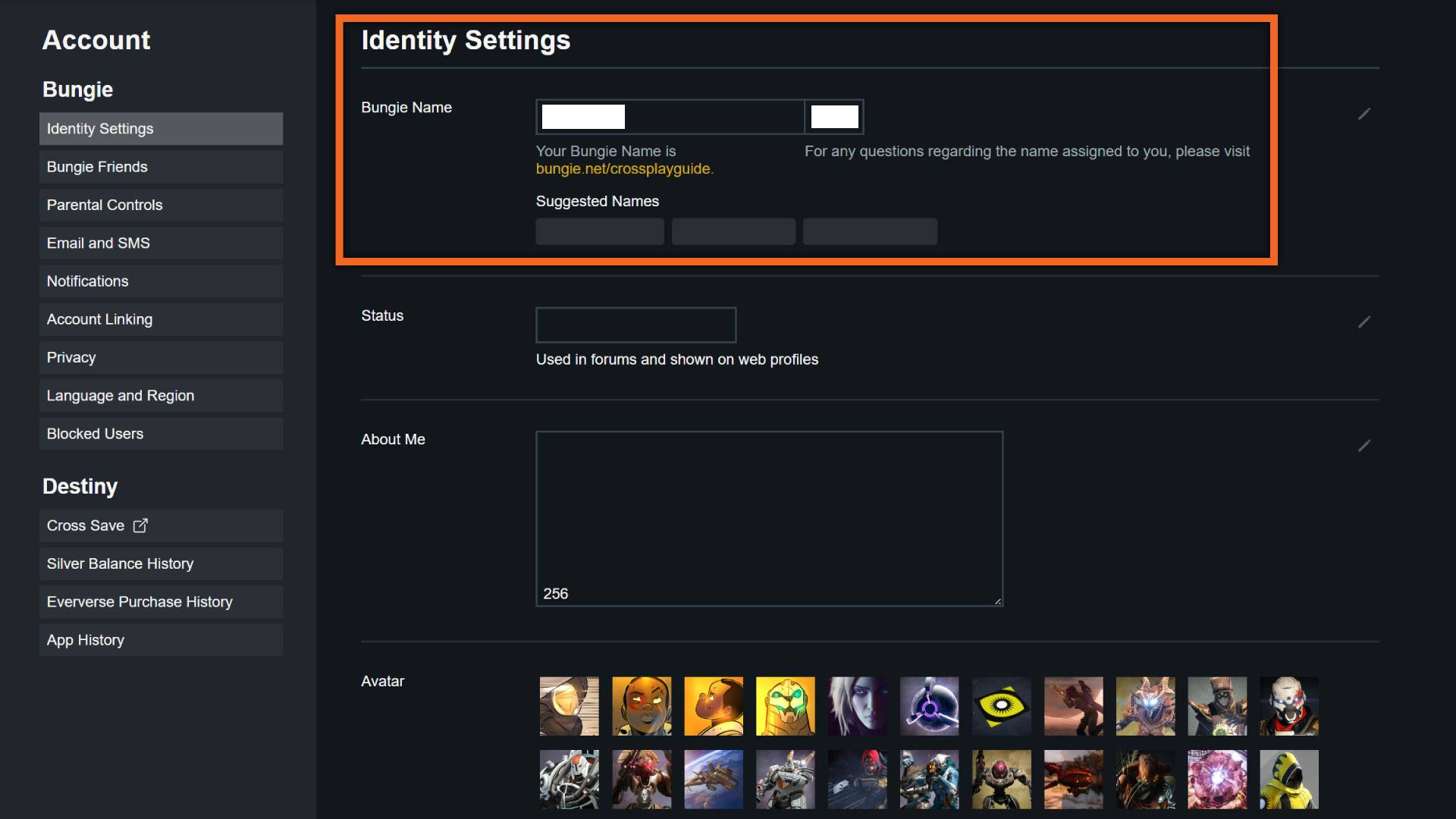
If you want to change your name in Marathon because it shows as “Redacted,” you can do it through Bungie.net. This bug, which caused your original Bungie name to appear as Redacted after logging into Marathon, has now been fixed. Initially, affected players received a one-time token to change their Bungie name, which also updates your name in Marathon. To change it, follow these steps:

ADVERTISEMENT

1. Log in to Bungie.net.
2. Click your profile icon in the top-right corner and select “Settings.”
3. From the menu on the left, choose “Identity Settings.”
4. Type in your new name in the “Bungie Name” box. The system will add a “#” followed by four numbers automatically—these are fixed for crossplay and can’t be changed.
5. Click “Save Settings” to confirm. Remember, this is a one-time change, so choose your name carefully.

Feel free to pick any name you like, as long as it follows Bungie’s terms and isn’t inappropriate. If your choice violates the rules, you may find your name changed back to “Redacted” with random numbers. You can also link your Twitch account to unlock special Marathon Twitch Drops.

If you’re still stuck as “Redacted” or your old name hasn’t returned after the bug fix, you can submit an appeal:

ADVERTISEMENT

1. Sign in to Bungie.net or Bungie Help.
2. Visit the appeal form here and click “Submit Request” at the bottom.
3. Select “Bungie Name was changed” from the category dropdown.
4. Fill out the rest of the form honestly and submit it.

That’s about all you can do while waiting for Bungie’s response. Hopefully, they’ll resolve it quickly!

ChatGPT ChatGPT Perplexity AI Perplexity Gemini AI Logo Gemini AI Grok AI Logo Grok AI
Google Banner
Tags: FPS Games
ADVERTISEMENT
Emily Smith

Emily Smith

Emily is a digital marketer in Austin, Texas. She enjoys gaming, playing guitar, and dreams of traveling to Japan with her golden retriever, Max.

Related Posts

Marathon Tox Clear: Event Walkthrough and Highlights
Gaming

Marathon Tox Clear: Event Walkthrough and Highlights

March 6, 2026
Essential Marathon Tips & Tricks for New Runners
Gaming

Essential Marathon Tips & Tricks for New Runners

March 3, 2026
What Is Marathon Silk Used For?
Gaming

What Is Marathon Silk Used For?

February 27, 2026
Server Slam Marathon: Start Times & Exclusive Rewards
Gaming

Server Slam Marathon: Start Times & Exclusive Rewards

February 27, 2026
Next Post
Resident Evil Requiem: Difficulty Modes & Classic Mode Differences

Resident Evil Requiem: Difficulty Modes & Classic Mode Differences

  • About Us
  • Contact Us
  • Advertise
  • Privacy Policy
  • Guest Post

© 2026 Digital Phablet

No Result
View All Result
  • Home
  • News
  • Technology
    • Education Tech
    • Home Tech
    • Office Tech
    • Fintech
    • Digital Marketing
  • Social Media
  • Gaming
  • Smartphones

© 2026 Digital Phablet