• About Us
  • Contact Us
  • Advertise
  • Privacy Policy
  • Guest Post
No Result
View All Result
Digital Phablet
  • Home
  • NewsLatest
  • Technology
    • Education Tech
    • Home Tech
    • Office Tech
    • Fintech
    • Digital Marketing
  • Social Media
  • Gaming
  • Smartphones
  • AI
  • Reviews
  • Interesting
  • How To
  • Home
  • NewsLatest
  • Technology
    • Education Tech
    • Home Tech
    • Office Tech
    • Fintech
    • Digital Marketing
  • Social Media
  • Gaming
  • Smartphones
  • AI
  • Reviews
  • Interesting
  • How To
No Result
View All Result
Digital Phablet
No Result
View All Result

Home » How to Replay Missions in LEGO Batman: Dark Knight Legacy

How to Replay Missions in LEGO Batman: Dark Knight Legacy

Emily Smith by Emily Smith
May 22, 2026
in Gaming
Reading Time: 1 min read
A A
How to Replay Missions in LEGO Batman: Dark Knight Legacy
ADVERTISEMENT

Select Language:

Most of the collectibles in LEGO Batman: Legacy of the Dark Knight are scattered across Gotham City in the large open-world map. However, you’ll also find numerous Batcave Trophies, WayneTech Caches, and Red Bricks inside individual levels. Getting all the collectibles on a single playthrough can be challenging, but the game allows you to replay missions as you go along.

ADVERTISEMENT

This feature is especially helpful if you aim for 100% completion, since you’ll need to find all those Trophies, Caches, and Red Bricks eventually. If you’re new to replaying missions, don’t worry—it’s easy to overlook how to do it when you first discover the mechanic.

### How to Replay Levels in LEGO Batman: Legacy of the Dark Knight

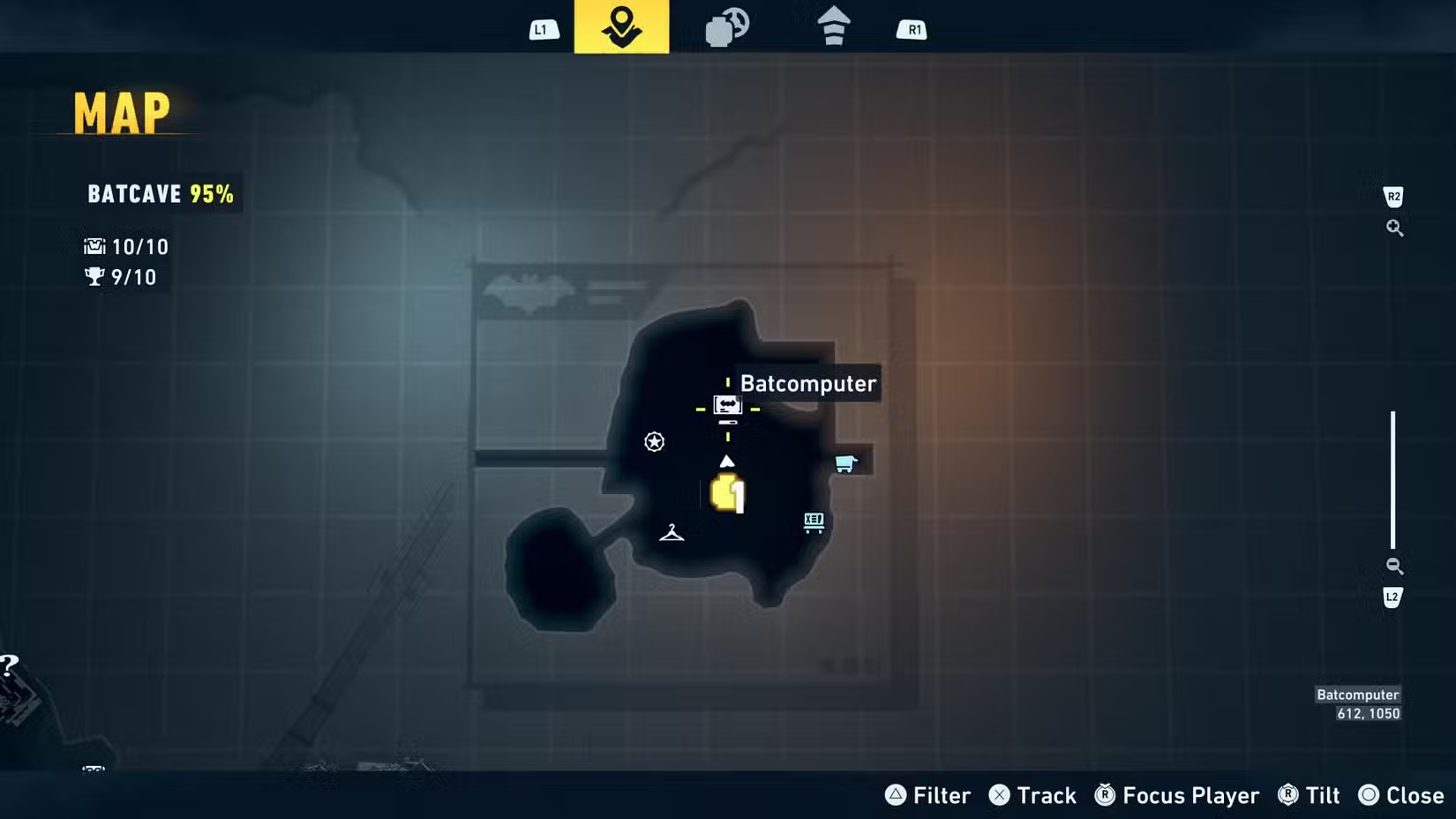
To replay levels, you first need to unlock the Batcave and access the Batcomputer. Once unlocked, the Batcave will appear on your map. Although you can’t fast travel directly to the Batcave, you can fast travel to it, place a marker in the right spot to see the Batcomputer clearly, and then use your grapple to reach it.

ADVERTISEMENT

### The Batcomputer Case Log Explained

Interacting with the Batcomputer chair makes Batman sit down and brings up the Case Log. This record shows all the story missions you’ve completed so far in the game. It also indicates which ones you’re missing, which is very useful. If you’ve finished a particular mission chain completely, a small yellow box with a black checkmark will appear next to it.

For example, if you see “Back to the Iceberg Lounge” marked as finished, but only 68% of “Iceberg Lounge” is completed, it means you’re missing one WayneTech Cache. To finish it, just select that mission and replay it—it’s that simple.

ChatGPT ChatGPT Perplexity AI Perplexity Gemini AI Logo Gemini AI Grok AI Logo Grok AI
Google Banner
ADVERTISEMENT
Emily Smith

Emily Smith

Emily is a digital marketer in Austin, Texas. She enjoys gaming, playing guitar, and dreams of traveling to Japan with her golden retriever, Max.

Related Posts

India faces power shortages as heatwave spikes electricity demand to record
News

India faces power shortages as heatwave spikes electricity demand to record

May 22, 2026
AWS Security: Handling Sophisticated Attacks & Collaborating with Authorities
How To

How to Fix AWS Bedrock Throttling Error

May 22, 2026
Best Countries for Medical Tourism 

1.  Mexico:
 Bariatric Surgery
 Dental Care
Infotainment

Top Countries for Medical Tourism Mexico Offers Bariatric Surgery and Dental Care

May 22, 2026
How to Build a Portfolio Website with GitHub Projects
How To

How to Build a Portfolio Website with GitHub Projects

May 22, 2026
Next Post
How to Build a Portfolio Website with GitHub Projects

How to Build a Portfolio Website with GitHub Projects

  • About Us
  • Contact Us
  • Advertise
  • Privacy Policy
  • Guest Post

© 2026 Digital Phablet

No Result
View All Result
  • Home
  • News
  • Technology
    • Education Tech
    • Home Tech
    • Office Tech
    • Fintech
    • Digital Marketing
  • Social Media
  • Gaming
  • Smartphones

© 2026 Digital Phablet