• About Us
  • Contact Us
  • Advertise
  • Privacy Policy
  • Guest Post
No Result
View All Result
Digital Phablet
  • Home
  • NewsLatest
  • Technology
    • Education Tech
    • Home Tech
    • Office Tech
    • Fintech
    • Digital Marketing
  • Social Media
  • Gaming
  • Smartphones
  • AI
  • Reviews
  • Interesting
  • How To
  • Home
  • NewsLatest
  • Technology
    • Education Tech
    • Home Tech
    • Office Tech
    • Fintech
    • Digital Marketing
  • Social Media
  • Gaming
  • Smartphones
  • AI
  • Reviews
  • Interesting
  • How To
No Result
View All Result
Digital Phablet
No Result
View All Result

Home » How To Complete and Use Shared EXP in Where Winds Meet

How To Complete and Use Shared EXP in Where Winds Meet

Emily Smith by Emily Smith
December 3, 2025
in Gaming
Reading Time: 2 mins read
A A
How To Complete and Use Shared EXP in Where Winds Meet
ADVERTISEMENT

Select Language:

Where Winds Meet currently features two large explorable areas, packed with side quests, dungeons, bosses, and hidden secrets. Almost everything you do in the game earns you experience points towards your next level, which unlocks new features and progressions.

ADVERTISEMENT

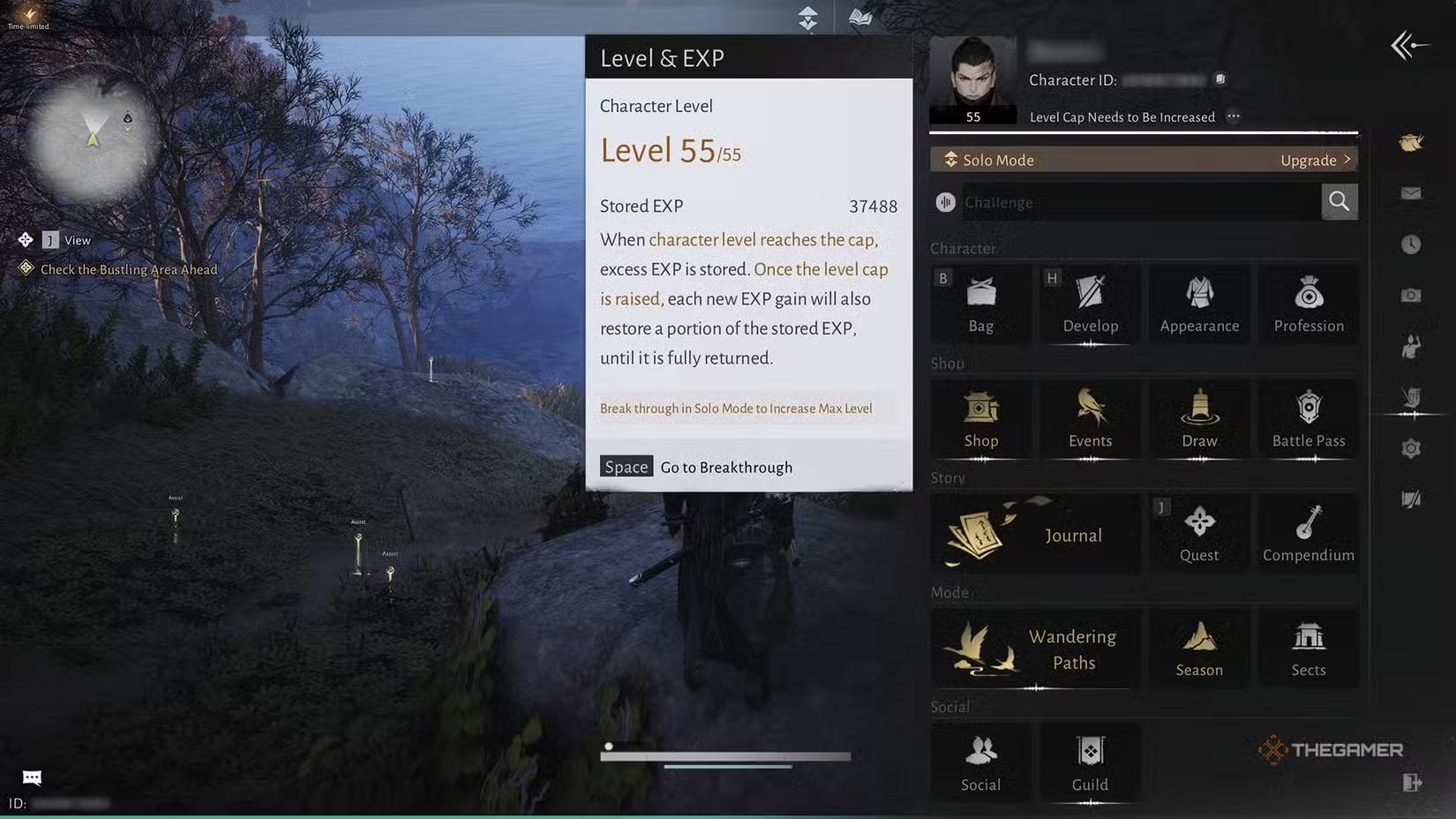
The game also has timed level caps, meaning your maximum level is limited until a new level cap is released. While at this cap, you’ll still earn experience, called Stored EXP. This experience goes into a bank and can be used once the level cap is increased. Your current Solo Mode Level determines your level cap.

You can check your Stored EXP by opening the main menu and clicking the three dots above your experience bar. Though stored EXP might be called something different, it works exactly the same as normal experience — it’s just earned under different circumstances.

Stored EXP is gained when you earn experience points while at the level cap. It accumulates at the same rate as regular experience but is stored instead of increasing your level immediately. This experience is stored in a separate bank and can be used after you raise your level cap.

ADVERTISEMENT

To use Stored EXP, you first need to increase your Solo Mode Level through a process called Solo Mode Level Breakthrough. Higher breakthrough levels require your account to have been active for a certain number of days, so there is some waiting involved.

Once your Solo Mode Level is raised, every time you earn experience, you’ll also get an extra 50% of that as a bonus from your Stored EXP until you run out of it. For example, if you earn 1,000 experience points, you’ll get an extra 500 from your stored EXP reserves. This bonus continues until your Stored EXP is fully used up.

Your Stored EXP isn’t added to your level all at once. Instead, it’s gradually distributed as you keep earning experience through gameplay.

ChatGPT ChatGPT Perplexity AI Perplexity Gemini AI Logo Gemini AI Grok AI Logo Grok AI
Google Banner
Tags: expHow TomeetsharedUseWhereWinds
ADVERTISEMENT
Emily Smith

Emily Smith

Emily is a digital marketer in Austin, Texas. She enjoys gaming, playing guitar, and dreams of traveling to Japan with her golden retriever, Max.

Related Posts

All Books and How to Get Them in Tomodachi Life: Living the Dream
Gaming

All Books and How to Get Them in Tomodachi Life: Living the Dream

April 23, 2026
How to Get Animal Fat in Windrose: Completing and Solving Guides
Gaming

How to Get Animal Fat in Windrose: Completing and Solving Guides

April 22, 2026
How To Turn Safe Mode On And Off On Android (And When To Use It)
How To

How To Turn Safe Mode On And Off On Android (And When To Use It)

April 20, 2026
How To Complete the Kuku Disruptor Spear Blueprint Quest in Crimson Desert
Gaming

How To Complete the Kuku Disruptor Spear Blueprint Quest in Crimson Desert

April 20, 2026
Next Post

Top 10 Best Selling Books in History

  • About Us
  • Contact Us
  • Advertise
  • Privacy Policy
  • Guest Post

© 2026 Digital Phablet

No Result
View All Result
  • Home
  • News
  • Technology
    • Education Tech
    • Home Tech
    • Office Tech
    • Fintech
    • Digital Marketing
  • Social Media
  • Gaming
  • Smartphones

© 2026 Digital Phablet