Select Language:
Managing sim games isn’t a new idea, but Hotel Architect offers a fresh experience by placing you in the role of a hotel owner. It provides both specific scenarios to manage and a sandbox mode where you can build the five-star hotel you’ve always dreamed of.
You’ll need to oversee different types of staff, add amenities to satisfy a variety of guests, design and decorate each hotel floor, and do all this without falling into debt or running out of money. Whether you’re new to this game or the genre, here are some tips to help you understand the systems and ensure your hotel management journey goes smoothly.
Upgrade Construction Crew Size and Worker Speed First
In Hotel Architect, construction workers are essential—they build everything from new foundations and staff equipment to room decorations. However, construction takes in-game time; it’s not instant.
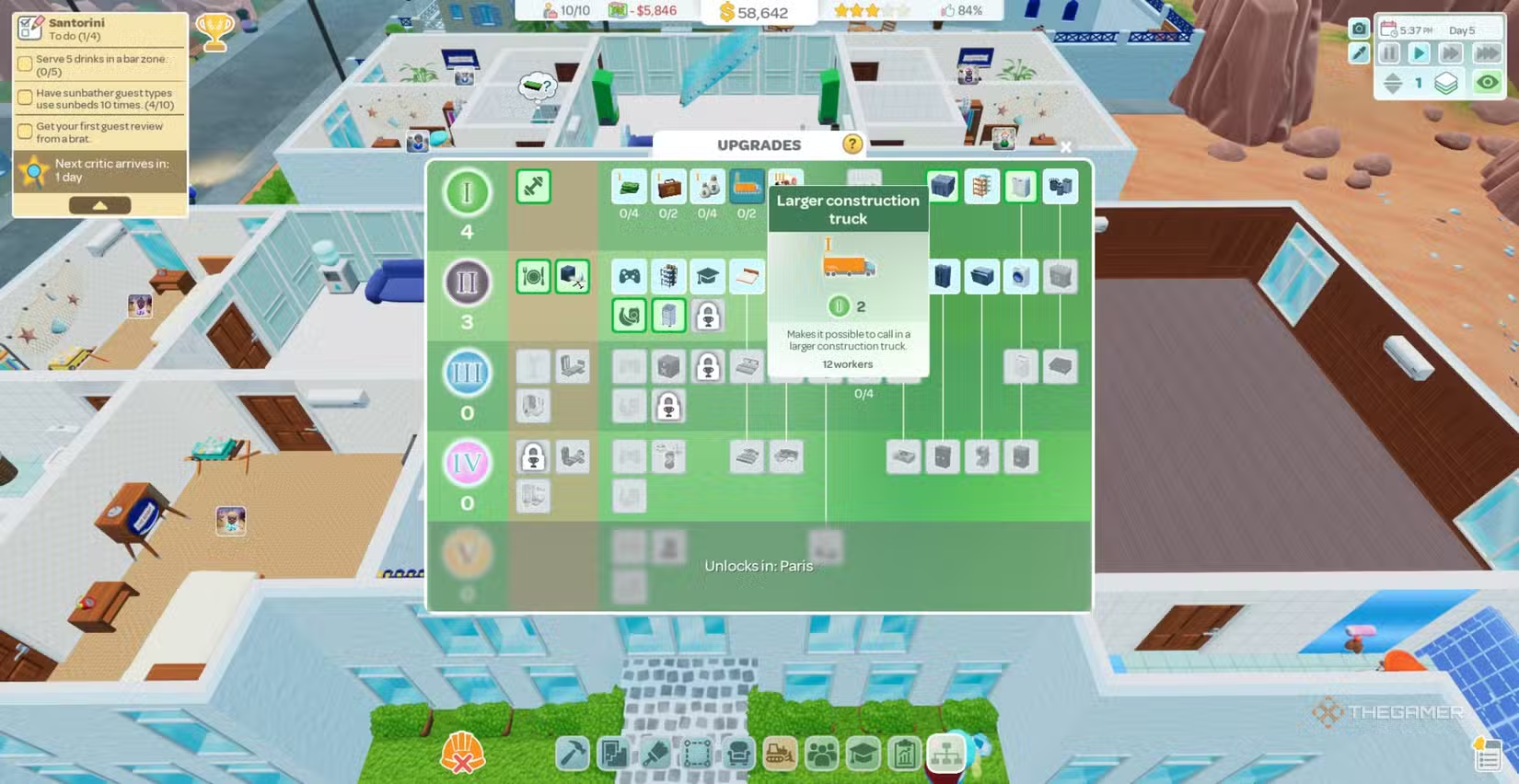
You can make this process faster by upgrading your large construction crew and increasing worker speed. Investing in these upgrades boosts their speed by up to 140%, making it quicker to add new floors and zones. Although these upgrades cost more initially, they save time in the long run and help you unlock new facilities that increase your revenue.
Avoid Building Big Sections Early On
While expanding your hotel to accommodate more guests is tempting, it’s best not to rush into large-scale construction early in the game. If your larger crews aren’t yet unlocked or upgraded, building too much at once can slow down progress.
Remember, new hotel areas are built gradually over time, not instantly. Focus on small, manageable sections to avoid missing important elements and to keep your operations running smoothly.
Tip: Place a Material Supply near your main construction zone before starting major builds. This prevents delays caused by waiting for supplies and helps keep your project moving efficiently.
Monitor Guest Review Scores
Your goal is to develop a five-star hotel, which depends heavily on guest feedback. Positive reviews from guests and critics are crucial.
You can view recent reviews by clicking on the thumbs-up icon next to your star level. The reviews are color-coded: green for ratings above 80%, yellow for around 60%, and orange or red for poor scores. Regularly checking these helps you identify areas needing improvement to boost your overall ratings.
Note: Currently, the game doesn’t offer colorblind options. Hovering over review categories can show the exact percentage if you prefer precise information.
Prioritize Staff Facilities Over Upgrades for Guests
Each scenario in the game emphasizes certain guest types based on location. While it’s tempting to upgrade amenities based on guest needs first, it’s more effective to improve staff facilities early on.
Upgrading staff equipment makes their tasks easier and faster, which helps maintain cleanliness and other standards—especially when you have many rooms. Faster staff performance prevents issues like towel shortages or trash buildup, which can impact guest reviews negatively.
Check Your Notification Log Regularly
With multiple floors and ongoing construction, it’s easy to overlook small issues. The in-game notification log, accessible via the paper and bell icon at the bottom right, details all occurrences—guest reviews, supply shortages, equipment failures, maintenance problems, and more.
Staying on top of these notifications allows you to address problems early before they escalate, keeping your hotel running smoothly and maintaining high guest satisfaction.
Use Sandbox or Free Play Modes for Practice
Tutorial scenarios are helpful but often limited in scope and resources. To experiment freely, use the Sandbox or Free Play modes, which can be selected from the main menu.
Sandbox mode lets you customize location, starting cash, and game settings, while Free Play offers a similar experience within a scenario’s environment but with more freedom. Just be cautious when saving, as Free Play files share the same save slot as scenarios, so avoid overwriting important data.
Set Up a Maintenance Room Early
Building your hotel from scratch in Free Play or Sandbox mode gives you full creative control, including room layout. However, setting up a maintenance room right away is vital.
Without a dedicated maintenance space, you may find yourself running out of supplies for your restaurant, bar, snack machines, and linens. Properly staffed maintenance ensures your hotel runs without shortages, helping you avoid guest complaints and maintain a good review score.
Spend Upgrade Points in Their Own Tier
Players earn upgrade points from attracting specific guest types, which are used to upgrade various aspects of your hotel. The game has five tiers of upgrades:
- Tier 1: Backpackers
- Tier 2: Sports enthusiasts
- Tier 3: Sunbathers and Business travelers
- Tier 4: Young guests (Brats)
- Tier 5: Upper-class guests
Points can only be used in their respective tiers or lower ones. To maximize efficiency, spend points in the correct tier, as higher-tier points can’t be used for lower-tier upgrades, and misusing points cannot be reversed unless more guests of that type check out. Planning upgrades carefully ensures you get the most benefit from your points.
Keep an Eye on Guest Feedback
Your hotel’s success depends heavily on guest reviews. Use the review panel, accessed by clicking the thumbs-up icon, to see recent scores and comments. Green ratings (above 80%) indicate good performance, yellow (around 60%) suggest areas to improve, and red or orange highlight urgent issues.
Regularly reviewing this feedback helps you pinpoint what needs fixing, whether it’s amenities, staff performance, or cleanliness, guiding your efforts to maintain a top-rated hotel.
 ChatGPT
 Perplexity
 Gemini AI
 Grok AI