• About Us
  • Contact Us
  • Advertise
  • Privacy Policy
  • Guest Post
No Result
View All Result
Digital Phablet
  • Home
  • NewsLatest
  • Technology
    • Education Tech
    • Home Tech
    • Office Tech
    • Fintech
    • Digital Marketing
  • Social Media
  • Gaming
  • Smartphones
  • AI
  • Reviews
  • Interesting
  • How To
  • Home
  • NewsLatest
  • Technology
    • Education Tech
    • Home Tech
    • Office Tech
    • Fintech
    • Digital Marketing
  • Social Media
  • Gaming
  • Smartphones
  • AI
  • Reviews
  • Interesting
  • How To
No Result
View All Result
Digital Phablet
No Result
View All Result

Home » Displaying Melee Attack Range in Marvel Rivals: A Guide

Displaying Melee Attack Range in Marvel Rivals: A Guide

Emily Smith byEmily Smith
March 1, 2025
inGaming
Reading Time: 2 mins read
AA
Displaying Melee Attack Range in Marvel Rivals: A Guide
ADVERTISEMENT

Select Language:

Marvel Rivals features an amazing and expanding cast of characters, each with unique abilities that stay true to their comic book roots.

One of the primary distinctions among characters is whether they focus on ranged or melee attacks. Some characters can do both, while others specialize in one. For those who prefer melee characters, it can be challenging to determine when an opponent is within striking distance, sometimes resulting in missed attacks and unexpected defeats.

How to Show Melee Attack Range


Fortunately, Marvel Rivals provides numerous options within the settings that let you customize gameplay and manage screen displays. One helpful feature is the ability to indicate if an enemy is close enough for your attacks to connect.

Locating the ‘Attack Range Hint’ Setting

This setting isn’t easy to find right away since it’s not always visible. To access it, follow these steps:

  • Settings > Controller/Keyboard (depending on your platform) > Combat
  • Here, you need to pick a Hero from the menu located above the settings. It’s set to ‘All Heroes’ by default. Choose a character with melee attacks, such as Spider-Man, Wolverine, or Iron Fist.
  • After selecting a melee hero, scroll to the Hero options. Among the specific options for that character, look for ‘Attack Range Hint‘ and turn it on.

How to Identify If an Enemy is Within Attack Range

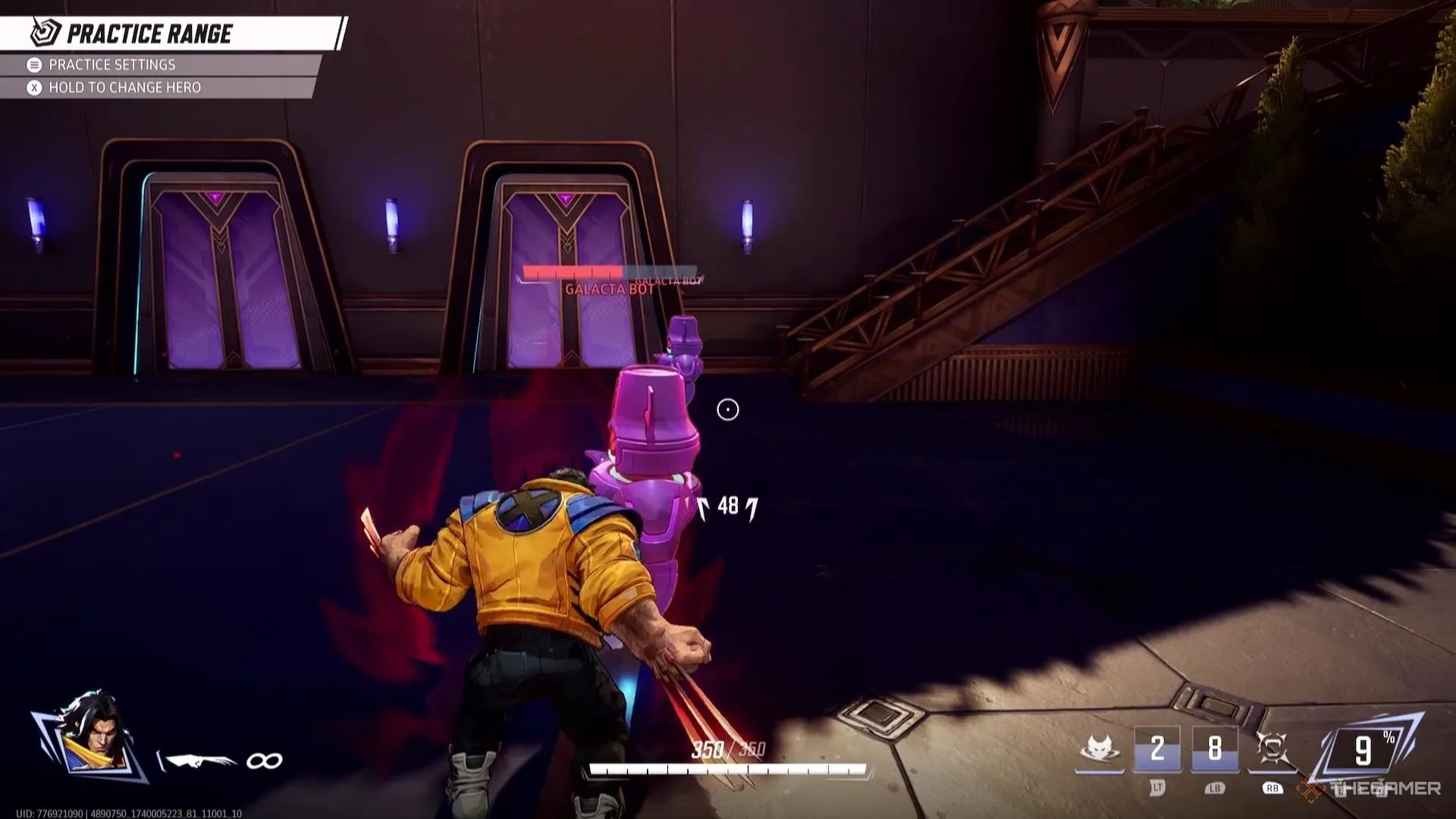
When this setting is turned on, enemies within the range of your melee attacks will be slightly highlighted in red. While this effect isn’t overly dramatic and could blend into the background during busy scenes, it remains noticeable in most situations.

You can adjust the color of this highlighting effect by modifying the ‘Enemy Color’ in the Accessibility Settings. Some colors may clash with certain character designs, so if the default color isn’t working well for you, try experimenting with other options to find one that stands out better.

ChatGPT ChatGPT Perplexity AI Perplexity Gemini AI Logo Gemini AI Grok AI Logo Grok AI
Google Banner
Tags: displayHow ToLive-Service GamesMarvelMarvel Rivalsmelee attack rangerivals
ADVERTISEMENT
Emily Smith

Emily Smith

Emily is a digital marketer in Austin, Texas. She enjoys gaming, playing guitar, and dreams of traveling to Japan with her golden retriever, Max.

Related Posts

How to Take a Screenshot on a Chromebook: Step-by-Step Guide
How To

How to Take a Screenshot on a Chromebook: Step-by-Step Guide

November 11, 2025
How to Solve the Red Room Puzzle in Arc Raiders
Gaming

How to Solve the Red Room Puzzle in Arc Raiders

November 11, 2025
How to Get All Four Photos for Lance: Completing and Solving
Gaming

How to Get All Four Photos for Lance: Completing and Solving

November 10, 2025
How to Repair Solar Panels in Arc Raiders: Completing and Solving
Gaming

How to Repair Solar Panels in Arc Raiders: Completing and Solving

November 8, 2025
Next Post
Connections Puzzle #630 Solutions and Tips for March 2, 2025

Connections Puzzle #630 Solutions and Tips for March 2, 2025

  • About Us
  • Contact Us
  • Advertise
  • Privacy Policy
  • Guest Post

© 2025 Digital Phablet

No Result
View All Result
  • Home
  • News
  • Technology
    • Education Tech
    • Home Tech
    • Office Tech
    • Fintech
    • Digital Marketing
  • Social Media
  • Gaming
  • Smartphones

© 2025 Digital Phablet