• About Us
  • Contact Us
  • Advertise
  • Privacy Policy
  • Guest Post
No Result
View All Result
Digital Phablet
  • Home
  • NewsLatest
  • Technology
    • Education Tech
    • Home Tech
    • Office Tech
    • Fintech
    • Digital Marketing
  • Social Media
  • Gaming
  • Smartphones
  • AI
  • Reviews
  • Interesting
  • How To
  • Home
  • NewsLatest
  • Technology
    • Education Tech
    • Home Tech
    • Office Tech
    • Fintech
    • Digital Marketing
  • Social Media
  • Gaming
  • Smartphones
  • AI
  • Reviews
  • Interesting
  • How To
No Result
View All Result
Digital Phablet
No Result
View All Result

Home » Discovering and Collecting Highlights in Marvel Rivals

Discovering and Collecting Highlights in Marvel Rivals

Emily Smith by Emily Smith
December 9, 2024
in Gaming
Reading Time: 3 mins read
A A
Discovering and Collecting Highlights in Marvel Rivals
ADVERTISEMENT

Select Language:

Quick Links

  • Where Are My Highlights Stored?

Marvel Rivals offers thrilling experiences, whether you’re outmaneuvering foes or executing a winning combo. There’s no shortage of moments to celebrate. So, how can you save those impressive plays without searching through endless menus? That’s the purpose of the highlight-saving feature.

ADVERTISEMENT

This guide will show you easy steps to keep your standout moments so you can show them off later. Learning how to use this feature will let you share, review, or revisit your best plays anytime you want. Ready to get started? Let’s go, because if you’re planning to boast, you’ll need the proof. Your highlight reel isn’t going to create itself!

How to Save Highlights

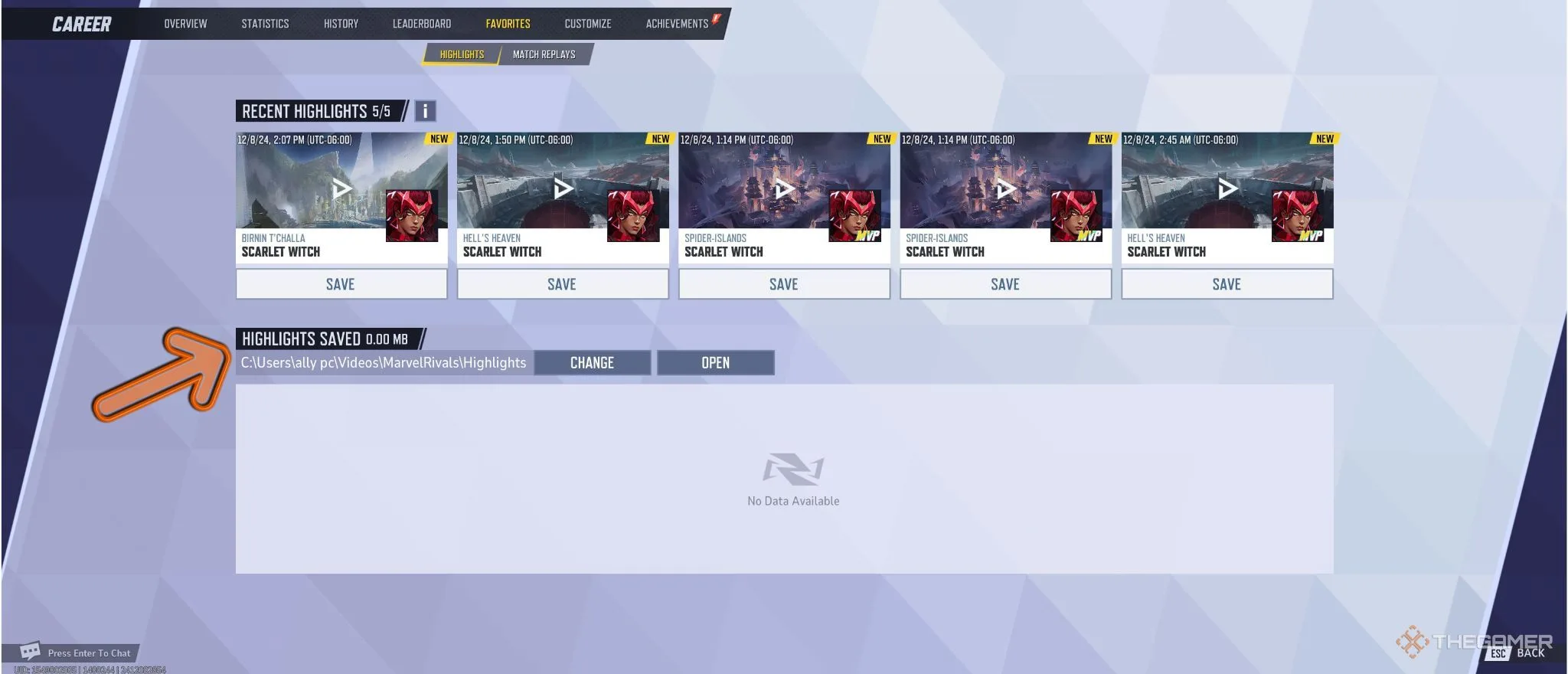
First, go to the main menu and click on your profile icon located at the top right corner. This will open your profile or ‘Career’ page. Once there, choose the ‘Favorites’ tab from the top menu bar, where you’ll find your five latest highlights listed.

Find the highlight you’d like to save and click the ‘Save’ button underneath it. You will then have the chance to adjust several settings, including the highlight’s name, resolution, and frame rate.

ADVERTISEMENT

Keep in mind, opting for higher quality settings may slow down the saving process as more data is being handled.

After making your adjustments, confirm your settings and the game will take you to a loading screen while your highlight is saved.

Where Are My Highlights Stored?


By default, saved highlights will be located in your computer’s ‘Videos’ folder or your console’s media library, depending on which platform you’re using. If you’re on PC and want to change where your highlights are saved, click the ‘Change’ button in the ‘Highlights Saved’ section and choose your preferred destination folder.

ChatGPT ChatGPT Perplexity AI Perplexity Gemini AI Logo Gemini AI Grok AI Logo Grok AI
Google Banner
Tags: FindhighlightsHow ToLive-Service GamesMarvelMarvel Rivalsrivalssave
ADVERTISEMENT
Emily Smith

Emily Smith

Emily is a digital marketer in Austin, Texas. She enjoys gaming, playing guitar, and dreams of traveling to Japan with her golden retriever, Max.

Related Posts

Every Hero Ranked in Marvel Cosmic Invasion: Completing and Solving
Gaming

Every Hero Ranked in Marvel Cosmic Invasion: Completing and Solving

December 4, 2025
How to Complete "One Leaf, One Life" in Where Winds Meet Through Solving
Gaming

How to Complete “One Leaf, One Life” in Where Winds Meet Through Solving

December 4, 2025
How to Find All Knee Deep in Earth Chests Through Completing Of Ash and Steel
Gaming

How to Find All Knee Deep in Earth Chests Through Completing Of Ash and Steel

December 3, 2025
How To Complete and Use Shared EXP in Where Winds Meet
Gaming

How To Complete and Use Shared EXP in Where Winds Meet

December 3, 2025
Next Post

Total Missions Available in Ready Or Not: A Complete Overview

  • About Us
  • Contact Us
  • Advertise
  • Privacy Policy
  • Guest Post

© 2025 Digital Phablet

No Result
View All Result
  • Home
  • News
  • Technology
    • Education Tech
    • Home Tech
    • Office Tech
    • Fintech
    • Digital Marketing
  • Social Media
  • Gaming
  • Smartphones

© 2025 Digital Phablet