

Select Language:
If you’ve recently upgraded your computer to Windows 11 25H2 and noticed some unrecognized devices in your Device Manager, you’re not alone. Many users find that after the upgrade, a few devices show up with no drivers installed. One common solution is to update the chipset driver, which helps your system recognize all hardware components properly.
Here’s a simple way to fix this issue:
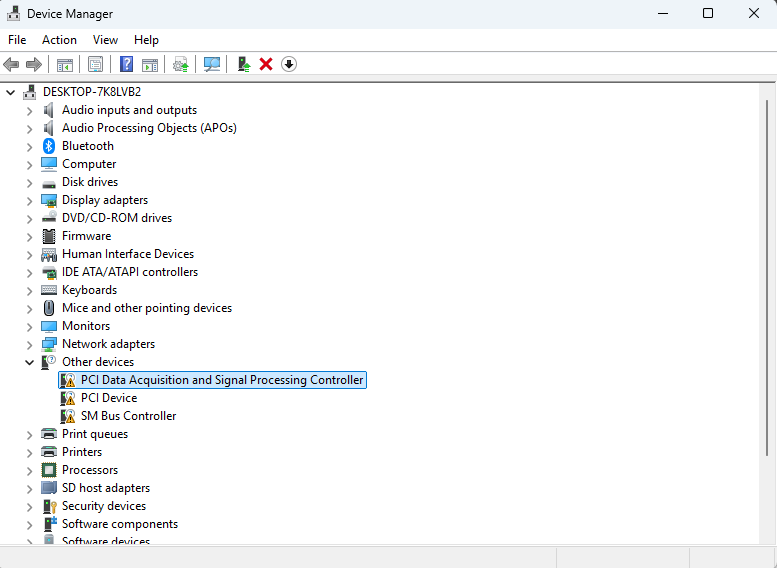
First, check what devices aren’t recognized properly. In Device Manager, unrecognized devices are usually marked with a yellow warning triangle. Common devices might include the PCI Data Acquisition and Signal Processing Controller, PCI Express Device, and the SMBus Controller.
Next, you’ll want to update the chipset drivers. The usual step is to download and install the “Intel Chipset Installation Utility and Driver” from the manufacturer’s website, like HP or your PC brand. However, sometimes these drivers only work with older versions of Windows, such as Windows 10.
So what do you do if the driver doesn’t install on Windows 11? The best approach is to look for a more recent Intel chipset driver designed for Windows 11. Intel frequently updates their drivers, and newer versions are typically compatible with the latest operating systems.
You can find updated Intel chipset drivers directly on Intel’s official website. Make sure to select the correct driver for your specific hardware. Look for keywords like “Windows 11 compatible” or check the release notes for compatibility updates. Download and run the installer, then restart your computer.
After restarting, go back to Device Manager and see if Windows has recognized the devices properly and installed the necessary drivers automatically. If some devices are still not recognized, try using Windows Update to see if it offers any drivers for your hardware.
In many cases, updating to a newer chipset driver that supports Windows 11 resolves the issue. This helps your system run smoothly and ensures all hardware components work as expected. Remember to always download drivers from official sources to keep your system safe.
 ChatGPT
 Perplexity
 Gemini AI
 Grok AI

