• About Us
  • Contact Us
  • Advertise
  • Privacy Policy
  • Guest Post
No Result
View All Result
Digital Phablet
  • Home
  • NewsLatest
  • Technology
    • Education Tech
    • Home Tech
    • Office Tech
    • Fintech
    • Digital Marketing
  • Social Media
  • Gaming
  • Smartphones
  • AI
  • Reviews
  • Interesting
  • How To
  • Home
  • NewsLatest
  • Technology
    • Education Tech
    • Home Tech
    • Office Tech
    • Fintech
    • Digital Marketing
  • Social Media
  • Gaming
  • Smartphones
  • AI
  • Reviews
  • Interesting
  • How To
No Result
View All Result
Digital Phablet
No Result
View All Result

Home » How to Hide Old Instagram Posts Using the Archive Feature

How to Hide Old Instagram Posts Using the Archive Feature

Rebecca Fraser by Rebecca Fraser
December 1, 2024
in Social Media
Reading Time: 3 mins read
A A
How to Hide Old Instagram Posts Using the Archive Feature
ADVERTISEMENT

Select Language:

Quick Links

  • How to Archive Your Instagram Posts
  • How to View and Restore Archived Instagram Posts

Instagram offers a handy Archive feature that lets you hide a post from your followers while keeping it intact. Your photos and videos remain accessible, just stored in a private section of your profile that only you can access.

ADVERTISEMENT

How to Archive Your Instagram Posts

Archiving posts on Instagram is quite simple. First, open your profile and scroll through to find the post you want to hide. Once you spot it, tap on the post to open it.

Next, click on the three vertical dots located in the top-right corner of your post. From the menu that appears, select Archive. Just like that, the post disappears from your public profile.

How to View and Restore Archived Instagram Posts

If you ever want to access your archived posts again, head back to your profile and tap on the three horizontal lines at the top to open the menu. Select Archive. You might initially find yourself in the Stories archive, so you just need to switch to the posts you’ve hidden by tapping Stories Archive at the top and then choosing Posts Archive.

ADVERTISEMENT

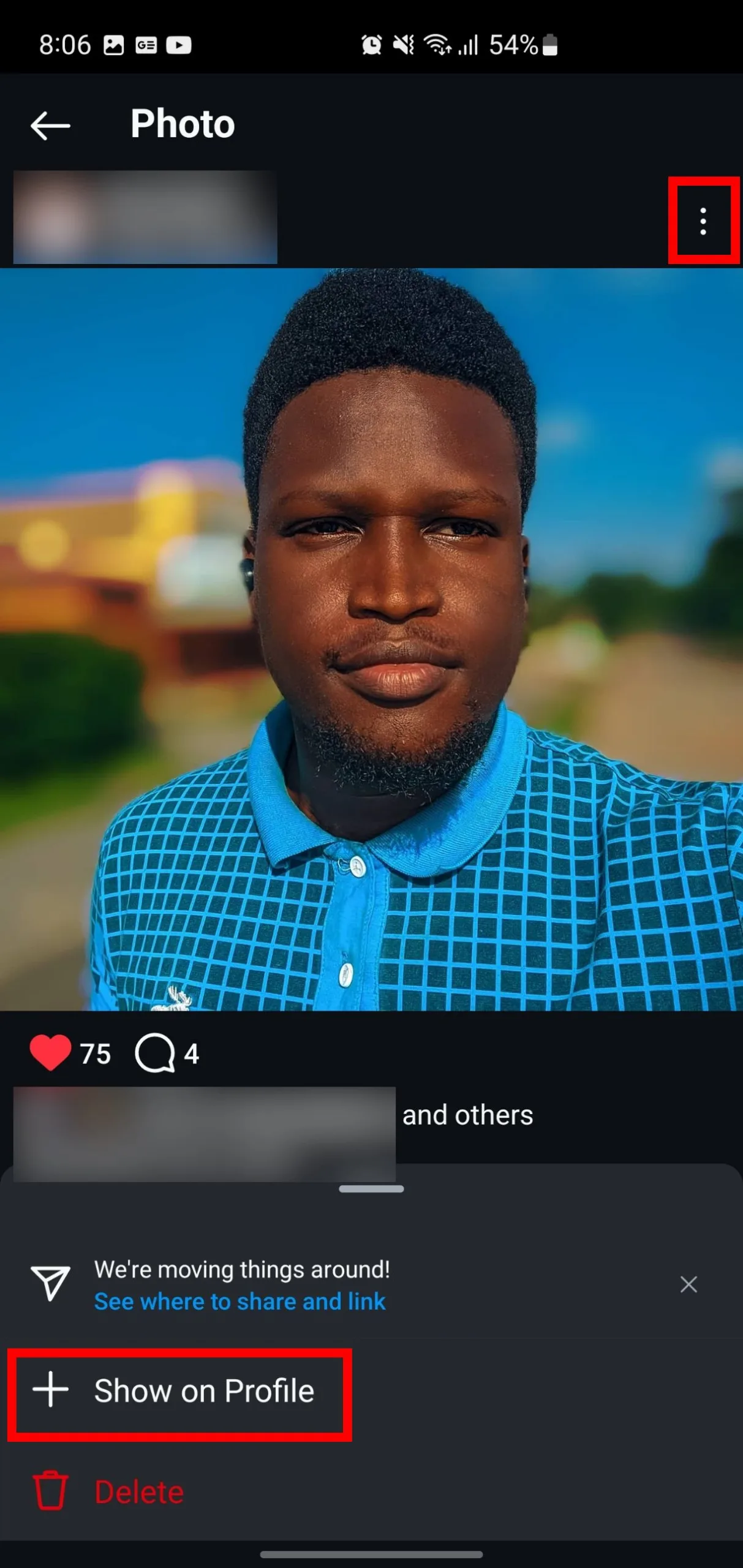
Scroll through your archived posts and tap on the one you want to restore. Open it, then press the three dots in the top-right corner, and select Show on Profile from the menu that pops up. Your post will now reappear on your profile.

Keep in mind that if you restore a post that you archived a while back, it won’t be flagged as new. It will return to your profile in the order it was originally posted. Plus, your archived posts retain all their original likes and comments, so you won’t lose any valuable engagement.

I truly appreciate the Archive feature because it allows for flexibility. Deleting a post feels like throwing away an entire album of memories—it’s irreversible. Archiving, however, is akin to safely tucking that album away for potential future enjoyment.

ChatGPT ChatGPT Perplexity AI Perplexity Gemini AI Logo Gemini AI Grok AI Logo Grok AI
Google Banner
Tags: InstagramMetaSocial Media
ADVERTISEMENT
Rebecca Fraser

Rebecca Fraser

Rebecca covers all aspects of Mac and PC technology, including PC gaming and peripherals, at Digital Phablet. Over the previous ten years, she built multiple desktop PCs for gaming and content production, despite her educational background in prosthetics and model-making. Playing video and tabletop games, occasionally broadcasting to everyone's dismay, she enjoys dabbling in digital art and 3D printing.

Related Posts

Nepal's Rapper-Mayor Balendra Shah Set to Rise as Prime Minister
News

Nepal’s Rapper-Mayor Balendra Shah Set to Rise as Prime Minister

March 7, 2026
Megan Fox Returns to Instagram with Bold Thirst Traps
Entertainment

Megan Fox Returns to Instagram with Bold Thirst Traps

March 5, 2026
Dubai Threatens Jail and Heavy Fines for Rumor Spreading
News

Dubai Threatens Jail and Heavy Fines for Rumor Spreading

March 4, 2026
UAE Targets Fake Job Ads as Scammers Swindle Jobseekers
News

UAE Targets Fake Job Ads as Scammers Swindle Jobseekers

February 12, 2026
Next Post
Defeating Cliff in Pokémon GO: December 2024 Strategy Guide

Defeating Cliff in Pokémon GO: December 2024 Strategy Guide

  • About Us
  • Contact Us
  • Advertise
  • Privacy Policy
  • Guest Post

© 2026 Digital Phablet

No Result
View All Result
  • Home
  • News
  • Technology
    • Education Tech
    • Home Tech
    • Office Tech
    • Fintech
    • Digital Marketing
  • Social Media
  • Gaming
  • Smartphones

© 2026 Digital Phablet