
Select Language:
Top 10 Essential Computer Shortcut Keys Everyone Should Know in 2025
In today’s fast-paced digital world, mastering keyboard shortcuts can significantly boost your productivity and streamline your workflow. Whether you’re a student, professional, or casual user, knowing the right shortcuts can save you precious seconds during your daily tasks. Below are the most vital computer shortcut keys in 2025 that everyone should incorporate into their digital routine.
1. Quick Screen Capture: Windows Key + Shift + S
Capturing your screen has become an everyday need, especially when sharing information or troubleshooting. Windows 10 and Windows 11 users can press Windows Key + Shift + S to instantly open the Snipping Tool, allowing you to select a specific area of your screen to copy to your clipboard. This shortcut simplifies the process without needing additional software.
2. Switch Between Multiple Windows: Alt + Tab
One of the most well-known shortcuts, Alt + Tab, allows users to switch between open applications seamlessly. Whether you’re multitasking between a Word document, a browser, or emailing apps, this shortcut help you jump rapidly without reaching for your mouse.
3. Lock Your Screen: Windows Key + L
When stepping away from your computer, securing your device is crucial. Pressing Windows Key + L locks your screen instantly, requiring your password or PIN to resume. This quick lock feature enhances security, especially in shared environments.
4. Open File Explorer or Finder: Windows Key + E
Managing files quickly can save a lot of time. On Windows, Windows Key + E opens File Explorer instantly, giving you easy access to your files and drives. Mac users can use Command + Space to open Spotlight Search and type “Finder” for quick access.
5. Undo & Redo Mistakes: Ctrl + Z / Ctrl + Y
Accidentally delete or change content? Ctrl + Z undoes your last action, while Ctrl + Y redoes it. These shortcuts are vital for editing, whether working on a document, photo, or code, preventing the frustration of mistakes.
6. Find Text Quickly: Ctrl + F
Need to locate specific words or phrases in a document or webpage? Press Ctrl + F, and a search box will appear, letting you type your query. This shortcut expedites navigation within lengthy documents or web pages, ensuring you find information in seconds.
7. Open New Browser Tab: Ctrl + T
Web browsing is faster with this shortcut. Press Ctrl + T to open a new tab in your preferred browser. This simple trick encourages multitasking across multiple websites without disrupting your current session.
8. Copy, Cut, and Paste: Ctrl + C / Ctrl + X / Ctrl + V
Among the most fundamental shortcuts, these commands underpin almost all digital workflows. Ctrl + C copies selected content, Ctrl + X cuts it, and Ctrl + V pastes it. Mastery of these ensures smooth document editing, data transfer, and organization.
9. Save Your Work: Ctrl + S
Frequent saving prevents loss of data, and Ctrl + S is a quick way to save your current document or project. Make it a habit to use this shortcut regularly, especially when working on important or large files, to prevent accidental data loss.
10. Close Current Window or Tab: Ctrl + W
Closing unnecessary or completed windows with Ctrl + W keeps your workspace uncluttered. Whether it’s a browser tab or a document, this shortcut saves time and helps you stay focused on your current task.
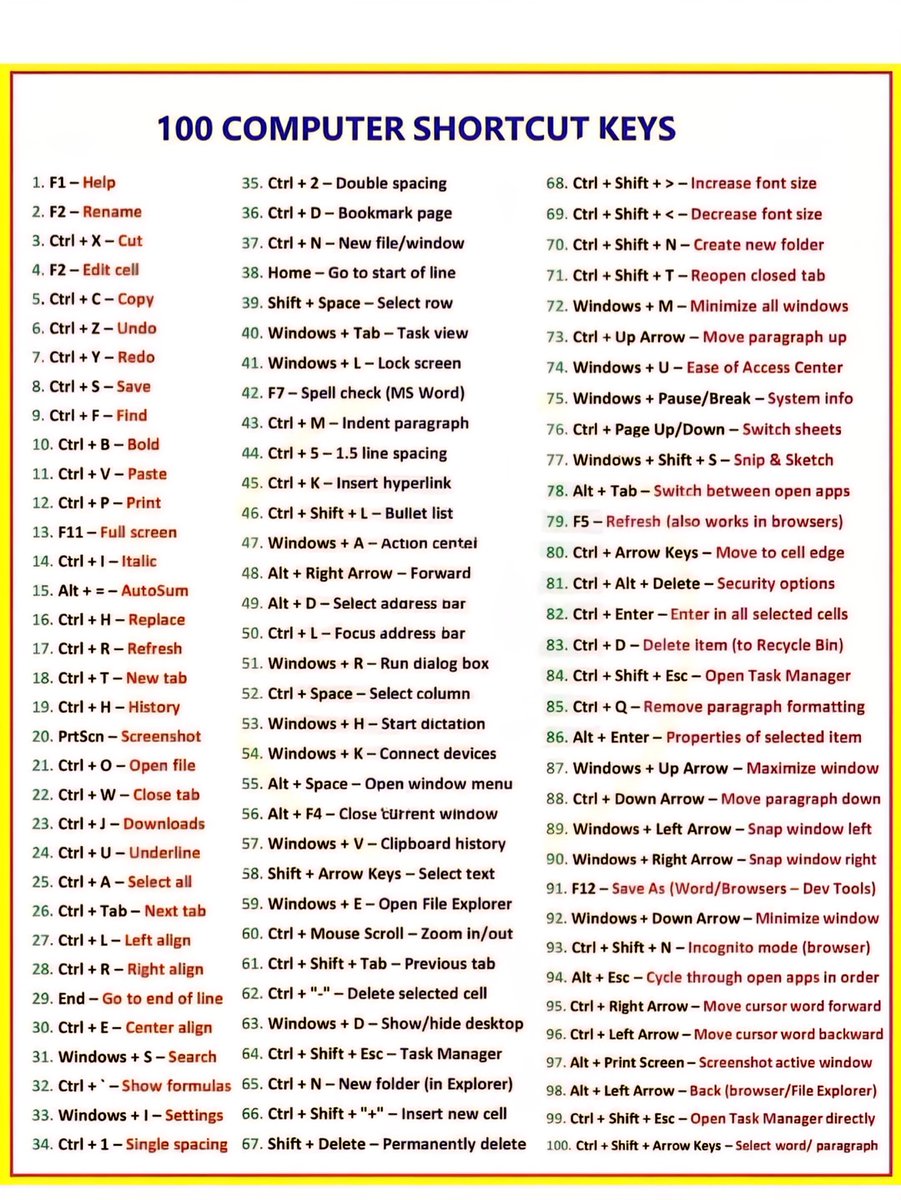
Adopting these essential keyboard shortcuts can profoundly impact your daily efficiency. Practice integrating them into your routine to become more comfortable clicking less and doing more with just your keyboard. As technology continues evolving in 2025, staying sharp with shortcuts remains one of the best ways to stay ahead in the digital game.
 ChatGPT
 Perplexity
 Gemini AI
 Grok AI