• About Us
  • Contact Us
  • Advertise
  • Privacy Policy
  • Guest Post
No Result
View All Result
Digital Phablet
  • Home
  • NewsLatest
  • Technology
    • Education Tech
    • Home Tech
    • Office Tech
    • Fintech
    • Digital Marketing
  • Social Media
  • Gaming
  • Smartphones
  • AI
  • Reviews
  • Interesting
  • How To
  • Home
  • NewsLatest
  • Technology
    • Education Tech
    • Home Tech
    • Office Tech
    • Fintech
    • Digital Marketing
  • Social Media
  • Gaming
  • Smartphones
  • AI
  • Reviews
  • Interesting
  • How To
No Result
View All Result
Digital Phablet
No Result
View All Result

Home » How to Stop Apple Intelligence Siri from Saying “Mmmhmm”

How to Stop Apple Intelligence Siri from Saying “Mmmhmm”

Rebecca Fraser by Rebecca Fraser
April 5, 2026
in How To
Reading Time: 1 min read
A A
d351f26baed114290f0de27018a79d21fee3033809e684e540024b288ab6790c.png
ADVERTISEMENT

Select Language:

If you find Siri’s “mmhmm” sound distracting or annoying, there’s an easy way to stop it from saying anything at all. Many users prefer that Siri just provides a simple sound or light indication when it hears you, instead of saying “mmhmm” or making other noises. Here’s how you can do that:

ADVERTISEMENT

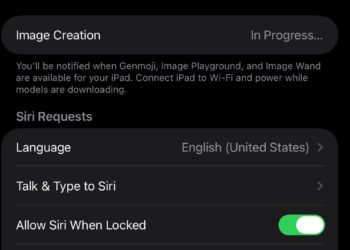
First, open your iPhone or iPad’s Settings app. Scroll down and tap on “Siri & Search.” Look for the setting called “Sound” or “Voice Feedback.” Depending on your device version, it might be under different menu names, but you’re aiming to find the options for voice feedback.

Once you find the voice feedback settings, select the option that best fits your preference. Choose “Control with Silent Mode,” “When Silent Mode is Off,” or “Never” — whatever option disables Siri’s spoken response. Essentially, you want Siri to respond with a sound or visual cue only, without saying “mmhmm” or other words.

Another trick is to ask Siri questions differently. Instead of pausing, speak in one complete sentence. For example, instead of saying, “Hey Siri… where are you?”, just say, “Hey Siri, where are you?” Siri will process it as a normal command without needing a pause for activation, and it won’t necessarily say “mmhmm.”

ADVERTISEMENT

It’s worth noting that many users who switch from Alexa or Google Assistant to Siri are used to talking in full sentences without pauses, which can sometimes cause Siri to not activate properly. By adjusting your tone and speaking naturally, Siri can recognize you without making unwanted sounds.

Finally, remember that Apple is continually updating Siri and other voice features. They are doing well, with millions of active devices worldwide, and often improve voice recognition and feedback based on user feedback. So, simplifying Siri’s responses is usually just a quick settings change away.

ChatGPT ChatGPT Perplexity AI Perplexity Gemini AI Logo Gemini AI Grok AI Logo Grok AI
Google Banner
Tags: Apple Intelligence
ADVERTISEMENT
Rebecca Fraser

Rebecca Fraser

Rebecca covers all aspects of Mac and PC technology, including PC gaming and peripherals, at Digital Phablet. Over the previous ten years, she built multiple desktop PCs for gaming and content production, despite her educational background in prosthetics and model-making. Playing video and tabletop games, occasionally broadcasting to everyone's dismay, she enjoys dabbling in digital art and 3D printing.

Related Posts

3c630d0a d943 46fb a94b d74e817c070d.jpeg
How To

How to Fix “Apple Intelligence Stuck at In Progress” Issue

April 5, 2026
woman 7314789 960 720.jpg
How To

How To Fix Siri and Apple Intelligence Speech-to-Text Issues

April 1, 2026
How To

How to Fix Apple Intelligence in Safari Showing Old Summaries on iOS

April 1, 2026
How To

How To Enable Apple Intelligence & Ainu Language Support

April 1, 2026
Next Post
How to Claim the Exclusive April Fool's Limited Item

How to Claim the Exclusive April Fool's Limited Item

  • About Us
  • Contact Us
  • Advertise
  • Privacy Policy
  • Guest Post

© 2026 Digital Phablet

No Result
View All Result
  • Home
  • News
  • Technology
    • Education Tech
    • Home Tech
    • Office Tech
    • Fintech
    • Digital Marketing
  • Social Media
  • Gaming
  • Smartphones

© 2026 Digital Phablet