• About Us
  • Contact Us
  • Advertise
  • Privacy Policy
  • Guest Post
No Result
View All Result
Digital Phablet
  • Home
  • NewsLatest
  • Technology
    • Education Tech
    • Home Tech
    • Office Tech
    • Fintech
    • Digital Marketing
  • Social Media
  • Gaming
  • Smartphones
  • AI
  • Reviews
  • Interesting
  • How To
  • Home
  • NewsLatest
  • Technology
    • Education Tech
    • Home Tech
    • Office Tech
    • Fintech
    • Digital Marketing
  • Social Media
  • Gaming
  • Smartphones
  • AI
  • Reviews
  • Interesting
  • How To
No Result
View All Result
Digital Phablet
No Result
View All Result

Home » How To Fix AWS ‘Persistent 400 Bad Request’ Blocking SMS Verification

How To Fix AWS ‘Persistent 400 Bad Request’ Blocking SMS Verification

Emily Smith by Emily Smith
March 24, 2026
in How To
Reading Time: 2 mins read
A A
AWS Security: Handling Sophisticated Attacks & Collaborating with Authorities
ADVERTISEMENT

Select Language:

It looks like the issue you’re experiencing isn’t caused by something on your end, but rather a temporary restriction put in place by AWS during their account registration checks.

ADVERTISEMENT

When you create an AWS account, they automatically check certain things to verify your identity. These checks include making sure your phone number is valid and not a VoIP number, assessing the reputation and location of your IP address, and monitoring how often verification attempts are made.

If you try to verify your account multiple times — even from different devices or using different phone numbers — these checks may trigger a temporary block. This can result in errors like a “400 Bad Request” message when attempting to get a verification code, or simply not receiving the OTP (one-time password) at all. These protective measures are in place to prevent misuse of their sign-up process.

To fix the problem, here are some simple steps to follow:

ADVERTISEMENT

First, wait between 24 to 72 hours before trying again. Making repeated attempts during this period can extend the hold or make it worse.

Next, make sure you use a valid mobile number. It should not be a virtual or VoIP number and must be able to receive international SMS messages.

It’s also a good idea to avoid using VPNs or proxy servers. Instead, try connecting through a stable residential or mobile network for better chances of success.

Finally, try to redo the verification in a fresh environment. Open a new browser window, use incognito or private mode, and clear your cookies and cache before trying again.

If after this waiting period you are still facing issues, it’s best to contact AWS Support directly. You can reach them through their support page at AWS Contact Support. They will be able to help you resolve the problem and get your account set up.

For more information, you can also review the official AWS documentation on account creation and verification processes.

ChatGPT ChatGPT Perplexity AI Perplexity Gemini AI Logo Gemini AI Grok AI Logo Grok AI
Google Banner
ADVERTISEMENT
Emily Smith

Emily Smith

Emily is a digital marketer in Austin, Texas. She enjoys gaming, playing guitar, and dreams of traveling to Japan with her golden retriever, Max.

Related Posts

European and US Clients Negotiate New Orders with Chinese Appliance Makers Amid Rising Costs
Business

European and US Clients Negotiate New Orders with Chinese Appliance Makers Amid Rising Costs

March 24, 2026
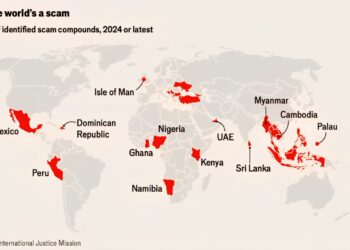
World Scam Hotspots 

 Mexico
 Dominican Republic
 Peru
 Isle of Man
 Ghana
 Nig
Infotainment

Top World Scam Hotspots You Should Know About

March 24, 2026
AI

Ali Damo Institute Launches Flagship CPU Xuan Tie C950 With Native Support for 100 Billion Parameter Models

March 24, 2026
How To

How to Handle a Red Box Issue on GitHub as a Normal User

March 24, 2026
Next Post
World Scam Hotspots 

 Mexico
 Dominican Republic
 Peru
 Isle of Man
 Ghana
 Nig

Top World Scam Hotspots You Should Know About

  • About Us
  • Contact Us
  • Advertise
  • Privacy Policy
  • Guest Post

© 2026 Digital Phablet

No Result
View All Result
  • Home
  • News
  • Technology
    • Education Tech
    • Home Tech
    • Office Tech
    • Fintech
    • Digital Marketing
  • Social Media
  • Gaming
  • Smartphones

© 2026 Digital Phablet