• About Us
  • Contact Us
  • Advertise
  • Privacy Policy
  • Guest Post
No Result
View All Result
Digital Phablet
  • Home
  • NewsLatest
  • Technology
    • Education Tech
    • Home Tech
    • Office Tech
    • Fintech
    • Digital Marketing
  • Social Media
  • Gaming
  • Smartphones
  • AI
  • Reviews
  • Interesting
  • How To
  • Home
  • NewsLatest
  • Technology
    • Education Tech
    • Home Tech
    • Office Tech
    • Fintech
    • Digital Marketing
  • Social Media
  • Gaming
  • Smartphones
  • AI
  • Reviews
  • Interesting
  • How To
No Result
View All Result
Digital Phablet
No Result
View All Result

Home » How to Fix “Apple Intelligence Stuck at In Progress” Issue

How to Fix “Apple Intelligence Stuck at In Progress” Issue

Rebecca Fraser by Rebecca Fraser
April 5, 2026
in How To
Reading Time: 2 mins read
A A
3c630d0a d943 46fb a94b d74e817c070d.jpeg
ADVERTISEMENT

Select Language:

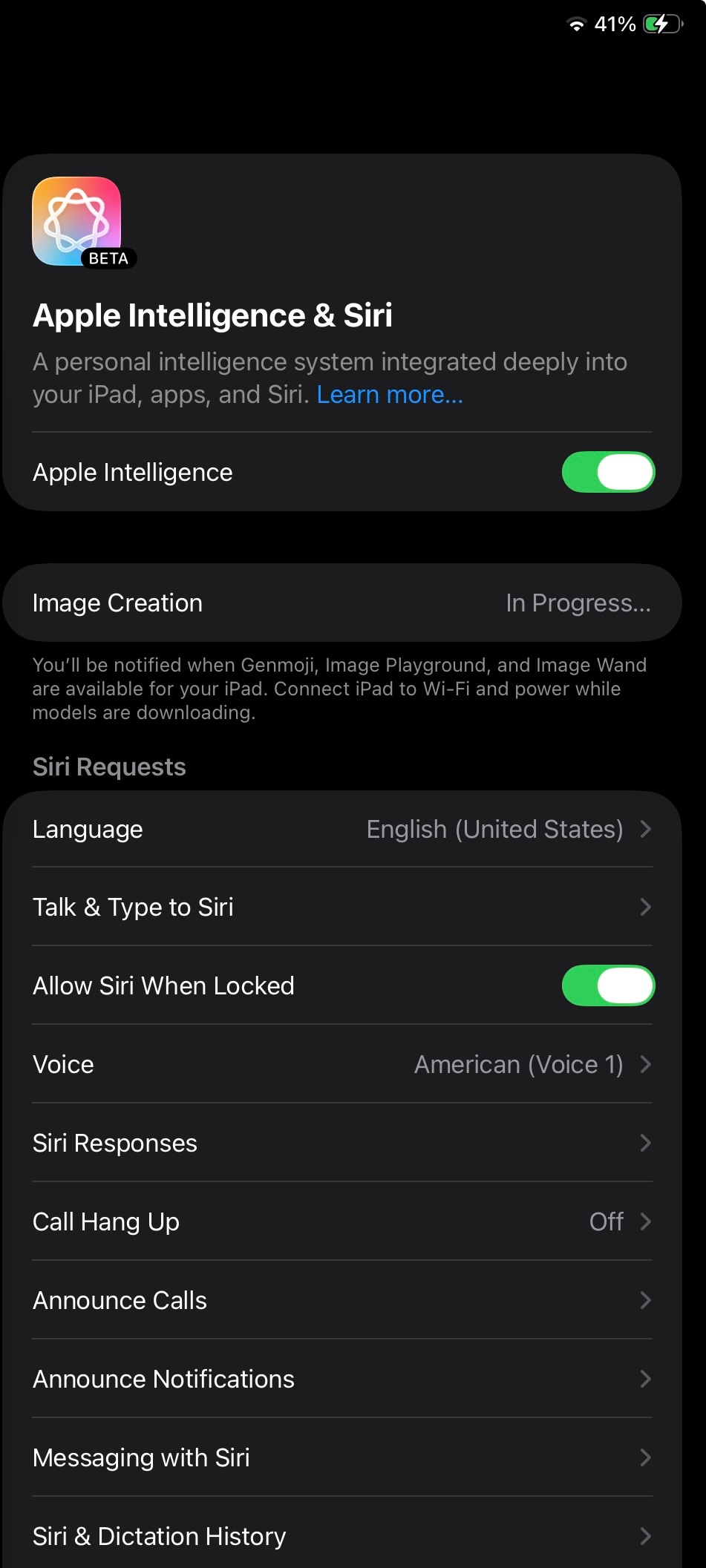
If your Apple device’s intelligence feature has been stuck at “In Progress” for over a month, you’re not alone. This can be frustrating, especially if resetting didn’t fix the issue. Here’s a simple guide to help you get things back on track.

ADVERTISEMENT

First, try checking for any software updates. Sometimes, outdated software can cause problems. To do this, go to your device’s settings, select “General,” then tap “Software Update.” If an update is available, install it. This could fix bugs that are causing the process to hang.

Next, try force restarting your device. For iPhones with Face ID, quickly press and release the volume up button, then do the same with the volume down button. Finally, press and hold the side button until the Apple logo appears. For older models with a home button, press and hold both the home button and the side (or top) button until the Apple logo shows up. This method often clears temporary glitches.

If that doesn’t work, consider removing any recent profile or configuration changes that might interfere with the process. Also, disconnect your device from Wi-Fi, restart it, and then reconnect to the network to see if that helps.

ADVERTISEMENT

Another option is to use a computer to reset or restore your device. Connect your iPhone or iPad to a Mac or PC with iTunes or Finder open. Select your device, then choose “Update” to reinstall iOS without erasing your data. If that doesn’t work, you might need to choose “Restore,” which will erase everything and reinstall the operating system—so be sure to back up your data first.

If none of these steps resolve the problem, reaching out to Apple Support makes sense. Sometimes, hardware issues or account conflicts can cause these problems, and a professional can help identify and fix the underlying cause.

Remember, patience is key. These steps often help resolve stuck processes, and with a little effort, you should be able to get your Apple device functioning smoothly again.

ChatGPT ChatGPT Perplexity AI Perplexity Gemini AI Logo Gemini AI Grok AI Logo Grok AI
Google Banner
Tags: Apple Intelligence
ADVERTISEMENT
Rebecca Fraser

Rebecca Fraser

Rebecca covers all aspects of Mac and PC technology, including PC gaming and peripherals, at Digital Phablet. Over the previous ten years, she built multiple desktop PCs for gaming and content production, despite her educational background in prosthetics and model-making. Playing video and tabletop games, occasionally broadcasting to everyone's dismay, she enjoys dabbling in digital art and 3D printing.

Related Posts

How To

How to Fix Apple Intelligence Siri Not Responding on Mac

April 5, 2026
d351f26baed114290f0de27018a79d21fee3033809e684e540024b288ab6790c.png
How To

How to Stop Apple Intelligence Siri from Saying “Mmmhmm”

April 5, 2026
woman 7314789 960 720.jpg
How To

How To Fix Siri and Apple Intelligence Speech-to-Text Issues

April 1, 2026
How To

How to Fix Apple Intelligence in Safari Showing Old Summaries on iOS

April 1, 2026
Next Post

How to Find Max RAM Support on Your HP 15-fd1057la with Windows 11

  • About Us
  • Contact Us
  • Advertise
  • Privacy Policy
  • Guest Post

© 2026 Digital Phablet

No Result
View All Result
  • Home
  • News
  • Technology
    • Education Tech
    • Home Tech
    • Office Tech
    • Fintech
    • Digital Marketing
  • Social Media
  • Gaming
  • Smartphones

© 2026 Digital Phablet