

• About Us
  • Contact Us
  • Advertise
  • Privacy Policy
  • Guest Post
No Result
View All Result
Digital Phablet
  • Home
  • NewsLatest
  • Technology
    • Education Tech
    • Home Tech
    • Office Tech
    • Fintech
    • Digital Marketing
  • Social Media
  • Gaming
  • Smartphones
  • AI
  • Reviews
  • Interesting
  • How To
  • Home
  • NewsLatest
  • Technology
    • Education Tech
    • Home Tech
    • Office Tech
    • Fintech
    • Digital Marketing
  • Social Media
  • Gaming
  • Smartphones
  • AI
  • Reviews
  • Interesting
  • How To
No Result
View All Result
Digital Phablet
No Result
View All Result

Home » How to Fix Apple Intelligence Priority Notifications Visual Bug

How to Fix Apple Intelligence Priority Notifications Visual Bug

Rebecca Fraser by Rebecca Fraser
December 7, 2025
in How To
Reading Time: 2 mins read
A A
8b9f08be 5de1 4afe a74f 7f043af554b4.jpeg
ADVERTISEMENT

Select Language:

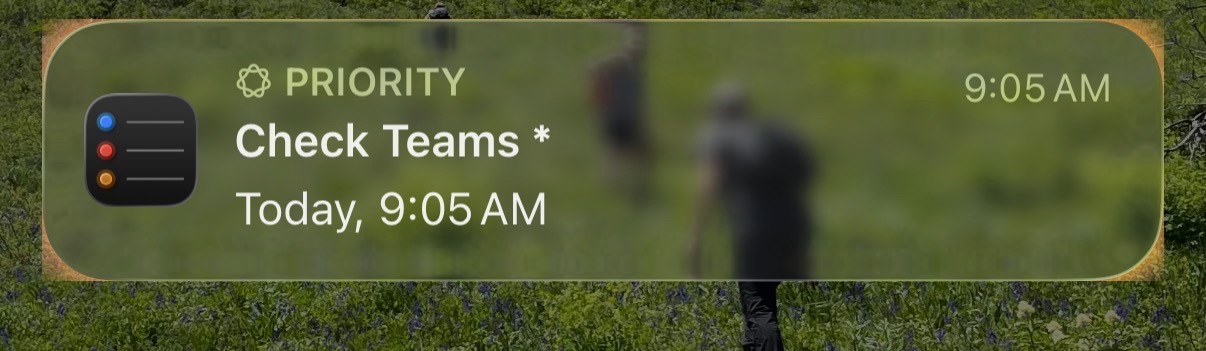
Are you experiencing a strange issue with your iPhone 16 Pro running iOS 26.1? Specifically, the priority notifications in your notification stack are showing a highlight that extends outside the border of the notification. Instead of having a smooth, rounded glow around the notification, the highlight has sharp square corners that stick out beyond the usual borders.

ADVERTISEMENT

You’ve probably tried rebooting your device several times, but the issue persists. It’s important to know that this doesn’t seem to be a new feature meant to enhance visibility. If you’re facing this problem, you’re not alone. Many users have noticed similar behavior and are looking for ways to fix it.

Currently, there’s no simple fix or official update that addresses this specific display issue. However, here are some steps you can take to try and resolve the problem:

  1. Check for Updates: Make sure your iPhone is running the latest version of iOS. Apple regularly releases updates that fix bugs and improve features. To check, go to Settings > General > Software Update.

  2. Reset Notification Settings: Sometimes resetting your notification settings can clear glitches. To do this, go to Settings > Notifications, then turn off notifications for a moment before turning them back on.

  3. Restart Your Device: You’ve already tried rebooting, but try a force restart. For the iPhone 16 Pro, press and quickly release the volume up button, then press and quickly release the volume down button, then press and hold the side button until the Apple logo appears.

  4. Contact Apple Support: If the issue remains after trying these steps, it’s best to reach out to Apple Support. They can provide tailored advice or inform you if this is a known problem being addressed in future updates.

While waiting for a fix, keep an eye on iOS updates, as Apple often releases patches for display bugs like this. Sharing your experience with Apple Support can also help them recognize the problem and work on a solution.

ChatGPT ChatGPT Perplexity AI Perplexity Gemini AI Logo Gemini AI Grok AI Logo Grok AI
Google Banner
Tags: Apple Intelligence
ADVERTISEMENT
Rebecca Fraser

Rebecca Fraser

Rebecca covers all aspects of Mac and PC technology, including PC gaming and peripherals, at Digital Phablet. Over the previous ten years, she built multiple desktop PCs for gaming and content production, despite her educational background in prosthetics and model-making. Playing video and tabletop games, occasionally broadcasting to everyone's dismay, she enjoys dabbling in digital art and 3D printing.

Related Posts

How To

Apple Intelligence: How to Improve Siri and ChatGPT Integration

December 6, 2025
How To

How To Fix Apple Intelligence Not Showing After iOS 26.1 Update

December 6, 2025
How To

How to Download ChatGPT Extensions Using Apple Intelligence

December 6, 2025
How To

Apple Intelligence: Fix Email Draft Disappearing When Tapping To Field

December 3, 2025
Next Post
Metroid Prime 4: Unlocks & Playtime vs. Past Titles

Metroid Prime 4: Unlocks & Playtime vs. Past Titles

  • About Us
  • Contact Us
  • Advertise
  • Privacy Policy
  • Guest Post

© 2025 Digital Phablet

No Result
View All Result
  • Home
  • News
  • Technology
    • Education Tech
    • Home Tech
    • Office Tech
    • Fintech
    • Digital Marketing
  • Social Media
  • Gaming
  • Smartphones

© 2025 Digital Phablet


