Select Language:
If you’re having trouble installing the full printer driver software using HP Smart or the HP App, you’re not alone. Sometimes, these apps only install basic drivers, which means you miss out on important features like Fax and HP Scan functions. Here’s a simple step-by-step guide to get the full driver installed and everything working smoothly on your Windows PC.
First, it’s a good idea to make sure your Windows system is fully up to date. Go to your Windows Settings, check for updates, and install any pending updates. After updating, restart your computer and log back in.
Next, you’ll want to remove any existing printer software. Open your Control Panel, go to ‘Programs and Features’, find your current printer software, and uninstall it completely. Also, uninstall any separate help files if available. Then, restart your computer again.
Now, disconnect your printer if it’s connected to your PC via USB cable. It’s best to install the full driver first before reconnecting.
To download the full driver, visit HP’s official website dedicated to your printer model. You can find the driver here: HP ENVY Photo 7800 Full Driver. Download the software file, save it to your computer, and run the installer.
Follow the on-screen prompts during installation. When prompted to connect your printer via USB, do so at the appropriate step, usually near the end of the installation process. Once the installation completes, restart your PC to finish setup.
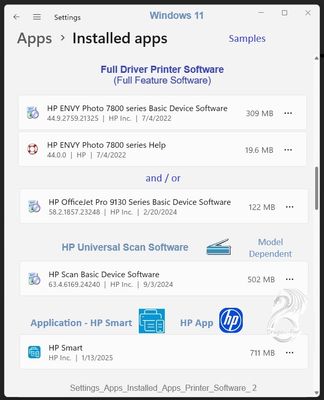
After installing the driver, check that the software is properly installed. You should see the full printer software listed in your ‘Programs and Features’ and in ‘Settings > Apps > Installed apps’ (especially on Windows 11).
Your printer’s desktop shortcuts, such as HP Scan or Printer Assistant, should appear automatically after installation. These shortcuts let you manage your printer settings and scans easily. Look for options like ‘Manage Scan to Computer’ and make sure they are enabled to use scan features smoothly.
If you want extra scanning features or software, you can also install the optional HP Universal Scan software. Visit this page to download it: HP Universal Scan Software. Download, install, and restart your computer after setup.
By following these steps, you’ll ensure you’re using the complete printer driver package with all the features, including Fax, Scan, and full printer management tools. This process might seem a bit involved, but it guarantees your printer runs at its best with all functions enabled.
 ChatGPT
 Perplexity
 Gemini AI
 Grok AI