• About Us
  • Contact Us
  • Advertise
  • Privacy Policy
  • Guest Post
No Result
View All Result
Digital Phablet
  • Home
  • NewsLatest
  • Technology
    • Education Tech
    • Home Tech
    • Office Tech
    • Fintech
    • Digital Marketing
  • Social Media
  • Gaming
  • Smartphones
  • AI
  • Reviews
  • Interesting
  • How To
  • Home
  • NewsLatest
  • Technology
    • Education Tech
    • Home Tech
    • Office Tech
    • Fintech
    • Digital Marketing
  • Social Media
  • Gaming
  • Smartphones
  • AI
  • Reviews
  • Interesting
  • How To
No Result
View All Result
Digital Phablet
No Result
View All Result

Home » How to Distinguish Between Apple’s Special Offerings

How to Distinguish Between Apple’s Special Offerings

Rebecca Fraser by Rebecca Fraser
November 30, 2024
in How To
Reading Time: 2 mins read
A A
apple 2720105 960 720.jpg
ADVERTISEMENT

Select Language:

Are you trying to decide between the Spanish and Latin American keyboards for your Apple device? Understanding the differences can make a significant impact, especially if you type in Spanish frequently. Here’s a simple guide to help you choose the right keyboard for your needs.

ADVERTISEMENT

Step-by-Step Guide to Choosing Between Spanish and Latin American Keyboards

  1. Identify Your Language Needs

    • If you type in standard Spanish, you might prefer the Spanish keyboard.
    • If your writing involves Latin American Spanish variations, then the Latin American keyboard is likely a better fit.
  2. Check the Keyboard Layout

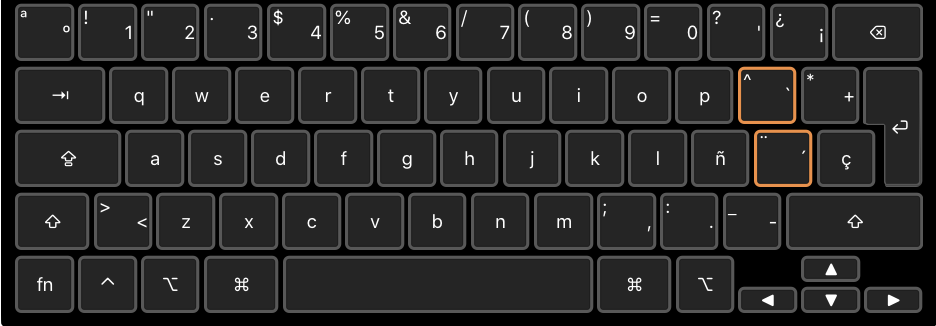
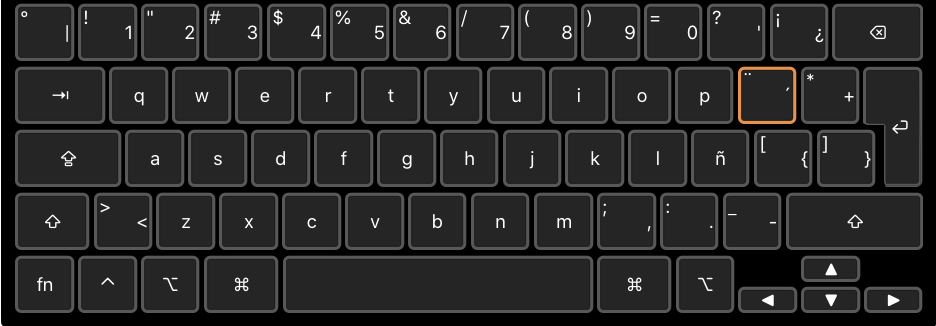
    • The main differences between the two layouts are found on the right side of the keyboard.
    • The Spanish keyboard features a key marked with "Ç," which is commonly used in Catalan. This key is absent on the Latin American version.
  3. Look at the At Symbol (@) Placement

    • In the Spanish keyboard layout, the "@" symbol can be found by pressing the Option + 2 keys.
    • On the Latin American keyboard, it’s located by pressing Option + Q. Depending on what you use more, this could be a deciding factor.
  4. Understand the Special Characters

    • The Spanish keyboard has square and curly brackets accessible via the Option key, which may be beneficial for programming or other specialized writing.
    • In contrast, the Latin American layout may have different accessibility for these characters, so consider what you require for your typing.
  5. Dead Keys for Accents

    • Both keyboards include dead keys, which are indicated by orange borders. These dead keys are used to create accented characters, an essential feature for Spanish writing.
  6. Visual Comparison

    • For a better understanding, you can refer to images of both layouts. The visual representation can help clarify the differences you’ve learned about.

    • Spanish Keyboard Layout:
      Spanish Keyboard

    • Latin American Keyboard Layout:
      Latin American Keyboard

Conclusion

Choosing the right keyboard layout for typing in Spanish can enhance your experience significantly. By considering factors like special characters and layout differences, you can select the keyboard that best fits your typing style. Whether you opt for the detailed Spanish keyboard or the versatile Latin American one, make sure it aligns with your writing needs. Happy typing!

ChatGPT ChatGPT Perplexity AI Perplexity Gemini AI Logo Gemini AI Grok AI Logo Grok AI
Google Banner
Tags: Earlier Operating SystemsMacOS
ADVERTISEMENT
Rebecca Fraser

Rebecca Fraser

Rebecca covers all aspects of Mac and PC technology, including PC gaming and peripherals, at Digital Phablet. Over the previous ten years, she built multiple desktop PCs for gaming and content production, despite her educational background in prosthetics and model-making. Playing video and tabletop games, occasionally broadcasting to everyone's dismay, she enjoys dabbling in digital art and 3D printing.

Related Posts

iphone 4408926 960 720.jpg
How To

How to Use Mac OS Tahoe on Apple Devices (September 15, 2025)

October 13, 2025
apple 1283307 960 720.jpg
How To

How to Update the Certificate Trust Store on Apple Devices

September 24, 2025
fruit 1379911 960 720.jpg
How To

How to Use a Profile to Disable iSign on Apple Devices

September 21, 2025
apple 2023616 960 720.jpg
How To

Apple Big Sur Migration Tip: Simplify Your Transition

September 16, 2025
Next Post
Nvidia Scales Down DLSS 3 For Better Performance

Plague Inc. Creator Launches A New Hopeful Game

  • About Us
  • Contact Us
  • Advertise
  • Privacy Policy
  • Guest Post

© 2025 Digital Phablet

No Result
View All Result
  • Home
  • News
  • Technology
    • Education Tech
    • Home Tech
    • Office Tech
    • Fintech
    • Digital Marketing
  • Social Media
  • Gaming
  • Smartphones

© 2025 Digital Phablet