• About Us
  • Contact Us
  • Advertise
  • Privacy Policy
  • Guest Post
No Result
View All Result
Digital Phablet
  • Home
  • NewsLatest
  • Technology
    • Education Tech
    • Home Tech
    • Office Tech
    • Fintech
    • Digital Marketing
  • Social Media
  • Gaming
  • Smartphones
  • AI
  • Reviews
  • Interesting
  • How To
  • Home
  • NewsLatest
  • Technology
    • Education Tech
    • Home Tech
    • Office Tech
    • Fintech
    • Digital Marketing
  • Social Media
  • Gaming
  • Smartphones
  • AI
  • Reviews
  • Interesting
  • How To
No Result
View All Result
Digital Phablet
No Result
View All Result

Home » How to Determine Your Laptop’s Maximum RAM Upgrade Capacity

How to Determine Your Laptop’s Maximum RAM Upgrade Capacity

Fahad Khan by Fahad Khan
January 6, 2025
in How To
Reading Time: 2 mins read
A A
388154i22DB6656598A613F.jpegcharsetUTF 8
ADVERTISEMENT

Select Language:

If you’re trying to figure out the maximum RAM capacity for your laptop, you might have encountered conflicting information. Some sources say you can upgrade to 8 GB, while others suggest you can go up to 16 GB. To determine the correct limit, follow these steps.

ADVERTISEMENT

First, it’s helpful to know how to check your laptop’s maximum RAM capacity using a simple command in the Command Prompt. Here’s how you can do it:

  1. Open Command Prompt: Click on the Start menu, type "cmd," and hit Enter. This will bring up the Command Prompt window.

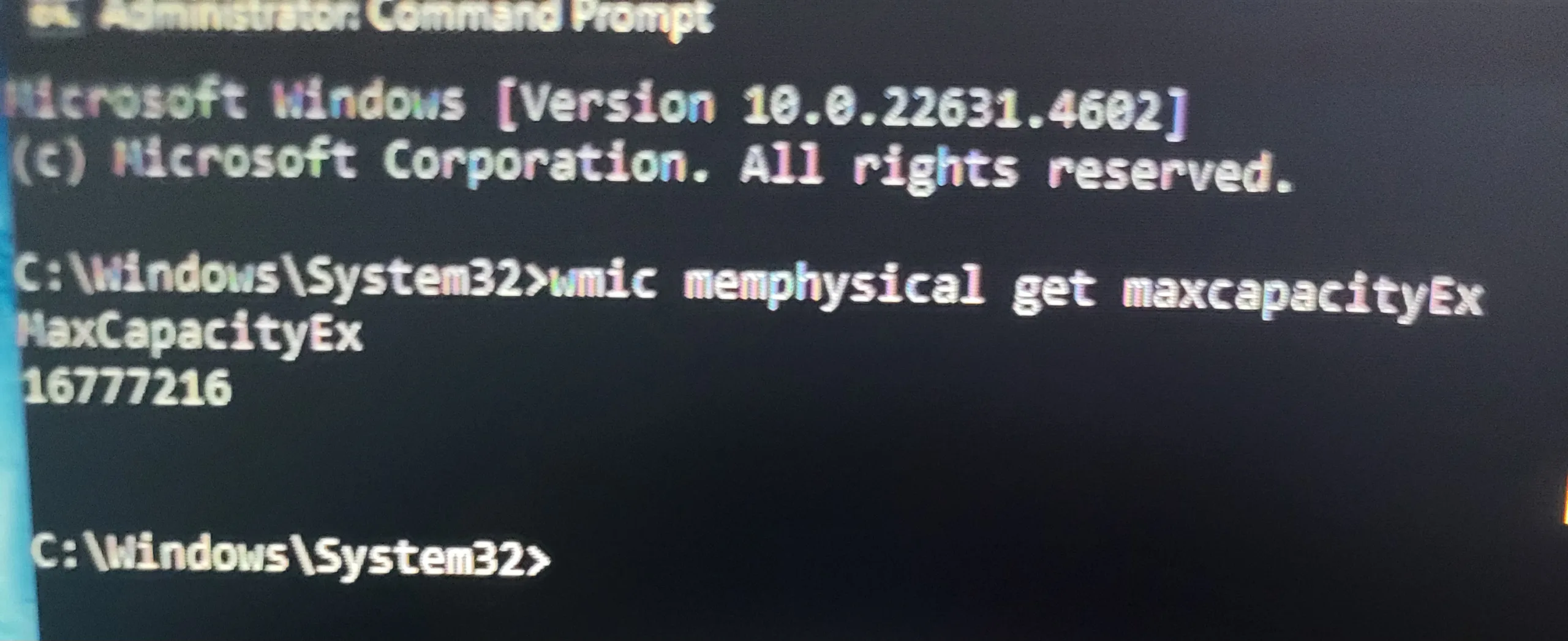
  2. Run the Command: In the Command Prompt, type the following command and press Enter:

    wmic memphysical get maxcapacityex
  3. Interpret the Result: You’ll see a number displayed, which is in kilobytes. For example, if it shows 16,777,216, this is what you need to do next:

    • Divide that number by 1,048,576 (the number of kilobytes in a gigabyte).
    • Using the example, 16,777,216 / 1,048,576 = 16. This means your laptop can support a maximum of 16 GB of RAM.
  4. Check Manufacturer Details: Sometimes, there might be a discrepancy between what the operating system allows and what the manufacturer specifies. So, check the official specifications of your laptop model to confirm the maximum RAM supported.

  5. Upgrade if Needed: If you find out that you can upgrade to 16 GB and you only have 8 GB, you might want to consider adding more RAM. This can improve performance for multitasking and running applications that require more memory.

  6. Installation: When you’re ready to upgrade, you can either do it yourself (if you’re comfortable with hardware) or take your laptop to a professional. Make sure to buy compatible RAM that matches your laptop’s specifications.

By following these steps, you’ll know exactly how much RAM you can upgrade your laptop to. If you discover you can expand beyond 8 GB, this could significantly enhance your computing experience.

ChatGPT ChatGPT Perplexity AI Perplexity Gemini AI Logo Gemini AI Grok AI Logo Grok AI
Google Banner
ADVERTISEMENT
Fahad Khan

Fahad Khan

A Deal hunter for Digital Phablet with a 8+ years of Digital Marketing experience.

Related Posts

Most Studied Languages in the World
Infotainment

Top Most Studied Languages Around the World

December 8, 2025
Who Is Hakan Sabancı's New Girlfriend Naz Şahin After Hande Erçel Split
Entertainment

Who Is Hakan Sabancı’s New Girlfriend Naz Şahin After Hande Erçel Split

December 8, 2025
How to Defeat the Omega Griever in Metroid Prime 4: Beyond & Completing
Gaming

How to Defeat the Omega Griever in Metroid Prime 4: Beyond & Completing

December 8, 2025
magpie 4598837 960 720.jpg
AI

2025 Japan International Robot Show Ends, Chinese Companies Lead in Humanoid Robots

December 8, 2025
Next Post
Unlocking Frost Petals in Roblox Jujutsu Infinite: A Guide

Unlocking Frost Petals in Roblox Jujutsu Infinite: A Guide

  • About Us
  • Contact Us
  • Advertise
  • Privacy Policy
  • Guest Post

© 2025 Digital Phablet

No Result
View All Result
  • Home
  • News
  • Technology
    • Education Tech
    • Home Tech
    • Office Tech
    • Fintech
    • Digital Marketing
  • Social Media
  • Gaming
  • Smartphones

© 2025 Digital Phablet