Select Language:
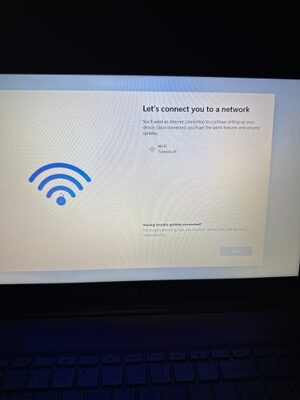
If you’ve just received a new HP Laptop 15-dy5033dx and are stuck on the setup screen, don’t worry—you’re not alone. Many people face this issue right after turning on a new device, especially if they can’t seem to move past the WiFi connection step.
First, make sure your WiFi is actually on and working. Since your phone is connected to the WiFi network, it’s clear the network itself is active. However, your laptop might not be recognizing or connecting to it for some reason.
Here’s a simple step-by-step way to try and fix this:
-
Forget and Reconnect to WiFi:
Sometimes, the device just needs a quick refresh. On the setup screen, look for the WiFi options. If you see your network listed, try selecting it and choosing “Forget” or “Disconnect,” then reconnect by selecting it again and entering the password. -
Use a Mobile Hotspot:
You mentioned that your phone’s hotspot isn’t being detected. Make sure your phone’s hotspot is active and visible. If it’s not appearing, toggle the hotspot off and on again. Also, ensure that your device is in the right mode to broadcast the hotspot (not in low power or other modes that might restrict it). -
Connect via Ethernet (if possible):
If your laptop has an Ethernet port and you have a cable, try plugging in directly to your modem or router. This can bypass WiFi issues altogether and allow you to finish the setup. -
Skip WiFi Setup Temporarily:
Sometimes, you can skip the WiFi connection during setup. Look for an option like “Skip” or “Set up later.” This will allow you to complete the initial setup without an internet connection. Once the laptop is fully configured, you can connect to WiFi through the Settings menu. -
Check for Hardware Issues:
If none of these steps work, ensure there’s no hardware problem with the WiFi module. You might need to contact HP support or bring the laptop to a technician for further assistance.
Getting stuck at this stage can be frustrating, but with these steps, you should be able to bypass the issue or get connected. Once you’re back on the internet, finishing your setup will be much easier, and you can start enjoying your new laptop.
 ChatGPT
 Perplexity
 Gemini AI
 Grok AI