Select Language:
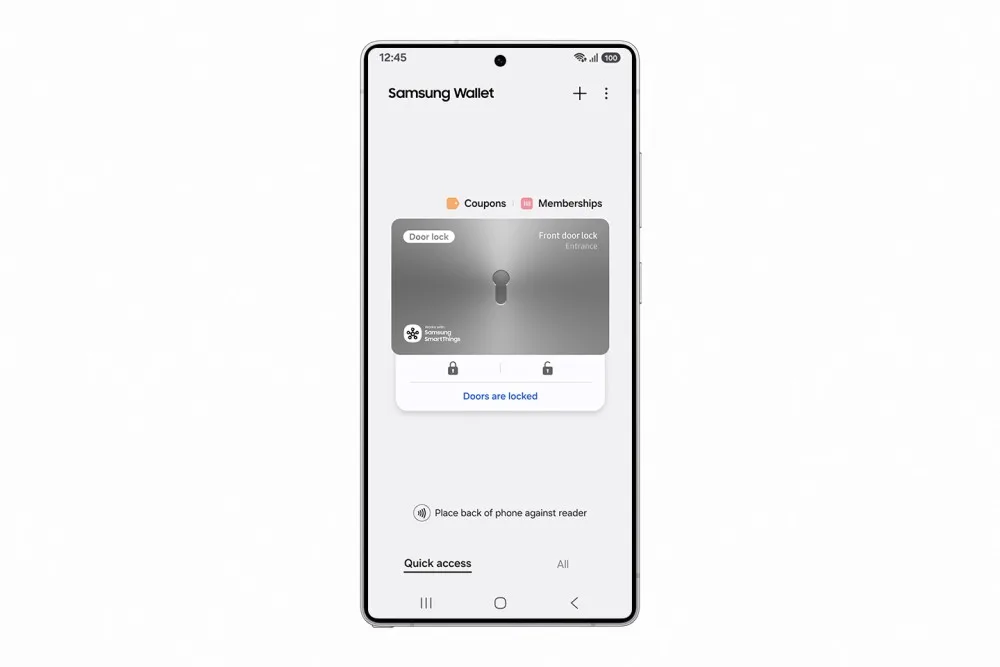
Samsung has made losing your house keys much less stressful. The company introduced Digital Home Key within its Wallet app, allowing Galaxy users to unlock compatible smart locks directly with their phones. If the device is misplaced, you can deactivate the digital key remotely.
This feature began rolling out this month. It works with NFC for quick tap-to-unlock functionality and will support hands-free UWB access starting in April. The system leverages the Aliro protocol, a standard for digital locks. Samsung hasn’t provided a comprehensive list of supported countries or phone models yet, so checking the official site for compatibility is recommended.
Remotely Disable Your Digital Key if Your Phone Is Lost
One of the standout safety features is the ability to disable the key remotely. If you leave your phone somewhere, such as a bar, you can log into Samsung Find and revoke access instantly.
Image description: A Samsung-branded photo of a mobile phone with a digital lock in the background.
Samsung keeps these keys stored securely in Wallet, protected by Knox, its advanced security platform. The system is designed to meet EAL6+ certification standards, meaning it can withstand sophisticated hacking attempts. Even with your phone in hand, unlocking requires biometric authentication—face scan, fingerprint, or PIN. Since it adheres to the Aliro standard, it’s compatible with locks from brands like Aqara, Nuki, Schlage, and Ultraloq.
How the Digital Key Works: Tap or Walk Up
There are two ways to use the digital key. The first is straightforward: hold your Galaxy phone near the lock, and NFC takes care of the rest. This method is available now on select devices. The second method is more seamless—starting in April, you’ll be able to walk up to the lock and have it unlock automatically using ultra-wideband technology.
Image description: A photo of a door lock with a phone nearby.
To set up, you’ll need a compatible deadbolt that supports SmartThings and is Matter-enabled. The key is added to Wallet during the lock’s setup process. Samsung is collaborating with leading lock brands, so you’re not limited to a single model.
Availability and Requirements
The feature is now available in certain regions, with a full nationwide rollout happening gradually. The ultra-wideband hands-free unlocking will be introduced in April. The initial compatible locks will become available based on each brand’s release schedule, with specific dates yet to be announced.
You’ll need a Galaxy phone equipped with Samsung Wallet and a lock that supports Aliro and connects via SmartThings using the Matter protocol. During setup, the digital key is added seamlessly. For those invested in the Samsung ecosystem, this is another reason to stay with Wallet. For others, it signals a move toward digital keys becoming mainstream. The real test moving forward will be how many lock manufacturers support these standards this year.
 ChatGPT
 Perplexity
 Gemini AI
 Grok AI