Select Language:
In the expansive world of Where Winds Meet, your character’s look is just as important as their fighting skills. While the game features stunning scenery and detailed martial arts, it’s essential to express your personality to fully enjoy the experience—whether that means looking authentic to the Song Dynasty or simply standing out in style.
Whether you prefer the bright, flowing silks of a traveling merchant, the subdued tones of a secretive assassin, or a bold new hair color, customization plays a big role. Luckily, the game offers a comprehensive dyeing system that lets you personalize your outfits and hairstyles in great detail.
How to Get Dyes
To change your hair or clothing colors in Where Winds Meet, keep in mind a few key points:
- There are four different dyes in the game—two for hair and two for clothes.
- Using dyes will consume these items, so be sure you’re happy with your color choices before finalizing.
- Many hairstyles and outfit options, especially those you unlock for free, can’t be dyed.
The three dyes available are:
| Dye Item | Purpose | How to Get It |
|---|---|---|
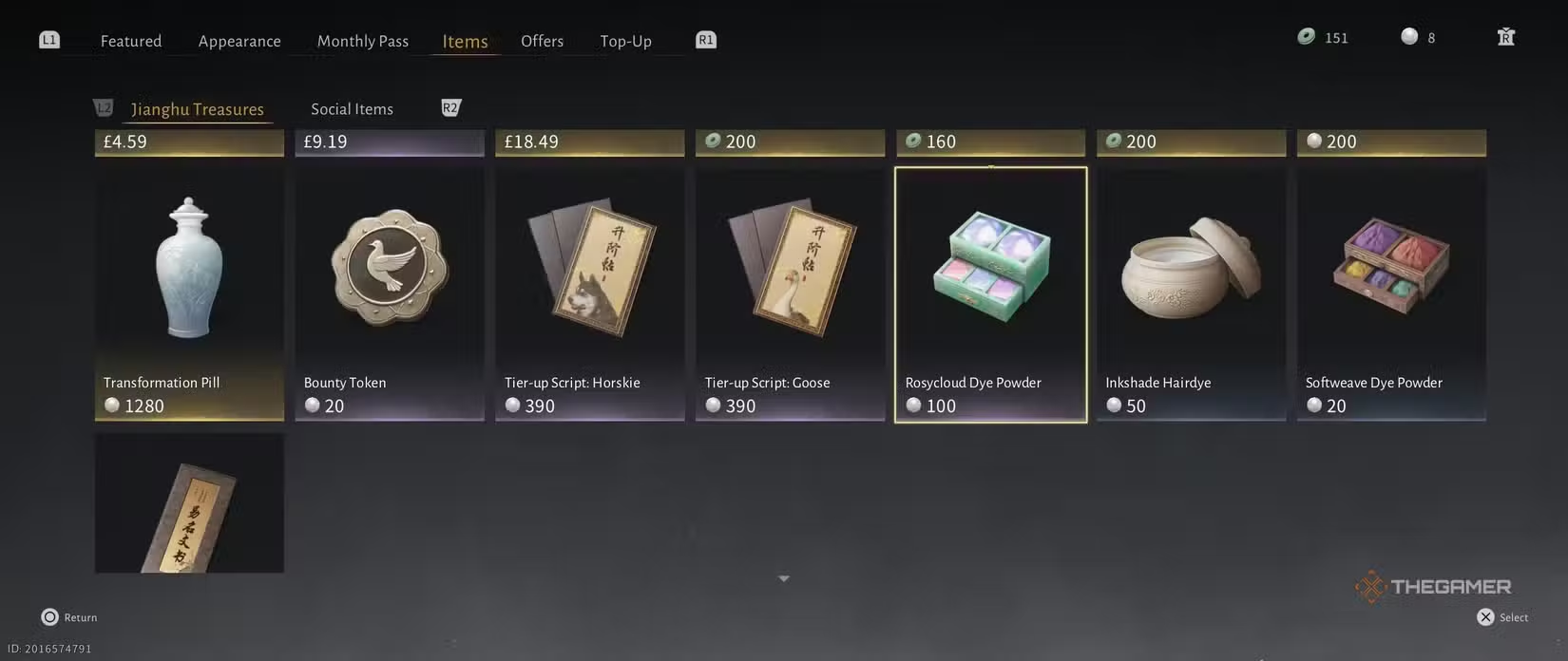
| Softweave Dye Powder | Dyes clothing | Costs 20 Echo Beads per piece at the shop; also found in loot and different locations shown in tooltips |
| Rosycloud Dye Powder | Dyes clothing | Costs 100 Echo Beads per piece at shops; also available in loot and other spots shown in tooltips |
| Inkshade Hairdye | Dyes hair | Costs 50 Echo Beads per item; can also be found in loot and other locations in tooltips |
| Timeless Hairdye | Dyes hair | Requires 1 Harmonic Core for 5 items from the Draw Shop |
It’s important to note that the less expensive, more common dyes can only give your clothes and hair “enduring colors,” which means bright and vivid shades require the more costly dyes.
How to Use Dyes
To apply dyes, go to your Character menu and choose the Appearance section. Select the hair or outfit you want to dye. If it’s dyeable, a button will appear at the lower right corner of the screen, opening the dyeing menu. If you don’t see this option, that item can’t be dyed.
Once in the dye menu, you can change the colors of different parts of your outfit, such as the hemline, outer coat, or boots, with options separated by fabric and accessories.
The dye menu defaults to “Advanced Dye,” which uses the more expensive dyes. You can switch to the “Basic Dye” section, which shows only cheaper colors that don’t require the costly dyes. This option has fewer color choices but is easier and less expensive to use.
When you’re satisfied with your look, click the Dye button in the bottom right, assign your design to a slot, and then select Apply. This final step will consume the dyes and lock in your new look.
 ChatGPT
 Perplexity
 Gemini AI
 Grok AI