Select Language:
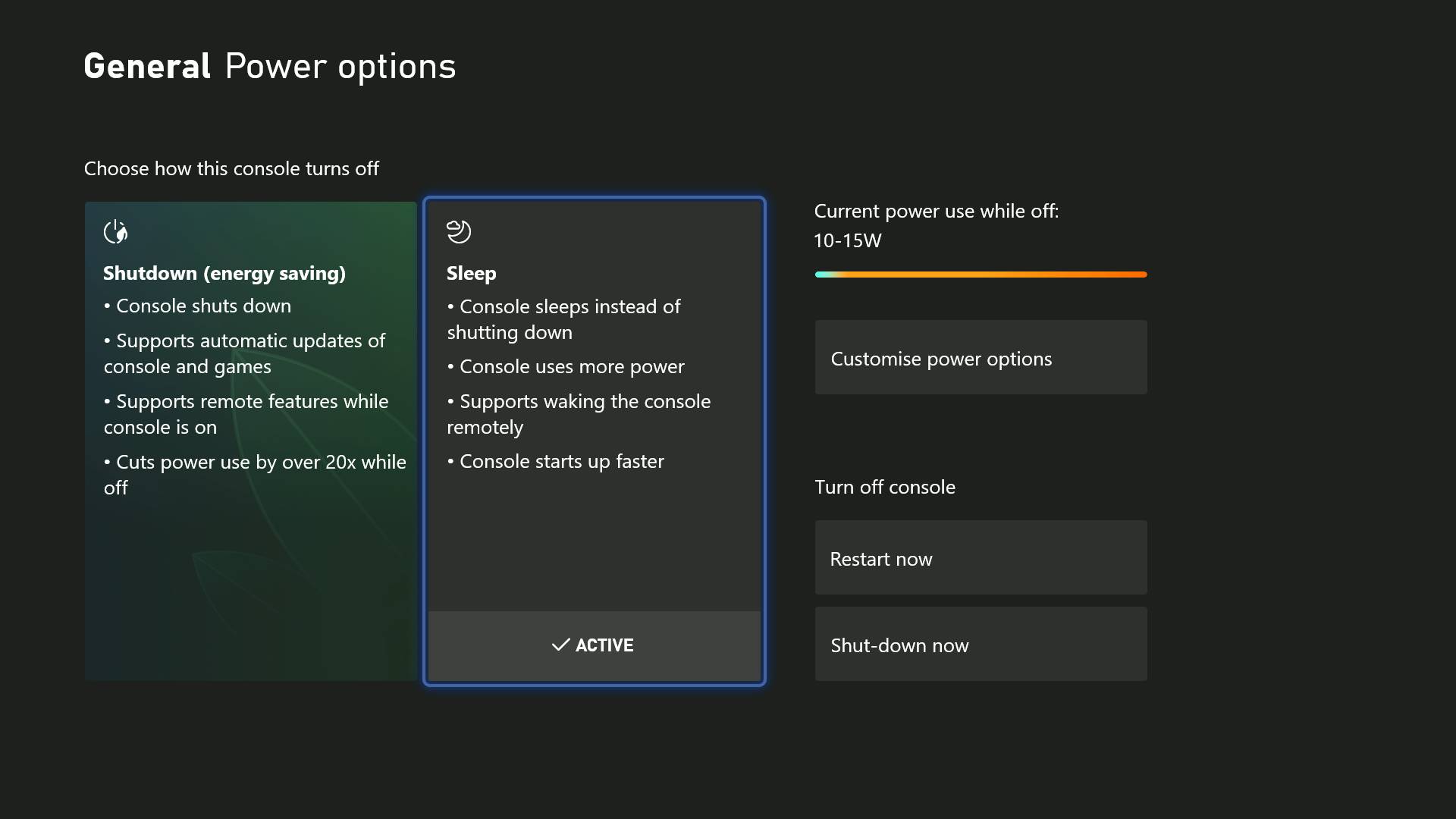
The Xbox Series X Sleep mode allows you to start up your console almost instantly, but it uses more power in the process. Recently, Microsoft made improvements to the Shutdown mode and set it as the default option, which makes Sleep mode less necessary. Both options have their advantages and disadvantages, but mainly you’re choosing between convenience and saving some energy on your bill. Here’s what you need to know about the Xbox Series X’s Shutdown and Sleep modes.
Sleep Mode Explained
Sleep mode on the Xbox Series X is similar to standby mode. When in this mode, your console starts up very quickly—usually in under five seconds. This means you can go from sitting on the couch to playing your game in about 20 seconds, thanks in part to the console’s solid-state drive and quick resume feature.
You can also turn on your Xbox remotely using the mobile app, and control various power settings through the menu. The app allows you to start your console, manage games, and even install updates from a distance. If you want to get set up with the app, there’s a guide to help you get started.
Using sleep mode gives you complete control over your power options. You can configure the console so that external storage turns off when it’s not in use, or set it to shut down after a certain period of inactivity.
However, even when using sleep mode, it’s still a good idea to do a full power cycle or hard reset periodically to clear the system’s cache.
Shutdown Power Saving Mode
The energy-saving shutdown mode on the Xbox Series X is designed to minimize power use. When the console is fully turned off, it consumes roughly 0.5 watts—much less than in sleep mode. This setting is the default and ensures your Xbox uses less electricity while not in use.
The main trade-off is that it takes longer to start up from fully off. You’ll still be waiting about 20 seconds for the console to boot up from a complete shutdown.
Updates for system software and games can still be downloaded while the console is off, though it hasn’t always been very reliable in practice. Sometimes, updates get interrupted if the console is turned off before they complete. It’s a good idea to check for updates manually regularly to avoid a backlog. Also, games stored externally won’t update if the external storage is turned off during shutdown.
Energy Savings
After spending money on your new console, games, and accessories, the last thing you want is for your electricity bill to go up. Luckily, the default energy-saving shutdown mode keeps your power consumption very low. When turned off, your console is nearly fully powered down, saving you money and reducing environmental impact.
While you won’t get the ultra-quick startup you do with sleep mode, you’ll only need about 20 seconds to turn your console on from cold. Plus, you can still use the Quick Resume feature to jump back into your game quickly after a full shutdown. System updates can continue to run in the background when in energy-saving mode, but be aware that sometimes downloads may pause or fail, so check for updates regularly.
In summary, if you want convenience and faster startup times, sleep mode is still pretty good, but it uses more energy. If you prefer to save power and reduce costs, the shutdown energy-saving mode is a reliable choice.
 ChatGPT
 Perplexity
 Gemini AI
 Grok AI