Select Language:
Trying out Madden 26 sliders is a fun way to customize the game to your preferences—or to make it more challenging if you prefer tough competition. In the game menus, you can adjust settings for passing accuracy, penalties, and more. This guide will walk you through how to do it and offer some tips to get the best experience.
How to adjust Madden 26 sliders
It’s straightforward to set up Madden 26 sliders. Go to the main menu, select “Settings,” then choose “Edit Settings.” Match the listed categories to the tabs on the menu bar. If there’s no value listed for a specific setting, leave it at the default. After making your adjustments, try playing a couple of exhibition games. For example, you can use some of the top Madden 26 players to see how it feels. From there, you can continue tweaking the sliders to better match your play style.
Best sliders for a realistic game
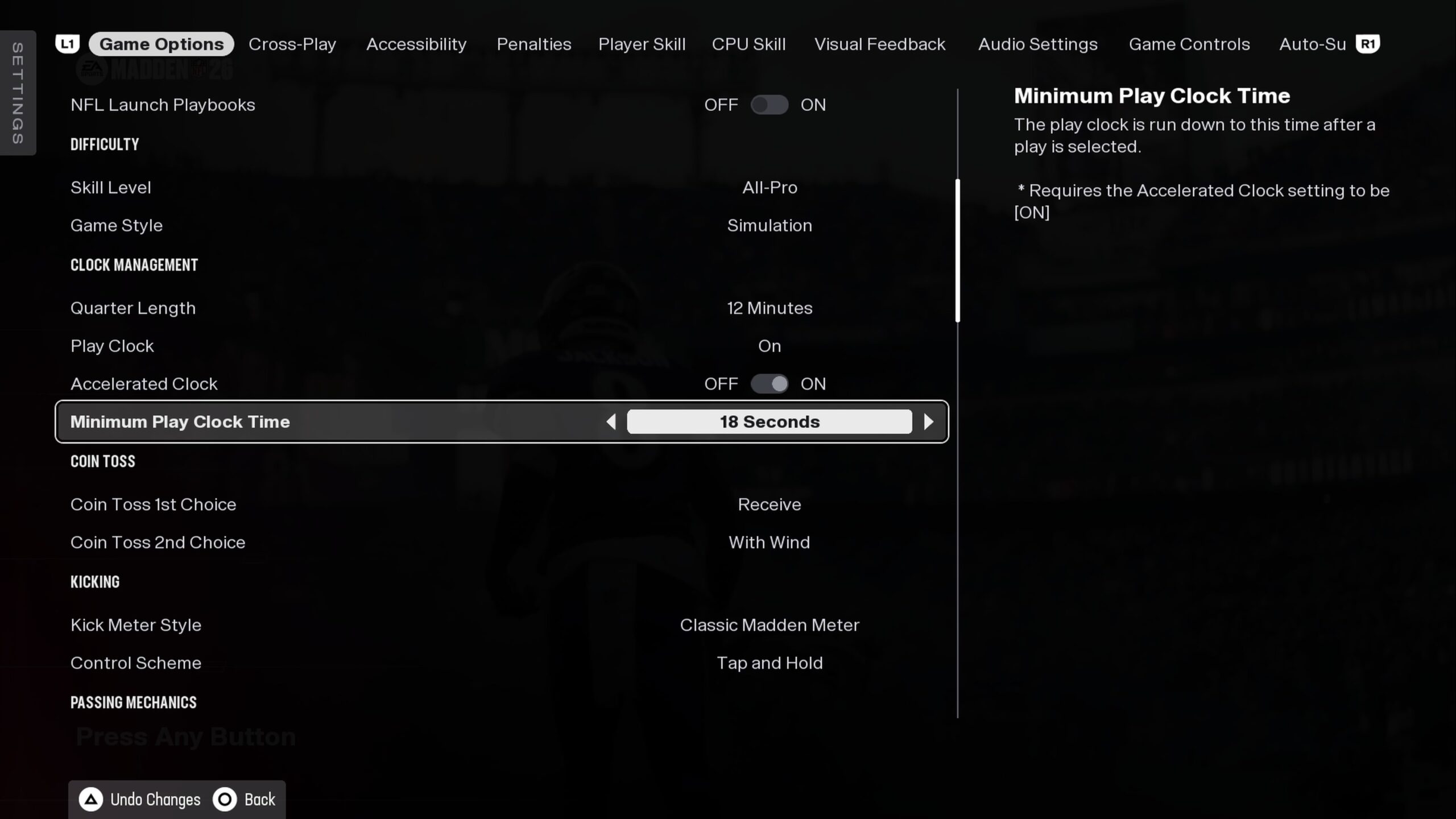
To make the game feel more real, consider these recommended settings. You can see them in the image, which shows the game options menu with tweaks like these:
- Skill Level: All-Pro
- Game Style: Simulation
- Quarter Length: 12 minutes
- Clock Acceleration: Enabled
- Minimum Play Clock: 18 seconds
- Injuries: 25
- Fatigue: 60
- Player Speed Balance: 60
- Physics Tackle: 90
Game Options: Wear & Tear
Adjust the impact of hits and injuries with these settings:
- Tackle Impact: 20
- Catch Tackle Impact: 25
- HitStick Impact: 35
- CutStick Impact: 30
- Defensive Tackle Benefit: 35
- Sack Impact: 25
- Block Impact: 25
- Impact Block: 30
- Recovery Pace: Varies session by session (e.g., 50, 55, 60, 75)
Penalty Settings
Fine-tune how penalties happen in the game:
- Offside: 60
- False Start: 55
- Holding: 55
- Facemask: 40
- Blocking in the Back: 80
- Roughing the Passer: 45
- Pass Interference: 55
- Ineligible Receiver Downfield: On
- Offensive Pass Interference: On
- Kick Catch Interference: On
- Grounding: Off
- Roughing Kicker: Off
- Running Into Kicker: On
- Illegal Contact: On
Player skills and offense/defense
Adjust skill traits for quarterbacks, receivers, and others to make gameplay more realistic. For example:
- QB Accuracy: 45
- Pass Blocking: 52
- WR Catch: 55
- Run Blocking: 45
- Ball Security: 50
And for the CPU opponents, similar setups:
- QB Accuracy: 42
- Pass Blocking: 52
- WR Catch: 50
- Run Blocking: 52
- Ball Security: 50
Who made these sliders
These settings were tested based on slider creator Matt10’s work, who also influenced other popular sliders like those for college football and Madden 25. Feel free to explore our guides on Madden 26’s top teams and quarterback traits for more help.
 ChatGPT
 Perplexity
 Gemini AI
 Grok AI