Select Language:
Once you’ve unlocked your main abilities and completed the side quests, it’s time to focus on improving and rebuilding your base in Pokémon Pokopia. This phase involves shaping each biome to reach its full potential, maximizing efficiency.
To do this effectively, use expert strategies to complete your building tasks faster and save time. Now that you know the basics, here are some advanced tips to help you work smarter in your next playthrough.
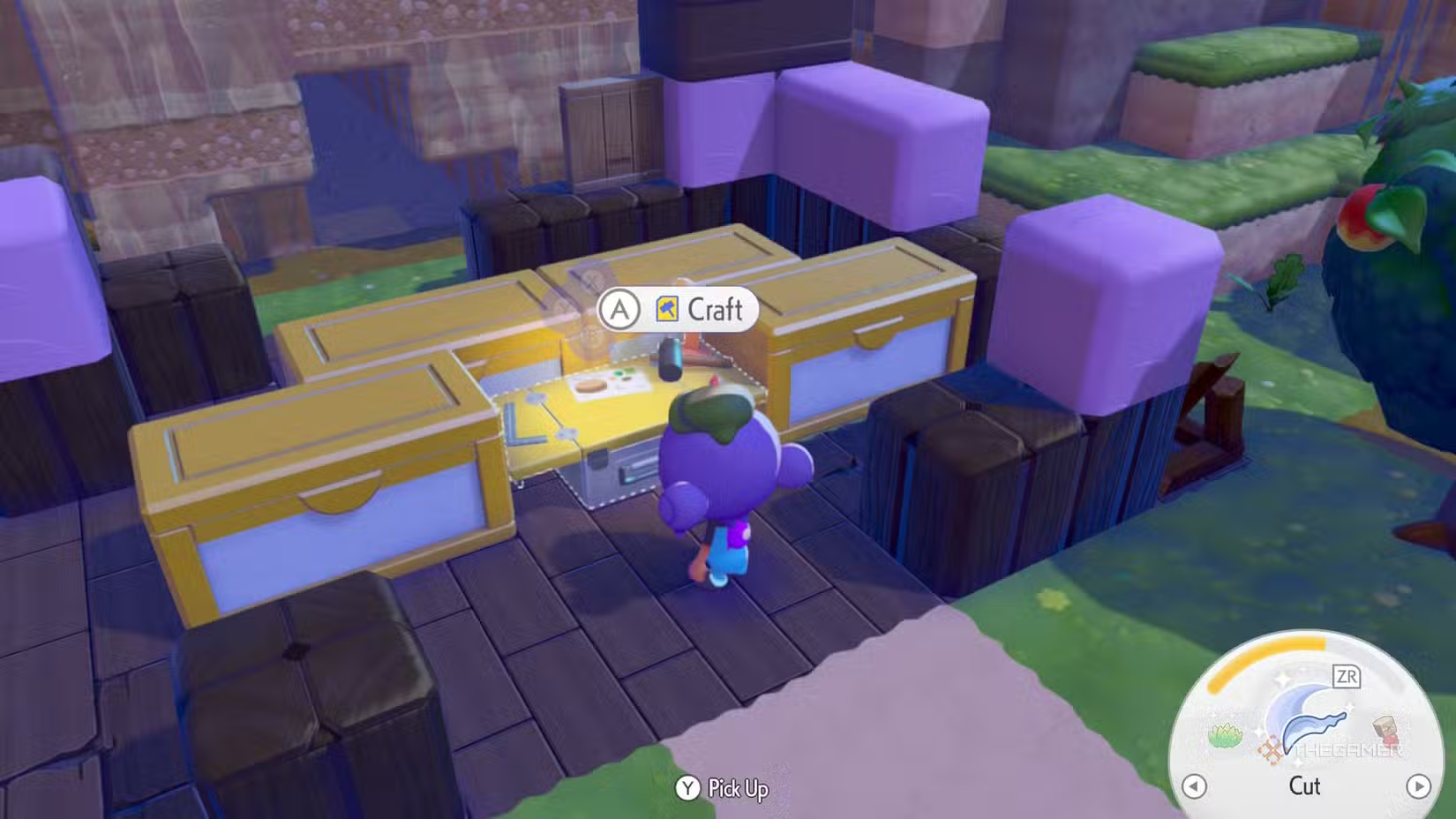
Link Multiple Storage Units to One Crafting Station
Proper placement of storage chests allows you to connect up to four large boxes to a single crafting bench. This setup means you can access resources from all connected storage at one station, streamlining your building process. Keep your materials neatly organized in these chests for quick access, avoiding wasteful trips through multiple boxes.
Cook Food with Chef Dente
When preparing meals, always cook alongside Chef Dente. There’s a chance she will double the amount of food produced, saving ingredients and ensuring a steady supply of nourishment. This trick helps keep your Pokémon energized and your skills upgraded. If you get Magnet Rise later, you might not need this as much, but during early gameplay, it’s a useful tool to stretch supplies.
Transfer Items Between Chests Rapidly
Need to move items between storage units quickly? Simply break a chest with Rock Smash, and all its contents will be transferred directly into your inventory. From there, you can organize your items into any other storage box without moving each item separately, saving a lot of time.
Fly to Missing Pokémon
In areas where Pokémon despawn after a certain number appear—typically beyond 20—finding specific Pokémon can be tricky. To speed things up, open your Pokédex, select the Pokémon you’re searching for, and show it to a Pokémon with Fly or Teleport. These Pokémon will then fly you directly to the target’s habitat, making it much easier to locate elusive species. You might still need to use honey to attract them, but this method is the fastest way to find a missing Pokémon.
Build Faster Using Shortcuts
While constructing structures, hold down the A button when placing blocks. This allows you to place multiple blocks in a row automatically, significantly speeding up the building process. For more precision, strafe with ZL or switch to mouse mode if available, which provides better control and enables you to reach more areas easily.
Get an Environmental Boost Quickly
Feeding Pokémon their favorite flavors can raise your environment level fast. Check the Pokédex for each Pokémon’s preferred flavor and give them berries or food items accordingly. This quick boost can be especially helpful when exploring new areas or trying to improve habitats rapidly.
Set Up Floating Security Cameras
To monitor large areas from above, build a tall pillar of blocks. Place a block at your desired height, attach a security camera, then break the block underneath to make the camera float. Remove the remaining supports, and you’ll have a floating camera to oversee crops or Pokémon habitats. Be careful not to place it too high, as it might not detect movements out of its range.
Create Vines with Leafage
If you want vines to climb walls or decorate your environment, use the Leafage move. Aim at a wall and activate Leafage to sprout vines. Using its powered-up version produces different vine styles, giving you more options for customization or climbing.
Use Gulpin for Portable Storage
Gulpin offers a helpful feature—portable storage for your items. Keep Gulpin following you to carry extra equipment, which is especially useful during big projects or when your main inventory is full. This way, your most essential items stay close and accessible, reducing trips back to your base.
 ChatGPT
 Perplexity
 Gemini AI
 Grok AI