Select Language:
Many open-world survival and factory simulation games are out there, but few combine both genres. That’s why StarRupture is such a unique game in the industry. When you first start playing, it can be challenging to get into, but once you do, you’ll find an entire planet ready for exploration.
If you enjoy building your base and optimizing production, there’s plenty for you here as well. The game can feel a bit overwhelming at first because there’s a lot of information to absorb, but these tips can help you have a smoother experience and enjoy the game more.
StarRupture is currently in Early Access, so some features mentioned here might change over time.
How to Unlock the Map
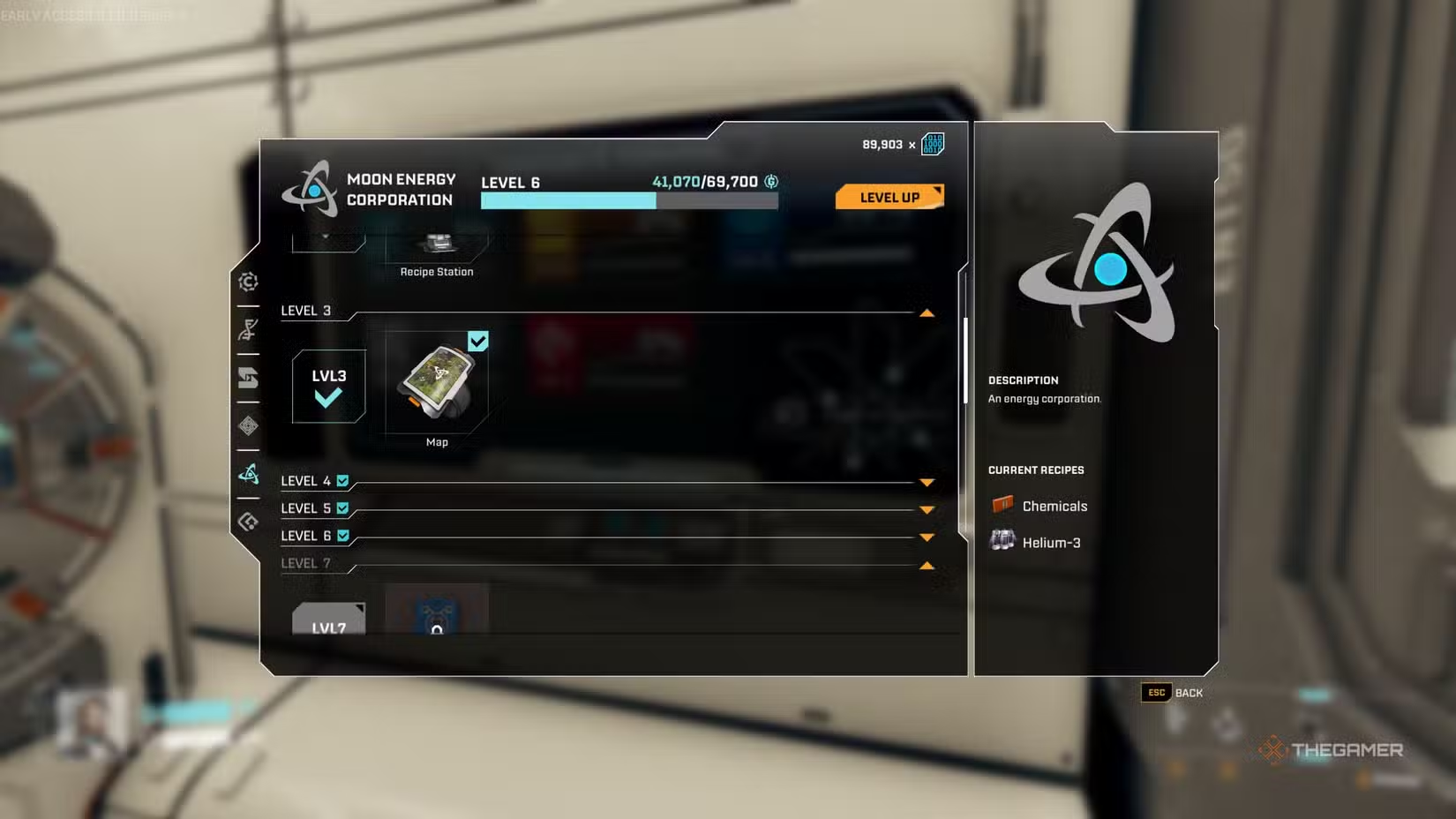
When you land on Arcadia-7, pressing the map button won’t do anything initially because the map feature isn’t unlocked right away. You don’t have to play the whole game without it, though. Progression involves satisfying large corporations back on Earth by sending them various crafted items. One of these, the Moon Energy Corporation, will reward you after completing certain orders. Once you reach level three with this corporation, the map becomes available, which you can access by pressing “M” on your keyboard.
To reach level three, you need to complete two more orders for the Moon Energy Corporation after finishing the tutorial. Right now, the game doesn’t have a mini-map — the full-screen map will automatically show your explored areas once unlocked. You can uncover more by exploring around and removing the fog of war.
Harvesting Ores and Managing Your Mining Tool
One of the first things you’ll do in Arcadia-7 is use your mining tool to collect ores and meteorites, which is part of the tutorial. These resources are essential for crafting and building your base. While mining, you’ll notice a heating bar at the bottom of your screen. If this fills up completely, your tool will overheat, making it take longer to cool down. To prevent overheating, press the reload button on your tool just before the bar fills up.
Switching Characters Anytime
At the start of the game, you’ll choose from one of four characters. Their personalities influence dialogue but don’t affect gameplay directly. If you accidentally pick one you didn’t intend to, you can change your character at any time using the Regeneration Chamber, which is located on your ship or built in any habitat using 100 Basic Building Materials. These chambers also serve as respawn points, but only one can be active at a time. If you’re heading into a dangerous area, it’s smart to set up a habitat with a new regeneration chamber nearby, so you have a place to respawn.
Always Keep Plenty of Ammo
Enemies will respawn after each planet wave, which makes exploration potentially dangerous, but they won’t stop appearing. The only exception is inside fully explored outposts. Since enemies keep respawning in different locations, it’s important to carry a lot of ammunition. Different guns require different ammo types, and during a single expedition, you could use over 500 rounds. Since ammo can be crafted with basic materials, it’s easy to restock.
How to Unlock Your First Weapon
You start with your mining laser, which can take out small groups of enemies, but you’ll need a proper weapon for larger hordes. To unlock your first gun, reach level two with Griffits Blue Corporation by completing one of their orders after the tutorial. This unlocks the UPP-7 Pistol, which holds nine rounds per magazine. The game also features more advanced weapons like:
- MAR-9 “Phantom” (Assault Rifle)
- SLAMS-12 (Shotgun)
- M175 “Grim” (Machine Gun)
You can unlock these by spending War Bonds after upgrading your Equipment Station.
Dealing with Wave Explosions
There’s a warning when increased Ruptura activity is detected, signaling an incoming wave. After the countdown, a massive explosion occurs, which can instantly kill you if you’re caught outside or unprotected. The planet remains very hot afterward, causing continuous damage. The best way to avoid this is to hide inside your habitats. Remember, underground caves and abandoned outposts do not prevent heat damage. To prepare, always carry at least one Meteorite Heart and some basic building materials so you can quickly craft shelter if a wave hits unexpectedly.
Keep an Eye on Structure Lights
If you’ve played factory simulators, managing multiple structures can be overwhelming, especially as you expand. In StarRupture, each building has a light indicator with three different colors:
- Blue: The building is functioning properly.
- Red: The power grid is short on energy; you need more generators.
- Yellow: Something’s stopping the building from working normally, such as missing input materials or not selecting a recipe.
Apart from your base, exploring abandoned structures and outposts reveals loot and resources, often marked by yellow lights indicating they’re worth checking out.
Spot Enemy Weaknesses
While exploring, you’ll face various enemy types. Some are common and easy to defeat, others are rarer and more challenging. Every enemy has a weak spot; for most, it’s their glowing red eyes. Others, like certain crab enemies, have body parts like a tail that shields them. Shooting these weak points will save ammo and make battles quicker, allowing you to explore more in less time.
 ChatGPT
 Perplexity
 Gemini AI
 Grok AI