

Select Language:
Rocket League has been around since 2015, and even after going free-to-play, many players continue to enjoy the fast-paced, car-based soccer game. While you might feel confident in your skills at first, you’ll soon discover there’s a lot more to mastering Rocket League than simply chasing the ball like a puppy at the park.
This guide offers helpful tips, tricks, and strategies to improve your gameplay beyond the basics and tutorials, helping you progress to the next level in this exciting “Hot Wheels football” game.
Updated on February 28, 2026, by Ben Williams: Over the years, Rocket League has become more competitive. Besides basic skills like jumping and powersliding, players are now focusing on fine-tuning camera angles and controller or keyboard settings. Casual players, as well as pro eSports athletes, are adjusting these to gain an edge. We’ve included key settings for controllers, keyboards, and camera setups to ensure you’re playing on equal footing with others.
Best Beginner Settings
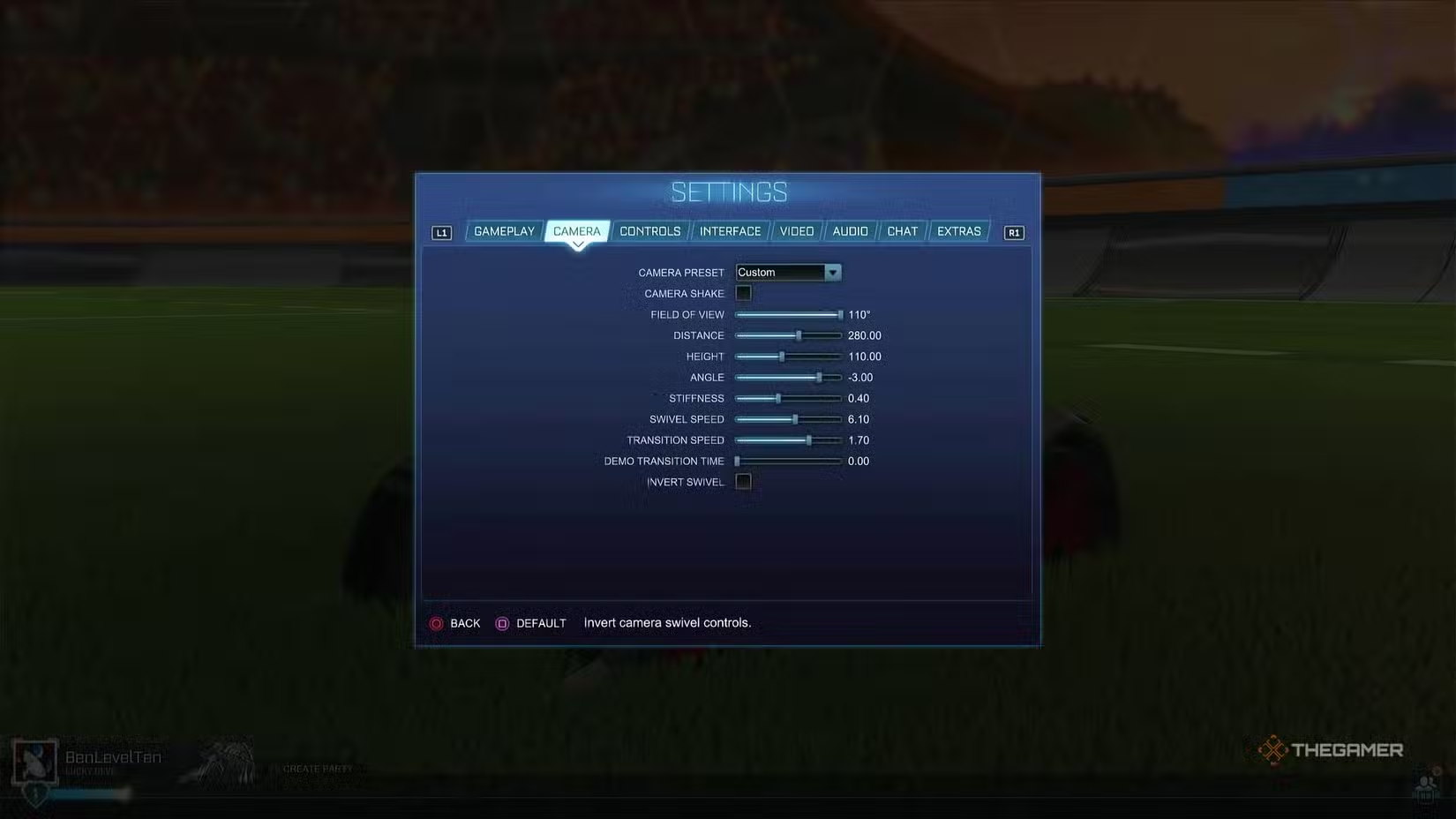
Before diving into gameplay tips, it’s essential to set up your camera and controls correctly. A well-balanced camera helps you read the field, spot teammates, and defend effectively without panic. Good keybinds and controller calibration make boosting, jumping, and recovery feel more natural and smooth.
Best Camera Settings for Beginners
| Setting | Value |
|---|---|
| Camera Shake | Off |
| FOV (Field of View) | 110 |
| Distance | 280 |
| Height | 110 |
| Angle | -3 |
| Stiffness | 0.4 |
| Swivel Speed | 6.1 |
| Transition Speed | 1.7 |
A higher FOV and a moderate distance/height combo help you monitor both the ball and nearby cars without feeling zoomed in. Slight stiffness keeps the camera steady during sharp turns, and toggling Ball Cam allows quick switching between main view and ball view without holding an extra button.
Best Controller Settings
| Setting | Value |
|---|---|
| Vibration | Off |
| Steering Sensitivity | 1.6 |
| Aerial Sensitivity | 1.55 |
| Controller Deadzone | 0.10 |
| Dodge Deadzone | 0.80 |
| Ball Cam | Toggle |
Turning vibration off results in more consistent inputs. A low deadzone allows faster responses to small stick movements, aiding in precise dribbling and quick recoveries. A higher dodge deadzone prevents accidental flips during in-air adjustments. Using toggle Ball Cam simplifies tracking the ball during play.
Best Controller & Keyboard Keybinds
| Control | Controller | Keyboard/Mouse |
|---|---|---|
| Boost | RT / R2 | W |
| Brake/Reverse | LT / L2 | S |
| Steer Left/Right | Left Stick | A / D |
| Jump | A / X | Space |
| Powerslide | LB / L1 | Left Ctrl |
| Air Roll (free) | LB / L1 | Left Ctrl |
| Air Roll Left | Optional: LB / L1 or X/Square | Q |
| Air Roll Right | Optional: RB / R1 or B/Circle | E |
| Ball Cam | Y / Triangle | Spacebar / Tab |
| Rear View | R3 / Right Stick Click | B |
| Air Pitch Up/Down | Left Stick (in air) | S / W |
| Air Steer Left/Right | Left Stick (in air) | A / D |
Using bumper buttons for boost and powersliding helps you perform aerials and recoveries more smoothly. Pairing powerslide and air roll on one button simplifies landings and flips.
Controller vs. Keyboard
Both work well across all skill levels, but controllers are generally easier for beginners because of analog steering and throttle. Keyboards can be more responsive for instant inputs but can feel less forgiving for newcomers. Choose what feels most comfortable and stick with it.
Double Jumps, Flips, and Powerslides
Holding jump increases your car’s height, while flicking the analog stick and jumping propels you forward.
Pro tip: Double jumping by pressing jump again is especially useful when defending. Holding the second jump and tilting the stick allows you to flip, which is perfect for gaining momentum when out of boost. Mastering flips enables quick direction changes, especially when the game’s flow shifts unexpectedly.
On the ground, use powersliding by pressing and holding the designated button (Square on PlayStation or X on Xbox) to turn sharply and head back from offensive pushes.
Watch The Ball, Don’t Chase It
In team sports, it’s rare for everyone to chase the ball at the same time — and Rocket League is no different. Instead of chaos, stay back, observe the situation, and plan your attack.
A key tip: Switch to Ball Cam mode. This view keeps the ball in sight at all times, even though it might feel strange at first. Getting comfortable with Ball Cam is crucial for becoming a better player, as it ensures you never lose track of the ball.
Above All Else, Don’t Panic
Seeing the ball heading toward your goal can trigger panic—especially if you’re trying to defend. Remember, you’re not alone; many players will be nervous too. Take deep breaths, then use your skills to intercept or block the ball.
Most players rushing into the net with panic are unlikely to make a precise shot. Instead, stay calm, stay alert, and use your learned techniques to prevent the goal.
Rocket League seems simple on the surface, but understanding its depth offers rewards for those willing to learn its mechanics. Whether you’re new or returning for another shot at victory, you can improve starting today and develop a longer-lasting connection with a game that favors skill and strategy.
 ChatGPT
 Perplexity
 Gemini AI
 Grok AI

