Select Language:
On April 17, 2025, Marvel Rivals released an exciting new feature that enables players to customize colors for specific character skins they already own. Previously, skins would only feature a single design visible during MVP animations, emotes, and other actions. Now, with this customization option, you can alter the appearance of the skins you’ve purchased to add a personal touch.
At the moment, only four skins in the game offer color customization. While the selection is currently limited, the developers have expressed their intention to introduce more recolored skins in future updates for Seasons 2.5, 3, and beyond. The developers are also open to making adjustments to the customization process based on player feedback as the game evolves.
How Does Costume Customization Work In Marvel Rivals?
Change How Characters Look From Non-Default Outfits
The customization feature in Marvel Rivals is activated once you purchase a skin for your character. Custom colors apply to specific outfits that developers have designated, so not every skin for a character will have this option. It’s still uncertain if Default costumes will receive the majority of these custom colors, as currently only a few alternative looks come with additional color options.

Related
Marvel Rivals: Cerebro Database Event & Rewards Guide
The latest limited-time event in Marvel Rivals is the Cerebro Database in Season 2, where you can complete objectives for a free Mantis skin.
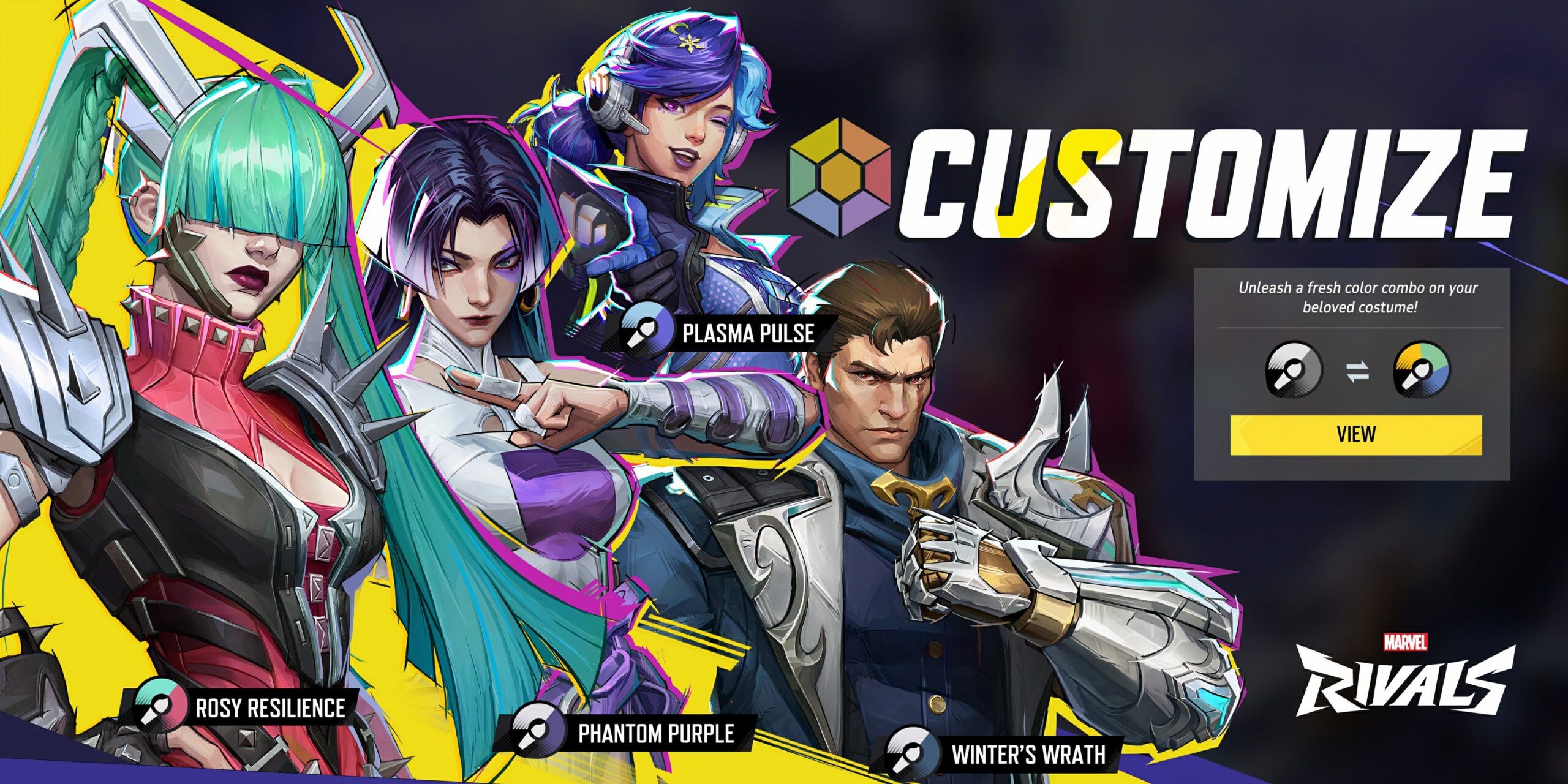
As of April 2025, here are the custom colors that are currently available along with the corresponding skins in Marvel Rivals:
- Magik (Punkchild) – Rosy Resilience
- Luna Snow (Mirae 2099) – Plasma Pulse
- Psylocke (Vengeance) – Phantom Purple
- Winter Soldier (Blood Soldier) – Winter’s Wraith
To customize any skins with recolors, you must first purchase the skins offering custom options. You cannot unlock a custom color unless you already own the associated skin. Acquiring these skins may require real-world currency depending on the Units or Lattice you currently possess.
A practical method to obtain a skin linked to custom colors is through the Costume Coin you earn in Marvel Rivals‘ Pick-Up Bundle event. By progressing through the Bundle, you can spend the Coin to acquire the Psylocke Vengeance skin for free, although without the new custom color.
After securing the necessary skins, the custom colors will be visible in the “Heroes” menu for those characters. Once unlocked, you can switch colors from a skin’s default design, influencing their animations. Consequently, that particular skin will display the custom color in various contexts, such as menus, MVP animations, and emotes.
How To Unlock Custom Colors
Purchase New Currency By Exchanging Lattice
After purchasing the correct skin, you will need to use a new in-game currency called Unstable Molecules to unlock a custom color for a character. Unstable Molecules cannot be gained through in-game activities, so don’t waste your time trying to earn them by playing matches. This currency is only obtainable by exchanging gold Lattice in Marvel Rivals at a 1:1 ratio.
Customized color costumes require 600 Unstable Molecules, which is approximately two-thirds the cost of the Luxury Battle Pass. Since you cannot purchase custom colors using Units or Chrono Tokens, you may need to spend real money to unlock them.
According to the Marvel Rivals developers, additional ways to earn Unstable Molecules will be introduced in Season 3, allowing players to unlock more custom colors in the future.
To buy a custom color, navigate to the “Heroes” menu and select the hero with a skin offering unique color options. After choosing a character with at least one custom color, enter the “Customize” menu of the Hero Profile to view their skins. Select a skin to reveal the “Customize” option above the “Equip” prompt, where you can toggle between the purchased colors.
Related
Marvel Rivals Season 2: All Character & System Changes
Season 2 introduces various changes to Marvel Rivals that will significantly influence the game’s dynamics going forward.
Additionally, you can switch colors while selecting a character before or during a match. If you opt to play as a character with a custom skin, a second dropdown menu will appear next to the costume selection bar. This allows you to easily toggle between custom colors you’ve unlocked for that specific skin.
After amassing enough Unstable Molecules, you can purchase available custom colors via the in-game Store or through a character’s Hero Profile. Once you buy a custom color in Marvel Rivals, it remains unlocked permanently, just like other cosmetics in the game.
 ChatGPT
 Perplexity
 Gemini AI
 Grok AI