• About Us
  • Contact Us
  • Advertise
  • Privacy Policy
  • Guest Post
No Result
View All Result
Digital Phablet
  • Home
  • NewsLatest
  • Technology
    • Education Tech
    • Home Tech
    • Office Tech
    • Fintech
    • Digital Marketing
  • Social Media
  • Gaming
  • Smartphones
  • AI
  • Reviews
  • Interesting
  • How To
  • Home
  • NewsLatest
  • Technology
    • Education Tech
    • Home Tech
    • Office Tech
    • Fintech
    • Digital Marketing
  • Social Media
  • Gaming
  • Smartphones
  • AI
  • Reviews
  • Interesting
  • How To
No Result
View All Result
Digital Phablet
No Result
View All Result

Home » Managing Stat Skins in UFL: A Simple Guide

Managing Stat Skins in UFL: A Simple Guide

Emily Smith by Emily Smith
December 13, 2024
in Gaming
Reading Time: 2 mins read
A A
Managing Stat Skins in UFL: A Simple Guide
ADVERTISEMENT

Select Language:

In UFL, skins function a bit differently compared to most games. While they do change the appearance of a player’s item in the game, their primary purpose is to enhance a player’s stats. You can obtain skins from packs and apply them to players who occupy the corresponding position.

ADVERTISEMENT

Some rarer skins provide greater boosts to specific stats than others, and there are even unique skins designed for certain players within the game. To ensure your team remains as powerful as possible, it’s beneficial to continuously add and remove skins for optimal boosts. However, figuring out how to do this isn’t always straightforward.

How to Apply Skins


After opening packs—whether as rewards for playing or purchasing from the store—you’ll have a variety of skins ready to apply. However, you can’t apply them directly from the squad screen.

Instead, navigate to the main menu and select the Skins option. Choose the Library option to view all the skins you have.

ADVERTISEMENT

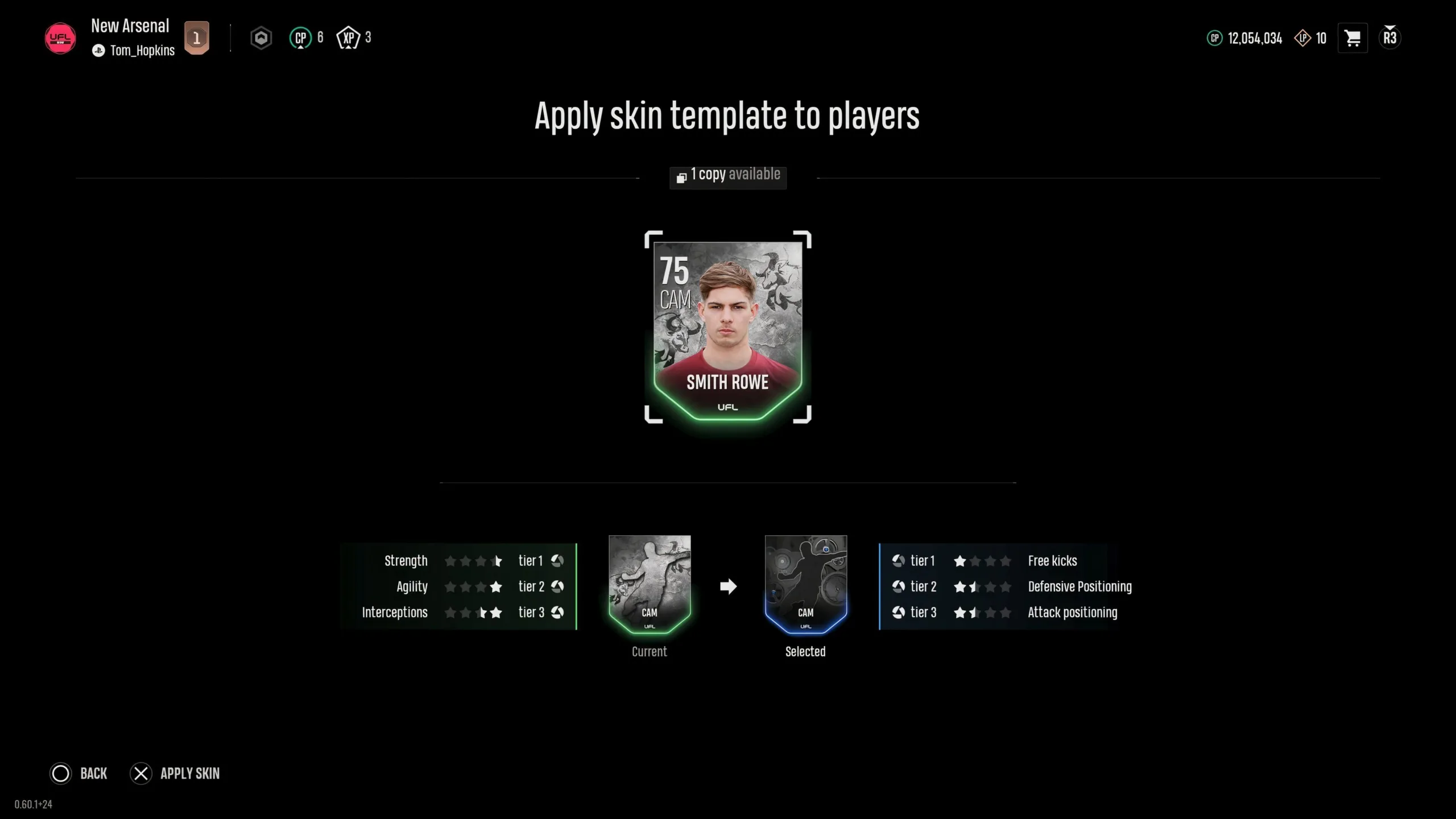
Next, locate the skin you want to use on your selected player. Press X/A on the skin, and a list of players from your club that suit the required position will appear. Press X/A again to apply the skin. Alternatively, you can first choose a skin and then select the player you want to apply it to.

Each skin enhances specific stats, so ensure you apply one that boosts the relevant attributes for the player.

How to Remove Skins

IMG_4111

Sometimes, you may need to replace a skin with a better one you’ve acquired over time. It’s important to remove the old skin before attaching the new one.

To do this, go to the skins library and find the player from whom you want to take off the skin. Then, press X/A on that player to detach the skin and return it to your library. Remember, this process can only be done within the skin-specific section of UFL, not the squad screen.

When you remove a skin from a player, it goes back into your library for you to use on another player.

ChatGPT ChatGPT Perplexity AI Perplexity Gemini AI Logo Gemini AI Grok AI Logo Grok AI
Google Banner
Tags: AddHow ToIndie GamesRemoveStat SkinsUFL
ADVERTISEMENT
Emily Smith

Emily Smith

Emily is a digital marketer in Austin, Texas. She enjoys gaming, playing guitar, and dreams of traveling to Japan with her golden retriever, Max.

Related Posts

How to Complete "One Leaf, One Life" in Where Winds Meet Through Solving
Gaming

How to Complete “One Leaf, One Life” in Where Winds Meet Through Solving

December 4, 2025
How To Complete and Use Shared EXP in Where Winds Meet
Gaming

How To Complete and Use Shared EXP in Where Winds Meet

December 3, 2025
How to Make a Pineapple Pizza in Goat Simulator 3 and Solve the Puzzle
Gaming

How to Make a Pineapple Pizza in Goat Simulator 3 and Solve the Puzzle

November 23, 2025
How to Reach Galaxy News Radio Station in Fallout 4 by Completing Challenges
Gaming

How to Reach Galaxy News Radio Station in Fallout 4 by Completing Challenges

November 20, 2025
Next Post
Another Nothing Phone Can Now Get Android 15 Beta

Another Nothing Phone Can Now Get Android 15 Beta

  • About Us
  • Contact Us
  • Advertise
  • Privacy Policy
  • Guest Post

© 2025 Digital Phablet

No Result
View All Result
  • Home
  • News
  • Technology
    • Education Tech
    • Home Tech
    • Office Tech
    • Fintech
    • Digital Marketing
  • Social Media
  • Gaming
  • Smartphones

© 2025 Digital Phablet