• About Us
  • Contact Us
  • Advertise
  • Privacy Policy
  • Guest Post
No Result
View All Result
Digital Phablet
  • Home
  • NewsLatest
  • Technology
    • Education Tech
    • Home Tech
    • Office Tech
    • Fintech
    • Digital Marketing
  • Social Media
  • Gaming
  • Smartphones
  • AI
  • Reviews
  • Interesting
  • How To
  • Home
  • NewsLatest
  • Technology
    • Education Tech
    • Home Tech
    • Office Tech
    • Fintech
    • Digital Marketing
  • Social Media
  • Gaming
  • Smartphones
  • AI
  • Reviews
  • Interesting
  • How To
No Result
View All Result
Digital Phablet
No Result
View All Result

Home » Installing and Using Mods in Ready Or Not: A Complete Guide

Installing and Using Mods in Ready Or Not: A Complete Guide

Emily Smith by Emily Smith
December 29, 2024
in Gaming
Reading Time: 2 mins read
A A
Installing and Using Mods in Ready Or Not: A Complete Guide
ADVERTISEMENT

Select Language:

Ready or Not is already an exhilarating experience, but if you’re looking to spice things up, mods are the way to go. Whether you want to increase the challenge or just add some entertaining twists, the modding community has a lot to offer.

ADVERTISEMENT

In this guide, we’ll walk you through how to find, install, and use mods effectively. You don’t need to be an expert—just follow these steps, and you’ll have your game modded in a snap.

Important Note:
Using mods can sometimes lead to problems, such as crashes or conflicts with other mods. Always be careful and back up your game files before installing anything new.

How to Find Mods

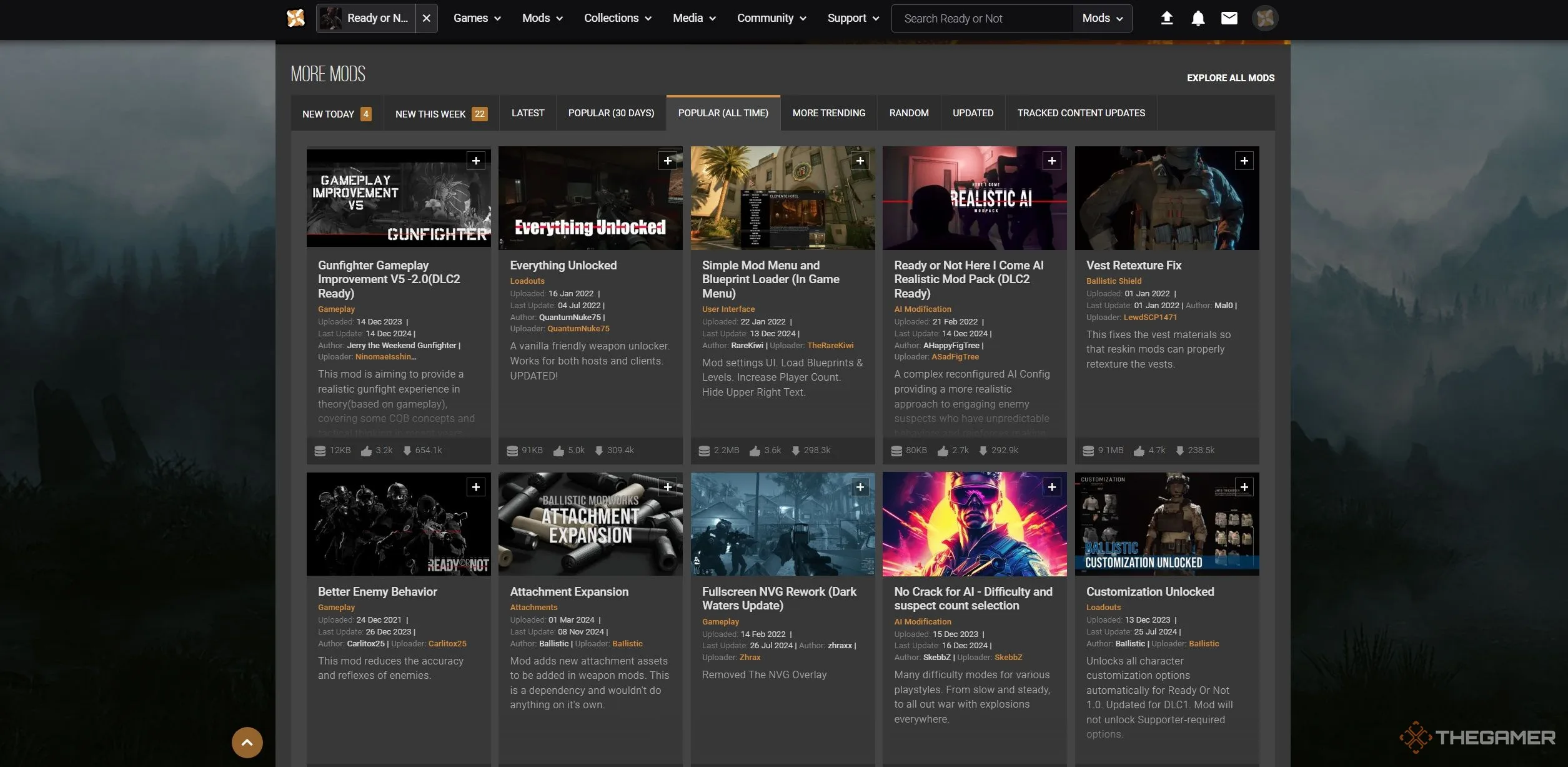
To start, open your web browser and head over to the Ready or Not Nexus Mods page. If you don’t have an account yet, you’ll need to create one. You can explore categories like ‘Popular,’ ‘Trending,’ or ‘Updated’ to discover mods that interest you. Once you find a mod you’d like to try, click on it, go to the ‘Files’ section, and select the manual download option.

ADVERTISEMENT

After the download is complete, the mod will be saved in your Downloads folder.

How to Install Mods

Once you’ve downloaded the mod, head to your Downloads folder and locate the file. Many mods come in compressed formats, so you’ll need to extract their contents first. Right-click on the downloaded file and choose ‘Extract Here’ or ‘Extract All.’ When the extraction is finished, you should see a folder containing the necessary files.

Most mods for Ready or Not will have a single pack file.

Next, you’ll need to place this pack file into the game’s mod directory. Open another file explorer window and navigate to your Ready or Not installation folder, typically located in E:\Steam\steamapps\common\Ready or Not. From here, go to the Content folder and then the Paks folder. This is where you should drop your extracted mod file. You can either drag and drop it or copy and paste it into the Paks folder.

After that, you’re all set! Your mods will be ready to go when you launch the game. Have fun!

ChatGPT ChatGPT Perplexity AI Perplexity Gemini AI Logo Gemini AI Grok AI Logo Grok AI
Google Banner
Tags: installLive-Service GamesmodsReady or NotUse
ADVERTISEMENT
Emily Smith

Emily Smith

Emily is a digital marketer in Austin, Texas. She enjoys gaming, playing guitar, and dreams of traveling to Japan with her golden retriever, Max.

Related Posts

How To Complete and Use Shared EXP in Where Winds Meet
Gaming

How To Complete and Use Shared EXP in Where Winds Meet

December 3, 2025
How to Complete and Use Pets in Solo Leveling: Arise Overdrive
Gaming

How to Complete and Use Pets in Solo Leveling: Arise Overdrive

November 28, 2025
Top Teams for Completing & Solving a Nuzlocke in Pokémon Legends: Z-A
Gaming

Top Teams for Completing & Solving a Nuzlocke in Pokémon Legends: Z-A

November 23, 2025
How to Obtain and Use the Afterglow Pendant in Where Winds Meet
Gaming

How to Obtain and Use the Afterglow Pendant in Where Winds Meet

November 21, 2025
Next Post
December 29, 2024: Today's Connections Clues & Solutions (Puzzle #567)

December 29, 2024: Today's Connections Clues & Solutions (Puzzle #567)

  • About Us
  • Contact Us
  • Advertise
  • Privacy Policy
  • Guest Post

© 2025 Digital Phablet

No Result
View All Result
  • Home
  • News
  • Technology
    • Education Tech
    • Home Tech
    • Office Tech
    • Fintech
    • Digital Marketing
  • Social Media
  • Gaming
  • Smartphones

© 2025 Digital Phablet