Select Language:
Aside from the impressive cutscenes, Inazuma Eleven: Victory Road makes your progress more challenging by setting team Attack (AT) and Defense (DF) thresholds. These limits prevent you from rushing through the story too easily. You’ll need to think strategically and do some quick calculations if you want to optimize your team’s ratings.
Moving at a steady pace is usually the best approach to make sure you don’t miss any opportunities. However, there are small advantages hidden in your inventory that can help you level up your AT and DF ratings faster. Here are the top methods to improve these stats quickly.
What Are Your Attack & Defense Ratings?
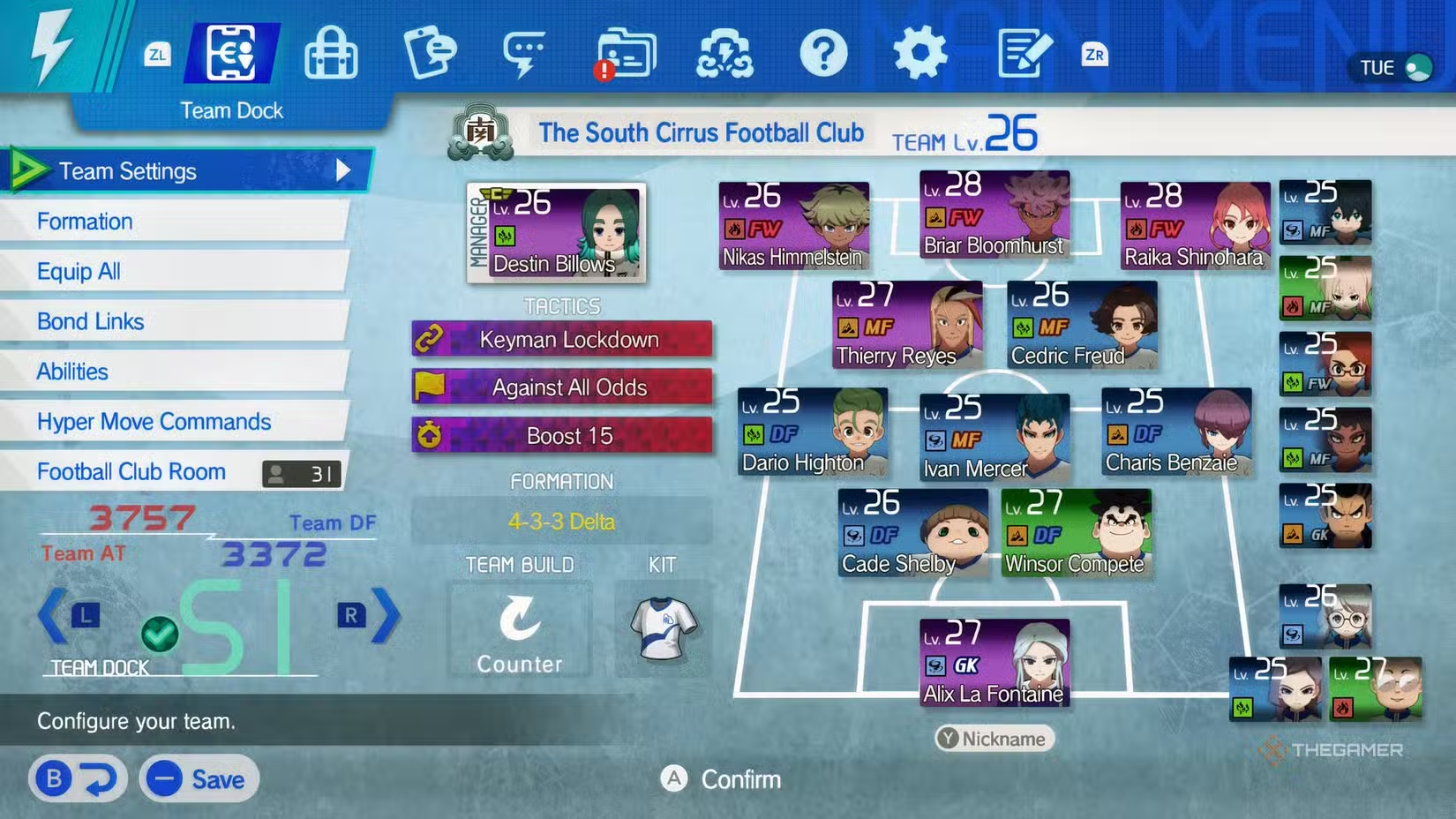
Your team’s overall strength on both attack and defense is shown in the bottom left of your Team Dock menu. These are split into two separate ratings:
- Team Attack (AT)
- Team Defense (DF)
As you progress through the story mode, these ratings will limit your advancement. Reaching the required thresholds for AT and DF can be tough without grinding, unless you take advantage of all available ways to boost your team.
How To Raise Your Team’s Attack And Defense
There are several key factors that influence your team’s overall AT and DF:
- Player Levels
- Gear
- The Abilearn Board
The combined level of your players determines your team’s minimum AT and DF. To level up your players quickly, try doing the following:
- Complete side quests
- Play practice matches
- Play story matches
- Use experience (EXP) items from your inventory
Increasing your levels is an essential first step, unlocking more features and making your team stronger.
How To Improve Players Using The Abilearn Board
The Abilearn Board is a valuable tool to upgrade your players. Reaching certain levels on this board grants bonus stats, which directly boost your team’s overall AT and DF. Improving your star players like Briar and Raika first can help you score goals more effectively because of their higher potential ceilings.
To further enhance your players, you can equip them with gear. Like skill beans, gear can be auto-equipped across your team by selecting “Equip All” in the Team Dock menu, saving you time from manual adjustments.
How To Equip Gear
Gear can give your team important stat boosts. You should prioritize shopping for new gear as you progress into the middle of the game, ensuring you have pieces that provide meaningful bonuses based on your current level. For convenience, you can automatically equip gear to all players using the “Equip All” option.
Keep in mind that players on the bench don’t impact your team’s AT and DF ratings. To keep improving, focus on completing side quests and finding phantom soccer balls, which provide tokens needed for gear upgrades. You won’t have to overhaul your entire squad to meet the story’s thresholds — just keep upgrading strategically.
 ChatGPT
 Perplexity
 Gemini AI
 Grok AI