• About Us
  • Contact Us
  • Advertise
  • Privacy Policy
  • Guest Post
No Result
View All Result
Digital Phablet
  • Home
  • NewsLatest
  • Technology
    • Education Tech
    • Home Tech
    • Office Tech
    • Fintech
    • Digital Marketing
  • Social Media
  • Gaming
  • Smartphones
  • AI
  • Reviews
  • Interesting
  • How To
  • Home
  • NewsLatest
  • Technology
    • Education Tech
    • Home Tech
    • Office Tech
    • Fintech
    • Digital Marketing
  • Social Media
  • Gaming
  • Smartphones
  • AI
  • Reviews
  • Interesting
  • How To
No Result
View All Result
Digital Phablet
No Result
View All Result

Home » How to Move Games from Switch 1 to Switch 2

How to Move Games from Switch 1 to Switch 2

Emily Smith by Emily Smith
December 15, 2025
in Gaming
Reading Time: 2 mins read
A A
How to Move Games from Switch 1 to Switch 2
ADVERTISEMENT

Select Language:

Transferring your data from Nintendo Switch 1 to Switch 2 is a smart move if you want to keep everything intact. It allows you to move your user accounts, game data, settings, saved progress, parental controls, and more to your new console. Essentially, it moves everything you’d want to transfer, making the switch seamless if you’re picking up where you left off. Here’s how to do it.

ADVERTISEMENT

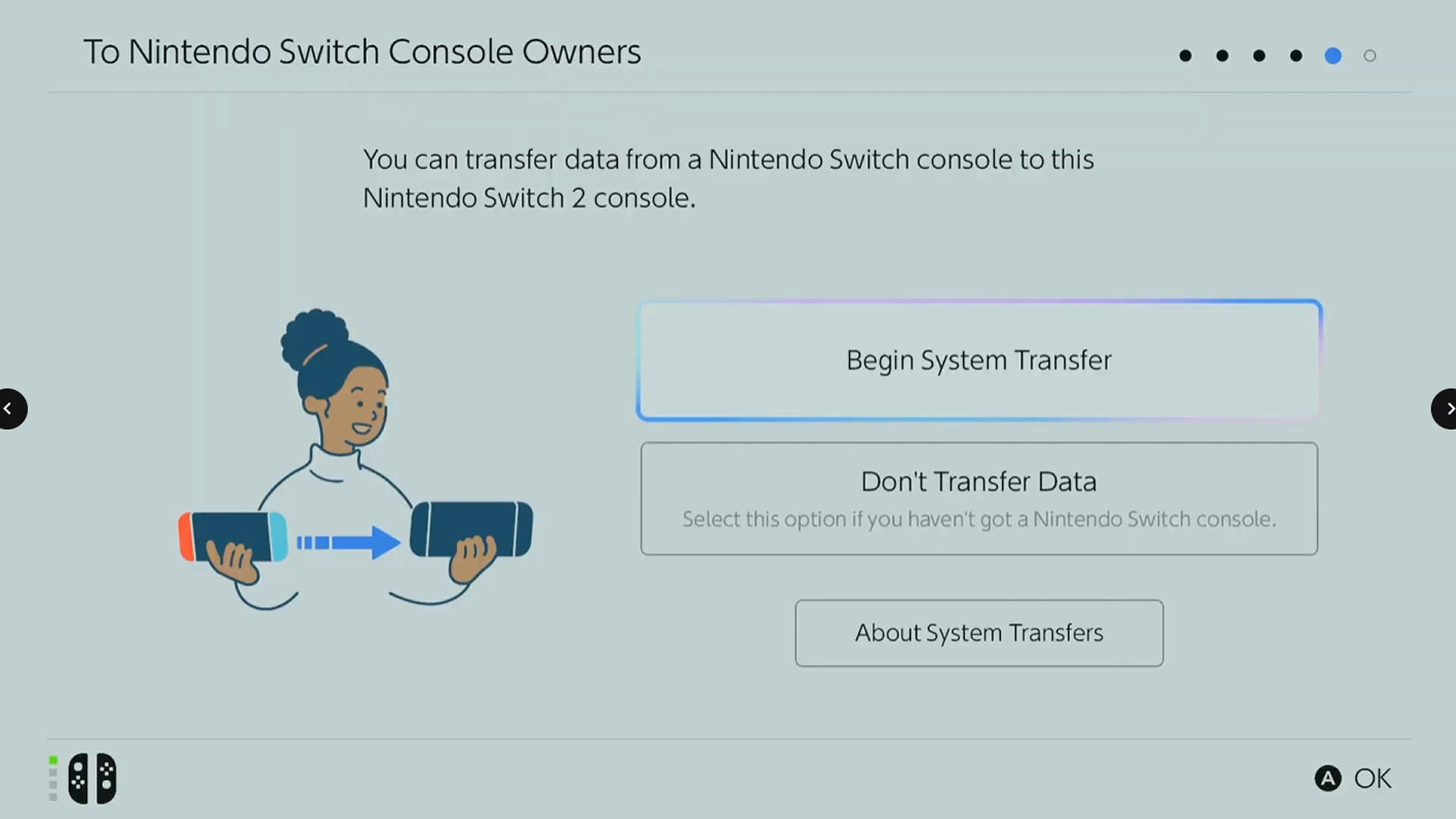
When you turn on your new Nintendo Switch 2 for the first time, you’ll be prompted during setup to transfer data from your old Switch. While it isn’t mandatory, I highly suggest doing it. If you choose to proceed, follow these steps:

1. Sign into your Nintendo Account by scanning the QR code shown on the Switch 2 with your phone and follow the instructions.
2. Place both your Switch 1 and Switch 2 close together so they can connect.
3. On your Switch 1, go to System Settings > System > System Transfer and follow the prompts until it searches for the new console.
4. Your Switch 2 will then display an option to “Start Receiving Data.” Select that, and keep both systems charged, connected to the internet, and close together until the transfer completes.

For more details, check out our Nintendo Switch 2 setup guide. If you’re wondering whether the transfer is worth it, note that this process covers moving:

ADVERTISEMENT

– User profiles and accounts
– Purchased digital games
– Saved game data
– Screenshots and videos
– Certain system settings
– Parental controls

If you’ve already set up your Switch 2 and missed the transfer window, the options are limited. The only way to move your data afterward is to log into your old user account on the new console and manually re-download your games. This method is slower and won’t carry over settings, cloud saves, or media files. So, if the system transfer prompt appears during setup, it’s best to do it right then and there for a smoother experience.

ChatGPT ChatGPT Perplexity AI Perplexity Gemini AI Logo Gemini AI Grok AI Logo Grok AI
Google Banner
Tags: Nintendo
ADVERTISEMENT
Emily Smith

Emily Smith

Emily is a digital marketer in Austin, Texas. She enjoys gaming, playing guitar, and dreams of traveling to Japan with her golden retriever, Max.

Related Posts

How to Share Virtual Game Cards on Nintendo Switch 2
Gaming

How to Share Virtual Game Cards on Nintendo Switch 2

December 19, 2025
All Pokémon Added in the Mega Dimension DLC for Pokémon Legends: Z-A, Completing and Solving
Gaming

All Pokémon Added in the Mega Dimension DLC for Pokémon Legends: Z-A, Completing and Solving

December 10, 2025
Activating Battery Saver Mode on Nintendo Switch 2
Gaming

Activating Battery Saver Mode on Nintendo Switch 2

December 9, 2025
Amiibo Completing Guide & Solving in Metroid Prime 4: Beyond
Gaming

Amiibo Completing Guide & Solving in Metroid Prime 4: Beyond

December 8, 2025
Next Post

Top Highest-Rated TV Shows of All Time

  • About Us
  • Contact Us
  • Advertise
  • Privacy Policy
  • Guest Post

© 2025 Digital Phablet

No Result
View All Result
  • Home
  • News
  • Technology
    • Education Tech
    • Home Tech
    • Office Tech
    • Fintech
    • Digital Marketing
  • Social Media
  • Gaming
  • Smartphones

© 2025 Digital Phablet