Select Language:
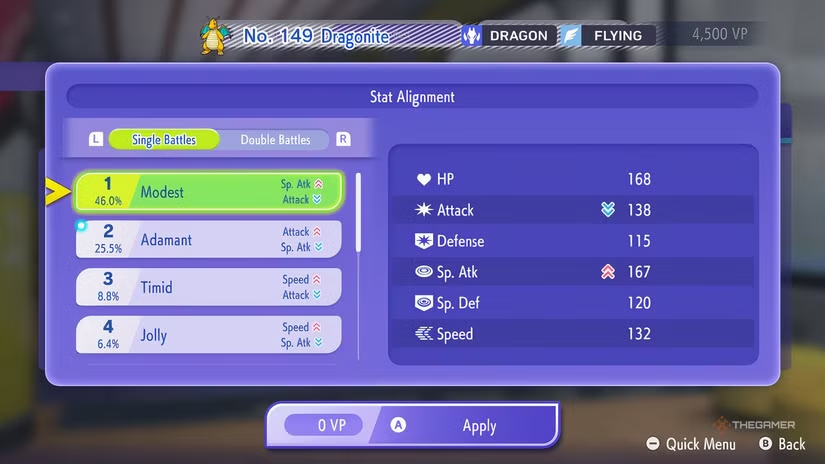
In Pokémon Champions, the term “Stat Alignment” is just another way of referring to Natures. If you’re familiar with Natures from previous Pokémon games, they represent how a Pokémon’s personality influences two of its six core stats.
Since you don’t actually catch Pokémon yourself in Pokémon Champions, the game simplifies things by changing the name from Natures to Stat Alignments. They work the same way, affecting two stats—one gets a slight boost, and the other gets a slight reduction—without the need for special items like mints.
What Are Stat Alignments?
Stat Alignments are similar to Natures. They’re named as if they are personality types and influence two key stats, although they don’t relate to a Pokémon’s personality in the game. The six core stats impacted are:
- HP: How much damage a Pokémon can take before fainting.
- Attack: Damage output for physical attacks.
- Special Attack: Damage output for special attacks.
- Defense: Resistance against physical attacks.
- Special Defense: Resistance against special attacks.
- Speed: How quickly a Pokémon acts in battle; it determines attack order.
Each Stat Alignment increases one stat slightly while decreasing another. There’s a unique Stat Alignment for every combination of boosted and lowered stats, except for five that are neutral and don’t change any stats.
Popular options include Modest, which boosts Special Attack, and Adamant, which boosts Attack. Ultimately, the best choice depends on your strategy and what fits your Pokémon’s role.
To see which Stat Alignments players are using most, you can check the battle data menu by selecting the option to change your Pokémon’s Stat Alignment and pressing “Y.” This will show the most popular choices and their usage percentages.
All Stat Alignments
Here’s a quick overview of some of the common and unique Stat Alignments:
| Stat Alignment | Increased Stat | Lowered Stat |
|---|---|---|
| Lonely | ↑ Attack | ↓ Defense |
| Adamant | ↑ Attack | ↓ Special Attack |
| Naughty | ↑ Attack | ↓ Special Defense |
| Brave | ↑ Attack | ↓ Speed |
| Bold | ↑ Defense | ↓ Attack |
| Impish | ↑ Defense | ↓ Special Attack |
| Lax | ↑ Defense | ↓ Special Defense |
| Relaxed | ↑ Defense | ↓ Speed |
| Modest | ↑ Special Attack | ↓ Attack |
| Mild | ↑ Special Attack | ↓ Defense |
| Rash | ↑ Special Attack | ↓ Special Defense |
| Quiet | ↑ Special Attack | ↓ Speed |
| Calm | ↑ Special Defense | ↓ Attack |
| Careful | ↑ Special Defense | ↓ Special Attack |
| Gentle | ↑ Special Defense | ↓ Defense |
| Sassy | ↑ Special Defense | ↓ Speed |
| Timid | ↑ Speed | ↓ Attack |
| Hasty | ↑ Speed | ↓ Defense |
| Jolly | ↑ Speed | ↓ Special Attack |
| Naive | ↑ Speed | ↓ Special Defense |
Natures Not Included as Stat Alignments
Not all Natures are represented. Four Natures are missing as separate Stat Alignments because the game only includes one neutral option, Serious, which effectively neutralizes all stats. The missing Natures are:
- Quirky (↑ Special Defense, ↓ Special Defense)
- Bashful (↑ Special Attack, ↓ Special Attack)
- Docile (↑ Defense, ↓ Defense)
- Hardy (↑ Speed, ↓ Speed), although in Pokémon Champions, Hardy appears swapped with Serious due to a game-specific glitch.
Changing Stat Alignments
Previously, changing a Pokémon’s Nature required items called Mints, which needed to match the Nature you wanted. In Pokémon Champions, this process is different and more flexible. Instead of items, you pay 500 Victory Points (VP) to change a Pokémon’s Stat Alignment in the training menu.
While training, you’ll see the current Stat Alignment at the bottom of the screen. Selecting it will show a list of available options. Pick the desired one, and it will be set. When confirming, a red “500 VP” mark will appear next to the new Stat Alignment, indicating the change. Once done, you can proceed with training, and the Pokémon’s Stat Alignment will be updated accordingly.
 ChatGPT
 Perplexity
 Gemini AI
 Grok AI