Select Language:
Quick Links
When you first enter the world of Aloft, you might think the map is impressive. But wait until you discover just how extensive it really is! The game features a massive sky populated with countless islands waiting to be explored and restored.
As you navigate from one section of the map to another, you’ll uncover uncharted islands while keeping track of which ones are thriving. Utilize those lost atlases you’ve collected during your travels to enhance your sailing skills and gather valuable information.
How to Use the Map in Aloft
Refer to Your Map Table Frequently While Flying
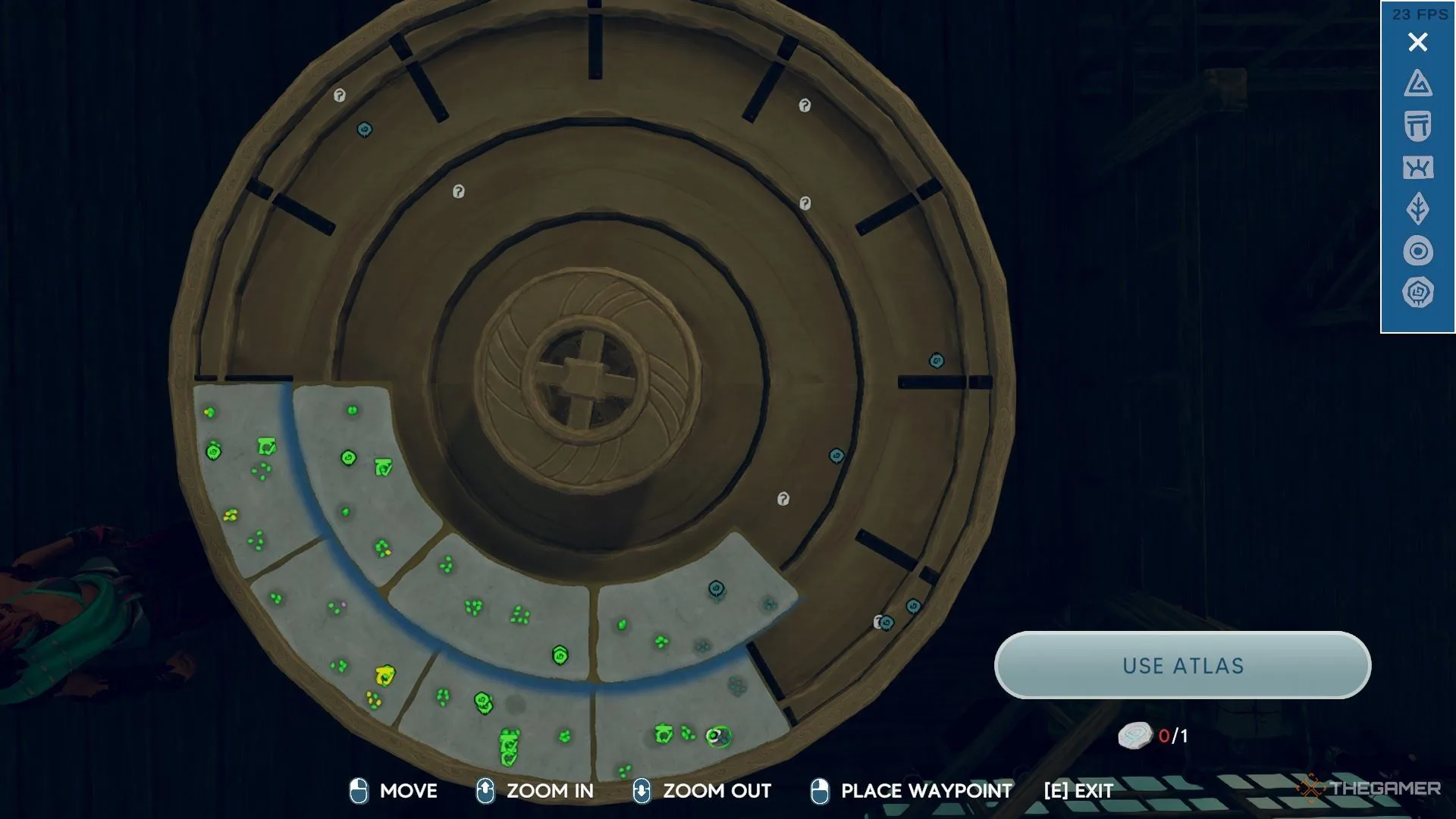
Your first significant discovery during the Forgotten Legacy quest will be a map table. This large, circular map can be positioned at the bridge of your home island next to your helm, allowing you to track islands across this expansive world. The islands that cluster together form an archipelago, and collections of archipelagos within a segment of your map are termed sectors.
When you place the map table, you can access it anytime. It displays all the archipelagos in any sector you’ve previously visited. Your ship is represented as an island with a circle and a point on one side—this point helps you identify the position of your helm for accurate steerage. When your ship icon enters a new sector, that entire area will be revealed.
While the islands in Aloft are hand-crafted, the locations where they appear are random. Everyone can explore the same hundreds of islands, but the arrangement of these islands will differ across various world seeds.
There’s an array of vital map symbols to keep in mind—such as distinguishing which islands were uncovered via lost atlases or which ones feature frescoes. Furthermore, the map shows colors to indicate the health status of each island’s ecosystem. Some islands, which were previously considered healthy, may revert to an unhealthy status until you visit them, and stepping onto these islands will restore their health back to green.

Use Symbols to Fine-Tune Your Search on the Map
On the right side of the screen, various symbols are available to highlight islands with particular characteristics, such as those you’ve located using lost atlases or islands that include frescoes. Once a specific feature is selected, other islands become less visible, while the desired islands stand out with a bright color and a thicker black border.
You can also place beacons to mark islands of interest. Once you unlock the beacon recipe in the Sailing section of the building menu, you can position them with different symbols that correspond to the icon set found on the right of your map table. After setting a beacon, remember its symbol and select it on the map table when you wish to revisit that island—it will be easily identifiable by the beacon marker.
Every Symbol on the Map in Aloft and Their Meanings
|
Symbol |
Meaning |
|---|---|
|
Island Colors |
|
|
Gray Dot |
This indicates an island you haven’t explored yet. Visiting for the first time will change its color to one of the options below. |
|
Green Dot |
This signifies an island you’ve visited that has a healthy ecosystem, according to the field guide. |
|
Yellow Dot |
|
|
Pink Dot |
This represents an island you’ve visited that is corrupted. You’ll need to return and address the corruption nodes (as well as fend off adversaries) to aid in the healing process. |
|
Symbols |
|
|
Checked Gate |
This marks an island that contains a fresco, offering valuable sailing knowledge. |
|
Circular Swirl |
This signifies an island where you can find a lost atlas. |
Always consult your map table when you’re uncertain about your next destination—there’s a vast sky filled with adventures waiting for you!
 ChatGPT
 Perplexity
 Gemini AI
 Grok AI