• About Us
  • Contact Us
  • Advertise
  • Privacy Policy
  • Guest Post
No Result
View All Result
Digital Phablet
  • Home
  • NewsLatest
  • Technology
    • Education Tech
    • Home Tech
    • Office Tech
    • Fintech
    • Digital Marketing
  • Social Media
  • Gaming
  • Smartphones
  • AI
  • Reviews
  • Interesting
  • How To
  • Home
  • NewsLatest
  • Technology
    • Education Tech
    • Home Tech
    • Office Tech
    • Fintech
    • Digital Marketing
  • Social Media
  • Gaming
  • Smartphones
  • AI
  • Reviews
  • Interesting
  • How To
No Result
View All Result
Digital Phablet
No Result
View All Result

Home » Completing the Transfer of System Data from Switch 1 to Switch 2

Completing the Transfer of System Data from Switch 1 to Switch 2

Emily Smith by Emily Smith
June 6, 2025
in Gaming
Reading Time: 2 mins read
A A
Completing the Transfer of System Data from Switch 1 to Switch 2
ADVERTISEMENT

Select Language:

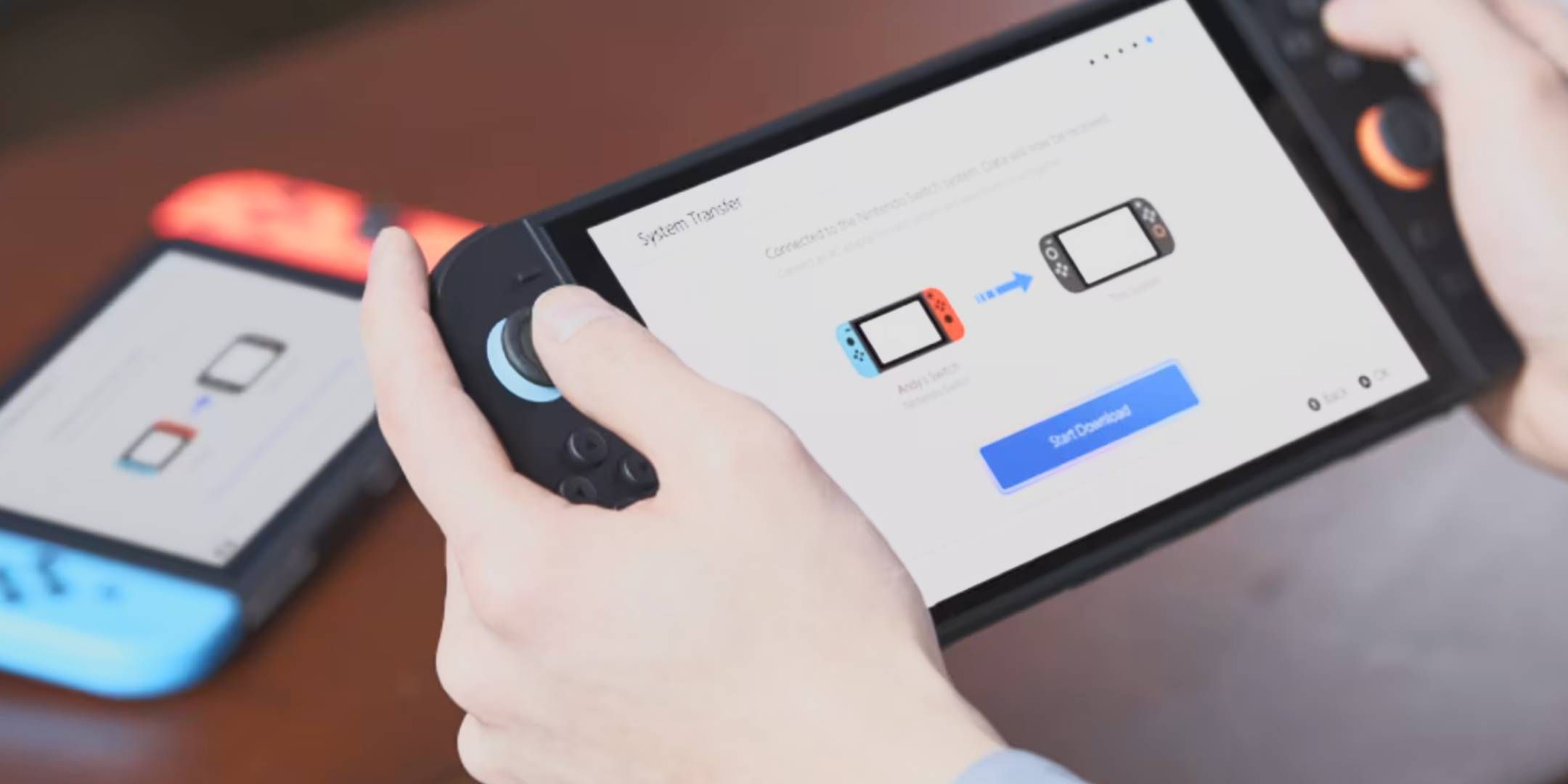
If you’re planning to transition from your original Nintendo Switch to the new Nintendo Switch 2, you’ll want to take advantage of its System Transfer feature to smoothly move your games and data over. Here’s some useful information to get you started.

ADVERTISEMENT

The process is pretty straightforward, so you shouldn’t run into too many issues. That said, it’s good to be aware of potential challenges. We’ve gone through the steps, so here’s what you need to know to initiate a System Transfer to your Switch 2.

Preparing Your Switch and Switch 2 for System Transfer

Before you start, make sure both your Nintendo Switch and Nintendo Switch 2 are up to date with the latest firmware. You’ll also need to be logged into your Nintendo Account on both devices.

Your new Switch 2 should be ready to go right out of the box, as it automatically installs updates the first time you connect to the internet. For your original Switch, check the System Settings menu for the option ‘System Transfer to Nintendo Switch 2.’ If you see it, you’re good to go; if not, you may need to perform a system update.

Important: You need to choose the System Transfer option when setting up your Nintendo Switch 2 for the first time. If you miss this step, you can reset your Switch 2 to get the prompt again. Alternatively, you can convert your Switch games to Switch 2 ‘Virtual Cards’ when you re-download your games. Also, you can access cloud-saved data, but be aware that not all games support this feature, and you’ll need a Nintendo Switch Online subscription.

Make sure both consoles are positioned close to each other, ideally side by side on a flat surface, for the best setup.

Steps for the System Transfer

The transfer process will typically take about ten minutes, but it might take longer if your internet connection isn’t stable or if many users are transferring their data at the same time, which is common right after a new console launch.

Select the ‘System Transfer to Nintendo Switch 2’ option. You’ll see a notification that your save data for specific games will be fully transferred, meaning you won’t be able to access those save files on your original Switch afterward.

And that’s it! The procedure is quite simple.

ChatGPT ChatGPT Perplexity AI Perplexity Gemini AI Logo Gemini AI Grok AI Logo Grok AI
Google Banner
Tags: moveNintendo Switch 2Switch 1Switch 2system data
ADVERTISEMENT
Emily Smith

Emily Smith

Emily is a digital marketer in Austin, Texas. She enjoys gaming, playing guitar, and dreams of traveling to Japan with her golden retriever, Max.

Related Posts

How to Completing and Solving Dinosaur Movements in Jurassic World Evolution
Gaming

How to Completing and Solving Dinosaur Movements in Jurassic World Evolution

October 21, 2025
Bonuses, Physical Edition, and More: Completing and Solving Extras
Gaming

Bonuses, Physical Edition, and More: Completing and Solving Extras

September 18, 2025
Physical Edition, Platforms, and Release Dates for Completing and Solving
Gaming

Physical Edition, Platforms, and Release Dates for Completing and Solving

September 15, 2025
Platforms, Prices, and Switch 2: Completing and Solving Upgrades
Gaming

Platforms, Prices, and Switch 2: Completing and Solving Upgrades

September 14, 2025
Next Post
Modi Launches Key Railway Project in IIOJK

Modi Launches Key Railway Project in IIOJK

  • About Us
  • Contact Us
  • Advertise
  • Privacy Policy
  • Guest Post

© 2025 Digital Phablet

No Result
View All Result
  • Home
  • News
  • Technology
    • Education Tech
    • Home Tech
    • Office Tech
    • Fintech
    • Digital Marketing
  • Social Media
  • Gaming
  • Smartphones

© 2025 Digital Phablet