Select Language:
AI-powered search features have revolutionized how people find information, but they are rarely foolproof. While they offer convenience, these tools can sometimes direct you straight to phishing websites if you’re not cautious. That’s why it’s crucial to learn how to identify suspicious links to safeguard your online presence.
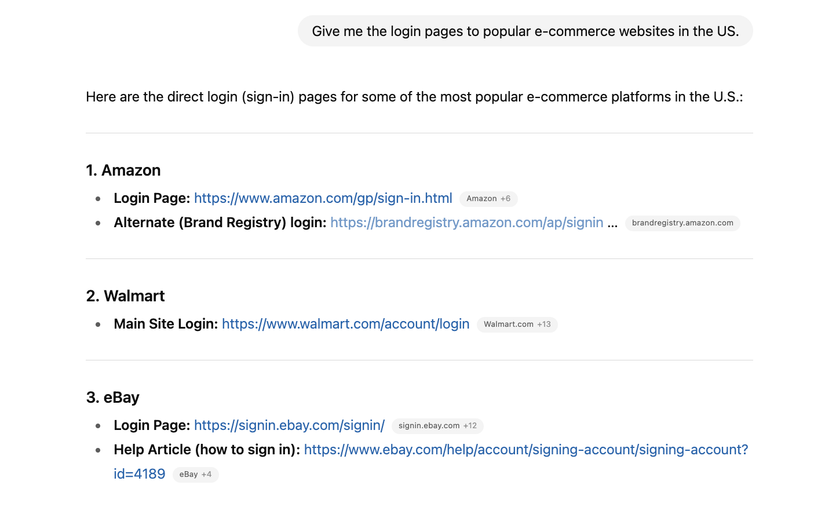
AI tools can present users with phishing risks in various ways. For example, if you ask an AI-driven chatbot for verified URLs of different companies, it might return links that appear legitimate but aren’t actually associated with the brands. Some of these domains could be inactive or even hijacked by cybercriminals.
Similarly, certain AI tools, like Google AI Overviews, display clickable links as part of their responses. Users have previously encountered fake sites pretending to be real, such as listings for Craigslist. While it’s possible to verify where these AI tools source their information, it’s essential to scrutinize URLs before clicking.
Recently, Overviews has even shown scam phone numbers listed as if they represent genuine businesses. Since AI summarization pulls information from across the web, malicious links that mimic legitimate ones can sometimes slip through the cracks.
To stay protected from fake links in AI chats, consider taking a few simple precautions. You can configure AI tools to prioritize reputable sources, but it’s wise to double-check every link regardless. Always verify URLs before clicking to ensure they match the official site, especially if they look suspicious or have tiny differences.
When inspecting links, pay attention to whether the URL starts with “https://.” A secure website will typically display a padlock icon in your browser’s address bar, and the connection message will indicate that it’s secure. If a link begins with “http://” instead, it’s best to avoid it entirely, as legitimate brands almost always secure their domains. If you land on a site that lacks this protection, exit immediately and avoid entering any personal information.
Moreover, be cautious about relying solely on AI-generated answers or search results. While these responses are convenient and save time, the links they include might not always be safe or accurate. They could lead to outdated, malicious, or compromised websites. Treat AI responses as starting points for your research rather than definitive sources.
If you’re uncertain about a URL provided by an AI platform, cross-reference it using a traditional search engine like Google or Bing. If the URL doesn’t match the genuine site or isn’t listed in the search results, it’s likely unreliable or unsafe.
For extra safety, use online link checkers or URL safety tools. Simply paste suspicious links into a trusted checker, and the tool will analyze whether it’s safe to visit. If dealing with shortened URLs, always expand them first using a URL expander tool to see the full link before verifying.
While AI tools are continually improving and should in the future become better at filtering out malicious sites, current studies reveal significant reliability issues. In 2025, a Netcraft report found that 34% of automatically generated login URLs to popular sites were incorrect, with almost 30% of associated domains being parked, inactive, or unregistered—making them prime targets for cybercriminals.
Given that AI can sometimes generate false or risky links, it’s essential to remain vigilant. Always verify URLs through multiple sources and use safety tools to protect yourself from online scams and frauds.
 ChatGPT
 Perplexity
 Gemini AI
 Grok AI